What Is SaaS PPC?
SaaS PPC is a paid marketing method that brings targeted users to your product through search and display ads. You pay only when someone clicks your ad. This makes paid advertising a practical choice for new and growing brands. You attract users who already want a solution like yours, and you reach them at the exact moment they search for it.
Think of it as a simple bridge that connects your ideal users with your software. A user searches for a term like “CRM for startups,” and your ad appears at the top of the results. They click your ad, visit your page, and explore your services. This direct path helps you get consistent traffic without depending on long-term channels.
This guide will act as your SaaS PPC handbook, so you understand how pay-per-click supports your funnel and helps you convert visitors into trial users, demo bookings, and paid customers. You will learn how each part works and how to use it as a stable growth tool for your software business.
How SaaS PPC Works (Step-by-Step)
Let us break down how cloud-based PPC works behind the scenes. The process stays simple when you look at it step by step.
Here is how the journey unfolds from search to signup:
You Choose the Right Keywords
You begin by selecting the right phrases your ideal users search on Google. These phrases reflect real problems they want to solve, like “CRM for small teams” or “email automation software.” Each keyword you choose guides Google on when to show your ad.
You Set Your Budget and Bidding Strategy
You decide how much you want to pay for each click. Google runs an auction each time someone searches. If your bid and ad quality are strong, your ad appears in a prime position, which gives your SaaS product instant visibility in a crowded market.
Your Ad Appears at the Top of Google
Your ad shows above the organic results when someone searches for your chosen keyword. This placement drives attention fast because users naturally look at the top listings first. A clear message increases the chance of a qualified click.
The User Clicks and Visits Your Landing Page
The user clicks the ad and reaches your landing page. This page highlights your product benefits, features, pricing, and value. A good page layout helps the visitor understand your product in a few simple moments.
You Convert the Visitor into a Lead
If your page matches their needs, the visitor takes the next step. This step can be a demo request, a free trial, or a signup. A clean layout and strong CTA help you convert the right users into active leads.
You Track, Measure, and Improve
You measure every click, every signup, and every action. You see which keywords bring quality leads. You also learn which ads perform well. This tracking helps you refine your approach and build a stronger SaaS PPC roadmap for steady growth.
Benefits of SaaS PPC
Running paid ads can feel like a big step for any cloud-based software team, but once you understand how PPC works, the benefits become clear. It is one of the fastest ways to bring real users to your product. You reach people who are already searching for software, and you guide them toward a trial or demo with steady intent.
Let us look at the key benefits that make it worth your attention.
1. Faster Visibility
Software as a Service Paid Search helps you gain visibility much sooner than organic channels. You do not wait months for rankings or slow content cycles. Once your ads are active, they start appearing for relevant searches and bring early traffic. This helps your product enter the consideration stage faster and gives you useful data that guides better decisions during the first phase of your campaigns.
2. Access to Users With Clear Intent
People who search for software already understand the problem they want to solve. They look for answers, compare tools, and explore features. When your ad appears at this moment, you connect with users who are motivated and ready to evaluate a solution like yours.
3. Full Control Over Budget and Targeting
You decide how much you want to spend and who should see your ads. You can target by keywords, locations, industries, and even device types. This level of control supports your SaaS PPC strategy guide because it helps you manage costs and stay focused on the right audience without wasting your budget.
4. Predictable Traffic for Your Funnel
SaaS PPC gives you steady traffic. You know how many visitors you can expect each day, and you know which campaigns support your trial or demo pipeline. This consistency helps you maintain a healthy flow of leads for your sales team.
5. Clear Tracking and Measurable Results
Every click, visit, and signup can be tracked. You see which keywords convert, which ads perform best, and how users behave on your landing pages. These insights help you refine your targeting and improve your overall performance with confidence.
6. Strong Positioning in a Competitive Market
The software market moves fast, and competition increases every year. Paid ads help you appear ahead of other tools and stay visible to potential buyers at key moments. This early presence builds trust and increases the chance of winning a signup.
Web-based PPC supports your growth with clarity, speed, and control. You reach the right users, understand your performance, and make decisions based on real data. These benefits create a strong foundation for everything you will learn in the next part of this guide.
Key PPC Terms You Should Know
Before you explore deeper strategies, it helps to understand a few basic PPC terms. These terms appear throughout any cloud-based paid marketing guide, and knowing them will make everything easier to follow. Each one plays an important role in how your campaigns perform and how you measure success.
Let us look at the essential terms you will use on a daily basis.
1. CPC (Cost Per Click)
This is the amount you pay each time someone clicks your ad. SaaS CPCs often vary by niche, but many software keywords fall in the mid- to high range because the intent is usually strong.
2. CTR (Click-Through Rate)
CTR shows how many people clicked your ad after seeing it. A strong CTR means your ad message aligns with what users want. This number helps you understand if your ad is relevant.
3. Conversion
A conversion is the action you want a user to take. This is usually a free trial signup, demo request, or lead form submission. Clear tracking is important so you can measure real results.
4. CPL (Cost Per Lead)
CPL tells you how much you pay for each signup or demo. This number helps you understand if your campaigns are efficient and within your target cost.
5. CAC (Customer Acquisition Cost)
CAC measures the total cost of getting a new paying customer. SaaS companies track this closely because it affects profitability and long-term growth.
6. Quality Score
This is Google’s rating of your ad relevance and landing page experience. A high Quality Score can lower your CPC and improve your ad positions.
7. Keywords
Keywords are the search phrases people use. When you bid on the right keywords, you appear in front of users who want a product like yours. This is the core of your paid search strategy.
8. Landing Page
This is the page users see after clicking your ad. A focused and clear landing page helps you convert visitors into leads. Strong pages often highlight key benefits, features, and simple CTAs.
9. Search Intent
Search intent shows what the user wants. Some want to learn. Some want to compare tools. Some are ready to sign up. Understanding intent helps you choose the right keywords and create better ads.
10. Retargeting

Retargeting shows ads to users who have already visited your site. This reminds them of your product and brings them back to take action. It is one of the most effective cloud-based retargeting strategies for improving signups.
These terms form the base of any manual. Once you understand them, the rest of the guide becomes much easier to follow. You will use these terms every day as you build and optimize your campaigns.
Why PPC Matters for SaaS in 2025
The SaaS world is moving fast, and users explore more tools than ever. Think about your own habits. When you look for software, you compare features, read quick reviews, and jump between tabs. Your potential users behave the same way. This is why PPC matters in 2025. It places your product right where buyers start their search.
Imagine someone typing “best project management tool for remote teams.” That user already has intent. They want a solution. Paid search advertising helps you appear in front of them at the exact moment they are ready to look. And that moment is powerful, because intent drives action.
Recent data shows SaaS CPCs rising across popular categories. Higher CPCs might sound scary, but they actually confirm one thing: every click matters. With paid ads, you can control which clicks you want and which ones you avoid. That control can shape your entire growth strategy.
Web-based service users rarely convert on the first visit. They browse, compare, and revisit pages. PPC helps you stay visible throughout this journey. And when you stay visible, you stay remembered. That is where growth begins.
The SaaS PPC Framework (Your Step-by-Step Path)
If you have explored PPC before, you might have noticed how overwhelming it can feel at first glance. There are campaigns, keywords, bids, match types, conversions, and dashboards that keep flashing numbers at you. It can feel like too much. That is why you need a simple and steady framework. A framework keeps you focused on the right steps, and it removes the noise that often distracts new marketers.
Think of this as your blueprint for cloud-based PPC. It guides you from setup to scaling in a clear, predictable way. As you go through each part, you will notice how every step connects to the next. This makes the entire system easier to understand and far less stressful to manage.
Let us walk through the core parts of this framework together.
1. Understanding Your SaaS Funnel
Your funnel is the path users follow from discovery to conversion. This funnel usually has three layers:
- Top of the Funnel (TOFU): Users are exploring ideas or learning about a problem.
- Middle of the Funnel (MOFU): Users compare tools, features, and pricing.
- Bottom of the Funnel (BOFU): Users are ready to sign up or book a demo.
Here is a quick example.
A founder searches for “how to improve team collaboration.” That is TOFU.
Later, they searched for “project management tools comparison.” That is MOFU.
Finally, they search for “best project management tool for remote teams.” That is BOFU.
Your ads should support each stage. When you understand your SaaS funnel, your campaigns feel more organized and your costs stay under control. You know which users need education and which users need a simple push to sign up.
2. Campaign Setup Basics
Setting up your first campaign becomes much easier when you break it into simple steps. Here is the flow that a professional SaaS PPC agency follows:
- Choose your core keywords
- Group similar keywords together
- Write clear ads that match those keywords
- Choose the right landing page
- Set your budget and bidding strategy
Think of it like building small rooms inside a house. Each room has a purpose, and every keyword group acts like a focused space. When someone searches a term that matches your room, your ad invites them in. This structure supports your overall paid advertising plan for cloud-based services and keeps your campaigns clean, organized, and easy to manage.
3. Targeting and Audience Strategy
Targeting determines who sees your ads. This matters more than you might think, because your ideal users often have very specific roles or needs.
You can target based on:
- Keywords
- Industry
- Company size
- Job titles (when using LinkedIn)
- Locations
- Previous website visitors
- Users who interacted with your free content
Here is a quick example.
A task management tool might target keywords on Google, but they can also run LinkedIn ads to project managers, team leads, and operations heads. This combination widens your reach and brings in users who match your perfect customer profile.
You gain more control when you mix keyword intent with audience filters. This helps you avoid wasted clicks and keeps your budget focused where it matters.
4. Ad Copy and Creative
Your ad is the first message users see. A clear message builds trust, and a confusing message pushes users away. That is why your ad copy should feel simple, direct, and aligned with what users search.
For example, if someone searches “CRM for small teams,” your ad should mention a CRM made for smaller teams. That tight alignment increases clicks and delivers better results.
Strong SaaS ad copy usually includes:
- The main benefit
- A specific feature
- A clear CTA
- A hint of credibility (ratings, awards, or user count)
You can also use simple visuals in display campaigns, such as UI screenshots or feature highlights. Users love seeing how a product actually looks. Visuals like these often strengthen your cloud-based PPC blueprint because they help users understand your tool faster and build trust before they click.
5. Landing Pages and CRO
Your landing page decides whether the click becomes a signup. When users reach your page, they want answers fast. They want to know what you do, how it helps, and why they should try it.
A strong SaaS landing page usually includes:
- A clean headline
- Clear benefits
- A product screenshot
- A short feature list
- A strong CTA
- Social proof such as reviews or logos
Think about your own behavior. When you visit a software page, you scroll fast. You look for clarity. Your users do the same. A focused landing page helps them feel confident and ready to take the next step.
6. Tracking and Attribution
Tracking is the backbone of your cloud-based PPC system. You cannot improve what you cannot measure. You will track:
- Clicks
- Sign-ups
- Demo requests
- Trial activations
- Actions inside your CRM
Accurate tracking helps you understand which keywords bring strong leads, which ads perform well, and which campaigns need a small adjustment. Many teams start with GA4 and then connect their CRM for deeper insights.
When you track correctly, your SaaS PPC playbook becomes easier to follow and far more effective.
7. Budgeting and Scaling
Budgeting helps you stay in control. You choose how much you want to spend each day or each month. You also learn how to allocate your budget across funnel stages.
Scaling becomes easier once you know your numbers. When you see which ad groups bring quality leads, you increase their budget. When you spot low-performing areas, you adjust or pause them.
Growth in PPC often comes from small, consistent optimizations. You scale the parts that work and refine the parts that need improvement.
SaaS PPC Pricing and Budget Expectations
Budget planning often feels like the most confusing part of PPC. You might wonder, “How much do SaaS companies even spend?” or “What if my niche is expensive?” You are not alone. Every founder asks these questions before running their first campaign.
Let us make this simple and clear to understand.
PPC follows a predictable pattern. Some industries spend more, some spend less, but all of them rely on one idea: your budget depends on how many demos or trials you want each month. Once you know that number, everything becomes easier.
Before we dive deeper, here is something interesting. According to multiple 2025 SaaS marketing benchmarks, the average Google Ads CPC for B2B cloud-based companies typically ranges between $2.50 and $6.00, with highly competitive keywords often exceeding $10 and sometimes reaching $15 or more. This might sound high, but remember one important thing: SaaS leads carry high value because one customer can stay with you for months or years. That long-term revenue is exactly why companies invest heavily in paid search.
Let us use a simple example.
Imagine you run a project management tool. Your target CPL is $35. If you want 120 leads this month, you need a budget close to $4,200. If your CPL improves to $28 after optimization, you can either save budget or scale for more leads. Budgeting becomes a game of smart decisions, not guesswork, especially when you follow a clear SaaS PPC roadmap.
To make this even easier, here is a quick table you can use as a reference:
SaaS PPC Budget Cheat Sheet (Helpful Example Table)
| Monthly Budget | Avg. CPC | Estimated Clicks | Estimated CPL | Estimated Leads |
| $3,000 | $4–$8 | 375–750 | $35–$60 | 50–85 |
| $5,000 | $4–$10 | 500–1,250 | $35–$55 | 90–130 |
| $10,000 | $5–$12 | 830–2,000 | $35–$50 | 180–260 |
Note: These are examples, not fixed numbers. Actual results depend on your niche, funnel, offer, and landing page quality.
Now here is an important question to ask yourself:
“Do I want steady signups, or do I want aggressive growth?”
Your budget changes based on your answer.
- If you want steady, predictable growth, you start small.
- If you want aggressive scaling, you invest more in high-intent keywords.
- If you want quick traction, you run both search and retargeting from day one.
You will notice something interesting as your campaigns run. Your early data shows which keywords perform well, which ads need more attention, and how your budget moves throughout the month. Many teams overlook how important smart budget pacing is during this stage. When you pace your spending with intention, you prevent early overspending, avoid slow weeks at the end of the month, and keep your results steady across your entire campaign cycle.
That is the real power of understanding your budget.
It gives you control, clarity, and a path to scale with purpose.
Proof and Results: The Paystubs 365 PPC Journey
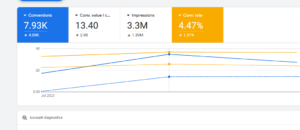
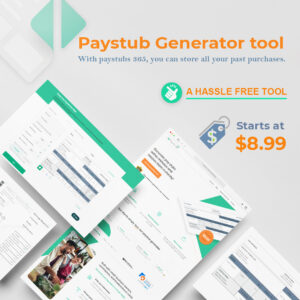
Paystubs 365 is a paystub generator tool used by employees, freelancers, and small business owners who need quick and reliable payroll documents. Their PPC journey shows how steady improvements can shape long-term success. The data in the above image highlight how the campaign became more focused and more aligned with real user behavior over two reporting periods.
How Consistent Optimisation Improved Performance
The biggest shift is visible in their conversions. The campaign reached 7,930 total conversions, which is an increase of 4,090 conversions from the earlier period. This improvement came after the team refined the keyword list, reduced broad searches, and aligned the landing page with the main user intent. When people searching for “paystub generator” or “create paystub online” found exactly what they needed, more of them completed the process.
You will also notice an increase in the conversion rate, which reached 4.47%, up by 1.57%. In SaaS PPC, small improvements in conversion rate can create noticeable impact. Users moved through the checkout flow more smoothly because the page structure became clearer and the messaging felt more direct.
Another interesting point is that impressions dropped to 3.3 million, yet conversions increased. This usually means your targeting has become more precise. Instead of chasing larger volumes, the campaign focused on high-intent users who needed a paystub tool immediately. This cleaner targeting is an important part of the SaaS PPC framework, especially for tools that solve urgent, task-based needs.
Finally, the conversion value per cost increased to 13.40, showing stronger returns for the same spend. As unqualified clicks reduced and relevant traffic increased, the overall performance became healthier.
The Paystubs 365 journey is a simple example of how paid advertising grows through consistent optimization. Month by month, small adjustments work together to build clearer intent, better traffic quality, and more predictable results.
Helpful SaaS PPC Resources You Can Use
As you start building your campaigns, you might feel the need for simple tools and templates that guide your decisions. Every marketer hits this point, and having the right resources at hand makes the journey much easier. Think of this section as your small but powerful toolkit, something you can keep beside you while you follow this SaaS PPC playbook.
Let us look at a few resources that can support your setup and optimization process.
1. SaaS Negative Keyword Checklist
Negative keywords save your budget more than you might imagine. They prevent your ads from showing on searches that do not match your product. This keeps your traffic clean and your costs under control.
For example, if you run a CRM for small teams, you would block searches like:
- “free CRM for students”
- “CRM course”
- “CRM definition”
These searches bring curiosity, not buyers. A negative keyword checklist helps you filter out noise before it drains your budget.
You can use this checklist each time you launch a new campaign or expand your keyword list. It is one of the simplest but strongest tools you can keep in your PPC workflow.
2. Demo-to-Paid Conversion Playbook
If you run a SaaS business, you already know that signups are only half the journey. The real challenge is turning trial users into paying customers. This playbook shows you how to guide users through that journey with clarity.
It includes practical steps like:
- Sending a welcome email within the first hour
- Highlighting “aha moments” inside your product
- Creating a simple onboarding path
- Sharing short video walkthroughs
Imagine someone signs up for your email automation tool. If they do not understand their next step, they may leave within minutes. This playbook shows you how to encourage them, support them, and lead them toward activation. You will notice a smoother path between PPC signups and revenue.
3. SaaS Landing Page Template
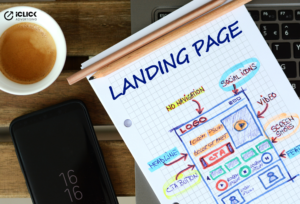
Your landing page decides whether a click becomes a demo or a trial. A strong template gives you a starting point that reduces guesswork and helps you keep your message clear.
This template includes:
- A simple headline format
- A benefit-driven subheading
- Space for product screenshots
- A short feature section
- A clean CTA area
- A spot for logos or testimonials
Imagine a user searching for “task scheduling software.” They click your ad and land on a clean page that explains the product in a few seconds. The page shows a screenshot, a clear CTA, and one strong benefit. That clarity helps them take action faster.
These resources give you structure while you follow this software company’s PPC guide. They make complex tasks feel lighter and help you build a stable, organized workflow. You can use them at any stage of your journey, whether you are launching your first ad or refining your next growth cycle.
Common SaaS PPC Mistakes to Avoid

Even the best cloud-based service teams make mistakes when they start with PPC. Some mistakes drain budgets quietly. Others slow down growth without showing any warning signs. The good thing is that most of these issues are easy to avoid once you know what to look for.
Let us walk through the most common mistakes and what you can do differently.
1. Targeting Broad Keywords Without Clear Intent
Many SaaS brands start with wide keywords like “CRM,” “automation tool,” or “email software.” These searches look exciting because they show high volumes, but they do not carry strong intent.
For example, someone searching “CRM” might be a student, a researcher, or someone who wants a definition. You pay for that click, but the user does not convert.
Switch to intent-rich searches such as:
- “CRM for small sales teams”
- “CRM for freelancers”
- “CRM with pipeline tracking”
This small change saves money and brings better leads instantly.
2. Sending Users to a Generic Homepage
Your homepage might look beautiful, but it is not designed for conversions. Homepages are built for exploration, not action. A PPC visitor expects clarity the moment they land.
Think about your own behavior. If you click an ad for a marketing automation tool, you expect to see automation features, not the entire company overview. A focused landing page increases conversions because it answers the user’s specific question right away.
3. Ignoring Retargeting in the First Month
Many founders delay retargeting because they feel the “audience is too small.” This delay slows your growth. SaaS users rarely convert on the first visit. They compare multiple tools, read reviews, and return later.
Retargeting brings them back with simple reminders like:
- Feature highlights
- Pricing updates
- Success stories
- Product screenshots
Strong SaaS retargeting strategies keep your brand fresh in their mind and help them return when they are ready.
4. Not Using Competitor Keywords

Your competitor’s users are already searching with intent. They are comparing tools. They are willing to switch if something better comes along.
For example, if you offer a team communication tool, bidding on “Slack alternatives” or “Slack competitors” brings users who are actively exploring better options. This traffic converts faster because the intent is crystal clear.
5. Forgetting to Track What Happens After Signups
Many SaaS campaigns track only the front-end metrics like clicks and form fills. But real performance depends on what happens after the signup. You need to know:
- How many trials activate
- How many demos convert
- How many leads become paying customers
This helps you optimize your funnel, not just your ads. It also helps you identify which keywords bring users who stick around.
6. Scaling Too Early Without Clean Data
Everyone wants to scale fast, but scaling without proper data leads to wasted budgets. The moment you see a few good days of performance, resist the urge to double your budget.
Imagine you get five demo requests from a new keyword. It feels exciting, but five is not enough data to confirm a pattern. Wait until you have consistent results across several weeks. Scaling becomes safer, smoother, and far more profitable when you follow data, not emotions.
7. Using the Same Ad Message for Every Audience
Different users care about different things. A startup founder cares about speed. A marketing manager cares about features. A sales leader cares about reporting. If you show the same generic message to everyone, your ads lose their impact.
Create variations like:
- “Built for fast-moving teams”
- “Automation that saves your day”
- “Smart reporting for sales leaders”
A little personalization makes your ads feel relevant.
Avoiding these mistakes helps you follow the core idea of this B2B PPC strategy guide , stay focused, stay intentional, and let your data guide you. When you remove these common blockers, you will notice a smoother path toward consistent and predictable SaaS growth.
Advanced SaaS PPC Tactics for 2025
Once you understand the fundamentals, you can start exploring the tactics that give your campaigns an extra lift. These ideas help you tighten your targeting, improve conversions, and move ahead of competitors who still follow basic setups. Do not worry; you do not need to be a PPC expert to use them. You only need a little curiosity and a willingness to experiment.
Let us explore the advanced tactics that make a real difference in today’s cloud service landscape.
1. Smart Bidding With Human Guidance
Google’s Smart Bidding can feel like magic when it works well, but it needs your direction. Think of Smart Bidding as an assistant that learns from your goals. It gets stronger as your data grows. You still guide it by setting the right targets and checking performance weekly.
Here is a simple example.
If your product is a team scheduling tool, you can set a target CPA that fits your ideal CPL range. As conversions increase, Smart Bidding learns which users convert better and starts prioritizing them. You get cleaner traffic and stronger results over time.
2. Combining Google Search With LinkedIn Ads
Google brings users with strong intent. LinkedIn helps you reach users by role or industry. When you combine both platforms, you create a full-funnel strategy that covers intent and identity.
Imagine you run a B2B analytics tool.
Google targets searches like “reporting dashboard for teams,” while LinkedIn targets job titles such as “Operations Manager” or “Business Analyst.” This dual approach gives you reach and relevance. You appear where users search and where they work.
3. Using Competitor Intent to Capture High-Value Leads
Competitor searches carry some of the strongest intent in SaaS. Users who search for “Asana alternatives” or “HubSpot competitors” already know what they want. They are comparing tools and looking for something better.
By creating ads and landing pages that speak to their needs, you meet them at the decision stage. This approach fits well within a solid B2B SaaS PPC tactics framework, especially in categories where switching tools is common.
4. Building a Strong Retargeting Journey
Most online service users do not convert on their first visit. Your retargeting strategy helps you stay present while they explore other options. You can show:
- Feature highlights
- Success stories
- Quick UI demos
- Pricing introductions
- Short comparison notes
For example, if someone viewed your project management features page, you can retarget them with a short video showing how tasks and timelines work. This gentle reminder brings them back when they are ready to decide.
5. Leveraging AEO & GEO for AI-Driven Search
Search engines now use AI to generate direct answers, not just list links. According to recent data by Exposure Ninja, AI-generated answer boxes appear in around 18% of global Google searches. Also, Wordstream states that “AI Overviews,” or generative answer panels, link back to sources from Google itself in about 43% of cases.
What this means for your SaaS PPC strategy is simple: you need to optimize so both humans and AI answer engines understand your content. That is where AEO (Answer Engine Optimization) and GEO (Generative Engine Optimization) come in.
Here is how you apply those techniques for your SaaS brand:
- Use clear, question-based headings that match how users ask things (e.g., “How does task management software help remote teams?”)
- Add crisp answers within your content: short paragraphs that directly solve the query
- Write feature explanations in plain language so both users and AI models grasp the value fast
- Include structured data (schema markup) so answer engines recognise your content as credible
When you do this, you increase the chance your content is featured in AI-powered answer boxes, and you improve visibility in search scenarios beyond traditional ranking.
6. Dynamic Visuals and Short UI Clips
SaaS buyers love visuals. A quick UI clip often communicates more than a paragraph. You can use dynamic creatives across YouTube, display ads, and even LinkedIn.
Imagine a user viewing a 30-second product tour that shows how your dashboard works. That single clip builds more trust than a long message. It makes your product feel real.
7. Multi-Touch Attribution to Understand Real Performance
The SaaS journey is multi-step. Users click, compare, return, and convert later. Multi-touch attribution helps you understand how each touchpoint contributes to the final conversion. This is useful when:
- Google Search starts the journey
- LinkedIn nurtures interest
- Retargeting closes the lead
- Email onboarding activates the user
When you view performance across these touchpoints, you make stronger decisions with your budget.
Advanced tactics help you move from “getting results” to “scaling results.” They add depth to your campaigns and give you more control, clarity, and momentum. As you continue through this SaaS PPC roadmap, you will see how these ideas fit naturally into your long-term growth strategy.
About iClick Advertising
SaaS PPC works best when research, structure, and human insight come together. iClick Advertising, follows a steady and organized approach that keeps campaigns clear, measurable, and aligned with real user behavior. The goal is not quick wins but consistent improvements that support long-term growth. Each campaign is reviewed with attention to detail, and every change is backed by data rather than guesswork. This simple and transparent workflow shapes the method behind this software-as-a-service PPC guide.
AI + Human Strategy

AI tools help speed up analysis, but human judgment turns those insights into meaningful actions. iClick blends automation with manual decision-making so campaigns stay flexible and aligned with real user behavior. This balance helps avoid over-automation, which can sometimes push campaigns in the wrong direction. You get structured optimization without losing the human understanding that SaaS audiences often require.
Industry-Focused Expertise
Cloud-based service funnels behave differently from other industries, and iClick keeps its work centred on software and tech-driven brands. This focus helps the team understand how users move between awareness, trial, and activation. It also helps identify which metrics matter for growth, such as activation rate and trial-to-paid conversions. Working within one core industry builds patterns, and those patterns guide better decisions throughout the PPC journey.
Transparent Reporting
Clear reporting helps teams understand performance without confusion. iClick keeps reporting simple and meaningful by highlighting what improved, what dipped, and what needs attention next. These updates are shared weekly so you always stay informed and connected to your campaign’s progress. The goal is to remove guesswork and make every performance change easy to interpret, even if you are new to PPC or analytics.
Performance-First Approach
Every decision is based on data, not assumptions. iClick looks at user behavior, conversion patterns, and long-term trends before adjusting campaigns. This method helps refine keywords, ads, and landing pages with intention rather than rushing into changes. A performance-first mindset creates stable results because each optimization builds on the last one. It also keeps the entire process grounded and clear for SaaS teams.
Frequently Asked Questions (FAQs)
1. How long does it usually take for a SaaS PPC campaign to stabilize?
Most SaaS advertising campaigns take two to four weeks to stabilize. During this learning phase, the system tests bids, audiences, and placements. You might see fluctuations, but this is normal. As more data comes in, performance becomes clearer, and easier to optimize. Stability grows as the algorithm understands which users respond best to your messaging.
2. Can SaaS PPC help identify new feature opportunities?
Yes, PPC can highlight feature demand through keyword patterns. When users repeatedly search for terms like “dashboard customization” or “team roles and permissions,” it shows what they value. These insights can support product decisions and help you shape future updates. This makes it a helpful part of broader SaaS PPC best practices, especially when you want to align marketing data with product development.
3. What is the role of CRM integration in SaaS PPC?
A CRM helps you track what happens after a user signs up through your ads. It shows activation rates, trial completions, and paid conversions. This gives you a full view of your funnel instead of focusing only on lead volume. CRM integration also improves reporting accuracy since it connects PPC activity with real business outcomes and long-term customer value.
4. Should SaaS companies use seasonal budgeting in PPC?
Seasonal budgeting works well for cloud-based products that see predictable demand cycles. Some tools gain traction during planning seasons, while others spike during hiring or budgeting periods. Reviewing industry patterns and historical data helps you adjust your spending for these windows. This approach supports efficiency and helps you reach high-intent users at the right time.
5. How does ad frequency affect SaaS retargeting performance?
Ad frequency shapes how users perceive your brand during retargeting. A low frequency may not bring users back, while a high frequency can feel overwhelming. A balanced frequency, usually two to five daily impressions, works well for most cloud-based software funnels. It keeps your product visible while respecting user attention, which improves return visits and conversions.
6. Why do some SaaS keywords stay expensive even after optimization?
Some terms remain costly because many companies bid on the same high-intent keywords. Categories like analytics, CRM, and automation often stay competitive. Even with strong optimization, demand keeps CPCs high. A good approach is to balance these terms with feature-focused keywords. This helps improve efficiency and supports a healthier SaaS PPC roadmap over time.
Ready to put this SaaS PPC playbook into action?
You now have a clear path to plan, launch, and improve your campaigns with confidence. If you want help spotting hidden opportunities or shaping your next steps, you can request a quick audit.