TL;DR: Google Ads and GA4 disagree by design. Ads credits a conversion to the click date, counts it up to 90 days later, and models consent gaps. GA4 credits the conversion date and loses sessions to ad blockers, which 21% of internet users run regularly (GWI, Q2 2024). Align settings first, then bid on Ads data.
Why GA4 and Google Ads never match
Google Ads and GA4 answer two different questions. Google Ads asks which ad interaction earned a conversion. GA4 asks what happened on your site, across every channel.
Those questions produce different counts, even on a perfectly tagged account. Google says so itself. Its data discrepancies help article lists a long set of factors that make the two tools disagree, from conversion delay to invalid traffic filtering.
So the goal is not a perfect match. The goal is a gap you can explain, line by line. An unexplained gap usually means a broken tag, a double count, or a lost click ID. Those cost money because Smart Bidding trains on whatever Google Ads records.
This guide covers the seven causes we check first, a 30-minute sizing process, and which number to trust for which job.
The seven causes of a GA4 Google Ads discrepancy
Work through these in order. The first four are settings. The last three are data loss.
1. Click date versus conversion date
This is the biggest source of confusion. Google Ads reports a conversion on the date of the ad interaction. GA4 reports it on the date the conversion happened.
Say a prospect clicks your ad on March 1 and books a demo on March 14. Google Ads puts that conversion on March 1. GA4 puts it on March 14. Pull a report for March 1 to 7 and the two tools disagree, with no error anywhere.
The longer your sales cycle, the bigger this gap. A Shopify store selling $40 phone cases sees most buyers convert the same day. A law firm or a B2B SaaS company can see weeks of lag. Recent date ranges will always look worse in Google Ads, because late conversions are still arriving and getting back-dated.
Google also advises allowing 24 to 48 hours for data to sync between platforms. Never reconcile yesterday.
2. Conversion windows and lookback windows
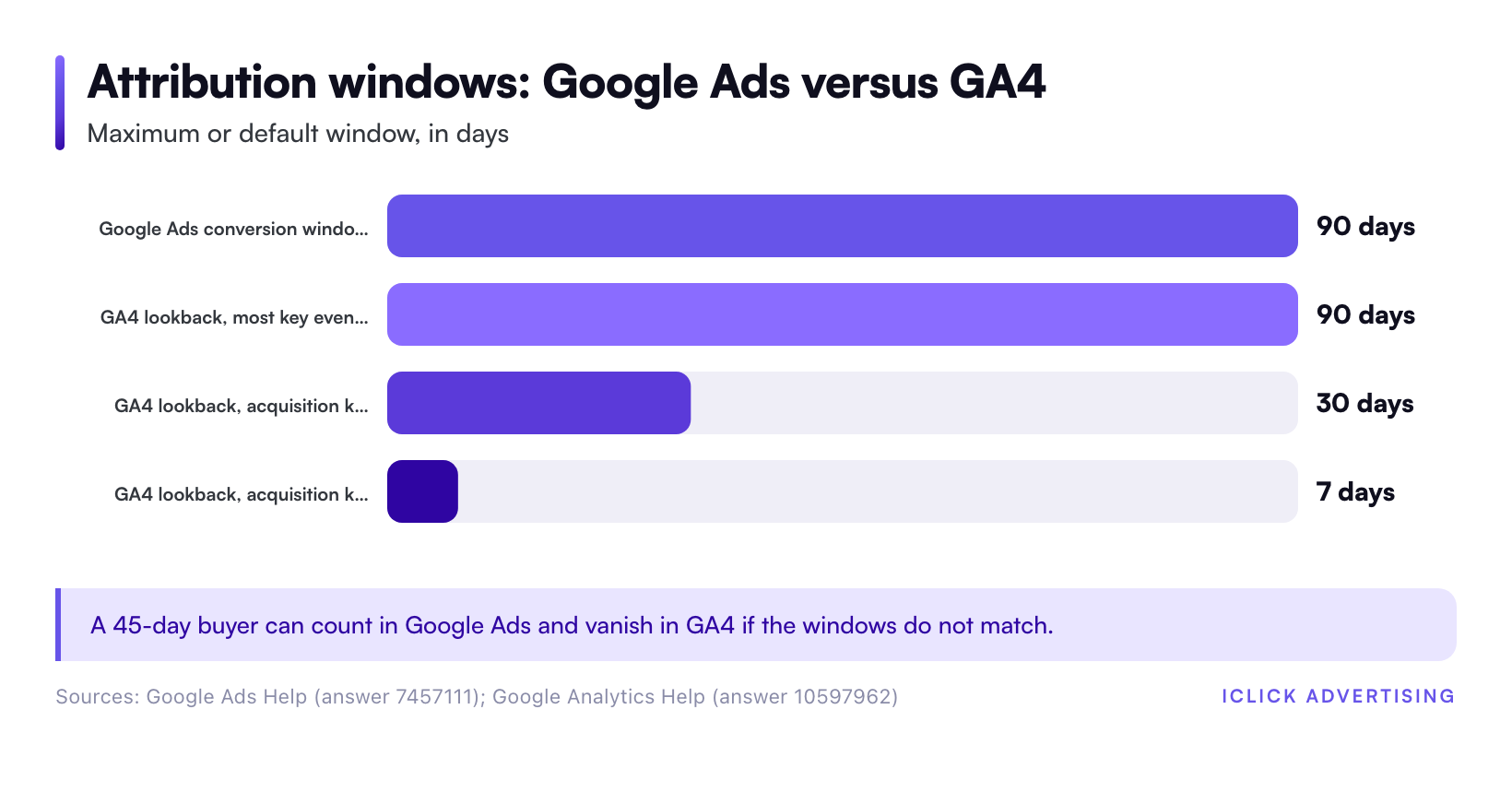
Google Ads can record a conversion up to 90 days after the click, depending on the conversion window you set for each action. GA4 uses its own lookback windows, set once at the property level.
According to Google Analytics Help, GA4 defaults to a 90-day lookback for most key events. Acquisition key events (first_visit and first_open) default to 30 days, with a seven-day option. Other key events can drop to 30 or 60 days.
If your Google Ads purchase action uses a 90-day window and your GA4 property uses 30 days, a 45-day buyer counts in one tool and not the other. Match the windows before you compare anything.
3. Attribution model mismatch
Both tools now default to data-driven attribution. That does not mean they give the same answer.
Google Ads data-driven attribution only distributes credit across Google ad interactions. GA4 data-driven attribution spreads credit across every channel it sees, including organic search, email, and Meta. A conversion that Google Ads credits fully to a Search click might be split three ways in GA4.
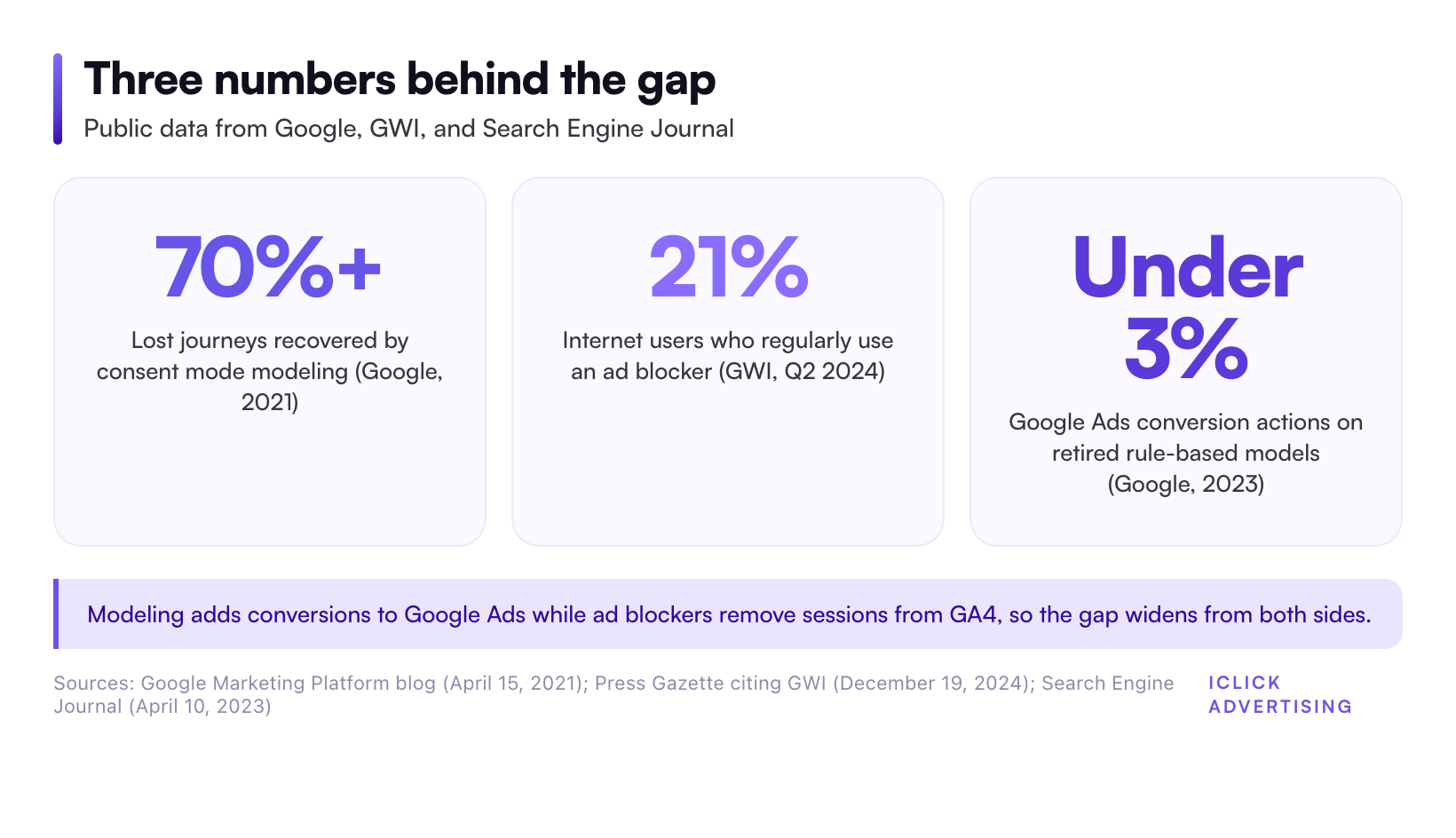
The model menu also shrank. Google retired first click, linear, time decay, and position-based models in both products by September 2023. Google said fewer than 3% of Google Ads conversion actions still used them, as reported by Search Engine Journal on April 10, 2023. If an old report or a client deck still references linear attribution, the numbers behind it no longer exist.
For a deeper breakdown of how each model assigns credit, read our guide to B2B attribution models, from first-touch to data-driven.
4. Counting settings: every or one
Each Google Ads conversion action counts either every conversion or one conversion per ad interaction. Purchases should count every. Leads usually should count one.
GA4 counts key events differently. A form submission that fires twice on a thank-you page reload counts twice in GA4. The same event, imported into Google Ads with “one” counting, counts once.
Also check primary versus secondary actions. Google notes that secondary actions do not appear in the default Conversions column. They only show in All conversions. Many “missing conversion” tickets are just a secondary action nobody added to the view.
5. Consent mode and modeled conversions
When a visitor declines cookies, Google Ads can still estimate the conversion through consent mode modeling. GA4 can model some of this too, but the two models are separate and use different inputs.
The effect is not small. Google’s own early results showed consent mode modeling recovers more than 70% of ad-click-to-conversion journeys lost to cookie consent choices, according to a Google Marketing Platform post from April 15, 2021.
That means a Google Ads account with consent mode active can show conversions that GA4 never observed. Google Ads also adds modeled cross-device conversions, where someone clicks on a phone and buys on a laptop. GA4 only sees that journey if the user is signed in or matched another way.
6. Ad blockers, browsers, and lost sessions
The Google Ads click happens on Google’s servers. The GA4 session only exists if the GA4 tag loads in the visitor’s browser. Anything that stops the tag creates a click with no session.
Ad blockers are the obvious culprit. GWI’s Q2 2024 data shows 21% of internet users across almost 60 countries regularly use an ad blocker, with a further one in 10 using one occasionally, as reported by Press Gazette on December 19, 2024. Many of those blockers stop analytics scripts too.
Google’s clicks and sessions troubleshooting page lists more reasons. Visitors with JavaScript disabled or an Analytics opt-out extension never get tracked. Slow pages lose visitors before the tag fires. Invalid clicks get filtered out of Google Ads, but GA4 records those sessions.
This loss runs in both directions. Returning visitors create extra GA4 sessions with no new click. Bookmarked URLs that carry a GCLID create sessions credited to an ad nobody clicked.
7. Broken click IDs: redirects, auto-tagging, and landing pages
GA4 attributes a session to Google Ads by reading the GCLID (or GBRAID and WBRAID on iOS traffic) from the landing page URL. Lose that parameter and the paid session shows up as organic or direct.
The common breaks:
- Auto-tagging turned off. Paid traffic gets misattributed to organic or direct instead of google / cpc.
- Redirects that strip parameters. A 301, 302, or JavaScript redirect can drop the GCLID before GA4 loads.
- Server rewrite rules. Extra parameters can break rewrite rules and serve an error page.
- Untagged landing pages. A standalone Unbounce or Instapage page without the GA4 tag sends no campaign data at all.
- GBRAID or WBRAID without UTM fallback. Campaign name can show as (not set) in GA4.
- Accounts linked recently. Linked data does not backfill, so any date range before the link will never match.
If GA4 shows unusually high organic or direct traffic on your top paid landing pages, start here.
How to size the gap in 30 minutes
Do not reconcile totals. Reconcile one conversion action, one campaign, and one closed date range. Here is the process.
- Step 1: Pick a closed window. Choose a 30-day range that ended at least your average conversion lag ago. For a same-day eCommerce buyer, a week back is enough. For a 45-day B2B cycle, go back two months.
- Step 2: Pick one action. Compare purchases to purchases, or demo requests to demo requests. Never compare Google Ads “Conversions” to GA4 “Key events” in total.
- Step 3: Match the scope in GA4. Filter to session source / medium google / cpc, or use the Google Ads campaign dimension. Use the same attribution model and lookback window as the Ads action.
- Step 4: Compare clicks to sessions. A clicks-to-sessions gap points to causes 6 and 7. A conversion gap with matching sessions points to causes 1 to 5.
- Step 5: Strip the modeled and secondary data. Check how much of the Google Ads count comes from modeled conversions. Separate primary from secondary actions.
- Step 6: Log the ratio. Record the GA4 to Google Ads ratio for this action. Repeat monthly.
There is no reliable public benchmark for an “acceptable” gap. It depends on your consent rates, your sales cycle, and how many of your visitors run blockers.
So baseline your own account. A stable ratio is fine. A ratio that moves sharply in one week almost always means something broke: a site redesign, a new consent banner, a checkout app, or a duplicate tag.
Which number should you bid on?
Use each tool for the job it was built for.
| Question | Trust this source | Why |
|---|---|---|
| How should Smart Bidding optimize? | Google Ads native tag | Bidding trains on Ads data, including modeled and cross-device conversions. |
| What did Google Ads cost per acquisition? | Google Ads | Credit ties back to the click date and the specific ad. |
| How do channels compare? | GA4 | GA4 sees organic, email, Meta, and paid in one model. |
| What happened on the site after the click? | GA4 | Engagement, funnel steps, and landing page behavior live here. |
| What actually closed or shipped? | Your CRM or store backend | Neither ad tool sees refunds, returns, or offline deal stages. |
One rule prevents the worst mistake. Never set both a native Google Ads purchase tag and an imported GA4 purchase key event as primary actions. Google Ads will count the same order twice, and Smart Bidding will chase a CPA that is half the real number.
Most accounts should use the native Google Ads tag with enhanced conversions as the primary action. Keep the GA4 import as secondary, for observation only.
Shopify stores have extra wrinkles here, because checkout tracking runs through customer events and app pixels. Our walkthrough of Shopify conversion tracking with GA4, enhanced conversions, and the Conversions API covers that setup step by step.
Fixes that shrink the gap
You cannot close the gap to zero. You can close the part caused by lost data.
Turn on enhanced conversions
Enhanced conversions send hashed first-party data, such as an email address, with the conversion. Google matches it to signed-in users when the cookie is gone. It recovers conversions in Google Ads that would otherwise drop out.
Implement consent mode v2 correctly
A consent banner that blocks tags without consent mode signals throws away modeling. With consent mode in advanced mode, Google receives cookieless pings and can model the missing journeys. Check your banner vendor, whether that is Cookiebot, OneTrust, or Shopify’s own banner.
Move tagging server-side
Server-side Google Tag Manager, run on your own subdomain, is harder for ad blockers to stop. It also gives you one place to enforce parameter handling before data reaches GA4 and Google Ads.
Fix click ID survival
Test every paid landing page with a fake GCLID appended. If the parameter disappears after a redirect, fix the redirect. Add UTM parameters as a fallback for iOS traffic carrying GBRAID or WBRAID.
Match the settings you control
Align conversion windows, lookback windows, and counting between the two tools. Document them. The next person who opens the account will thank you.
The same data loss hits Meta, only harder. If you run both channels, our guide to the Meta Conversions API setup for Shopify applies the same server-side logic to Facebook and Instagram ads.
Where this fits in your measurement stack
A GA4 and Google Ads discrepancy is one symptom of a bigger question: which system is your source of truth for each decision. Tag health, consent, attribution, and offline conversion imports all feed that answer.
Our measurement and tracking playbook pulls those pieces together, from tag architecture to attribution to CRM imports. Start there if this gap is one of several you are chasing.
Get a second set of eyes on your tracking
If your GA4 and Google Ads numbers moved apart and you cannot say why, Smart Bidding is probably learning from bad data. Request a free written audit and ask us to reconcile your tracking. You get a 47-point written PDF in five business days, with no sales call.
Sources
- Google Ads Help: Data discrepancies, factors and troubleshooting
- Google Analytics Help: Clicks and sessions discrepancy for Google Ads and Google Analytics
- Google Analytics Help: Attribution settings and lookback windows
- Google Marketing Platform blog: Conversion modeling through Consent Mode in Google Ads (April 15, 2021)
- Search Engine Journal: Google Is Removing 4 Attribution Models For Advertisers (April 10, 2023)
- Press Gazette: Ad-blockers mean publishers missing out on ad revenue from one in five readers (GWI Q2 2024 data, December 19, 2024)
Frequently asked questions
Why does Google Ads show more conversions than GA4?
Google Ads usually shows more because it includes modeled conversions from consent mode, cross-device conversions, and conversions up to 90 days after the click. It also credits each conversion to the click date. GA4 loses sessions to ad blockers and broken click IDs, and it splits credit across other channels like organic search and email.
Is a discrepancy between GA4 and Google Ads normal?
Yes. Google’s own help documentation lists many factors that make the two tools disagree, even with correct tagging. There is no reliable public benchmark for an acceptable gap, so track your own ratio for one conversion action each month. A stable ratio is normal. A sudden jump usually means a tag, redirect, or consent banner broke.
Should I import GA4 conversions into Google Ads or use the Google Ads tag?
For most accounts, use the native Google Ads tag with enhanced conversions as the primary action. It captures modeled and cross-device conversions that improve Smart Bidding. Keep any imported GA4 key event as a secondary action. Never make both primary, or Google Ads will count each order twice.
How long should I wait before comparing GA4 and Google Ads data?
Wait at least 24 to 48 hours for data to sync, as Google recommends. Then add your typical conversion lag on top. Google Ads back-dates late conversions to the click date, so recent ranges keep growing for weeks. For long sales cycles, compare a 30-day window that closed one or two months ago.