TL;DR: Google says 15% of searches are brand new every day, and broad match plus AI Max now chase them. Negative keywords are your main filter. Build four layers: account, shared lists, campaign, and ad group. Sculpt queries between Search and PMax, and set negation thresholds from your own CPC and conversion rate.
Why Negative Keywords Matter More in the Broad Match Era
Google keeps widening what your keywords can match. Your negative keyword list is the one control that still says no in plain terms.
The pool of queries isn’t shrinking, either. At Search Central Live NYC in March 2025, Google’s John Mueller said “15% of all queries are new every day.” Google has repeated that figure for years (Search Engine Journal, March 28, 2025). No keyword list covers queries nobody has typed yet. Broad match and AI matching exist to catch them.
Google is pushing hard in that direction. It launched AI Max for Search on May 6, 2025. Google said advertisers who turn it on typically see 14% more conversions or conversion value at a similar CPA or ROAS. For campaigns still running mostly exact and phrase keywords, Google put the typical uplift at 27% (Google Ads & Commerce Blog, May 2025). Those are Google’s internal numbers for non-Retail advertisers, not independent results.
For many accounts, the shift is no longer optional. Google’s April 2026 announcement says the campaign-level broad match setting and automatically created assets auto-upgrade to AI Max starting September 2026. Dynamic Search Ads follow in February 2027 (Google, updated June 11, 2026).
Here is the practical result. More of your budget now goes to queries you never wrote. Negatives decide which of those queries you pay for. If you want the auction basics first, start with our plain-English guide to how Google Ads works.
How Negative Keyword Matching Works in 2026
Positive and negative keywords follow different rules. Much of the wasted spend we find in audits traces back to someone assuming they work the same way.
Negatives do not expand to close variants
A positive broad match keyword reaches synonyms, related searches, and intent matches. A negative does not. Google’s help center states that negative keywords “won’t match to close variants or other expansions” (Google Ads Help).
In practice, excluding “free” does not block “complimentary” or “no cost.” Excluding “job” does not block “careers” or “hiring.” You add each version yourself. The one exception is spelling: Google says negatives handle casing and misspellings automatically.
Negative match types, side by side
Google Ads and Microsoft Advertising treat negative match types differently. That matters every time you import a Google campaign into Microsoft.
| Negative match type | Google Ads | Microsoft Advertising | Negative “free trial” blocks |
|---|---|---|---|
| Broad | Blocks queries containing all terms, in any order | Not supported | “trial software free” |
| Phrase | Blocks queries with the terms in the same order, extra words allowed | Default type, same rule as Google | “free trial crm software” |
| Exact | Blocks only the exact query, no extra words | Blocks only the exact query | “free trial” only |
Microsoft’s API documentation lists only exact and phrase as negative match types, with phrase as the default (Microsoft Learn). So “trial software free” can slip past a list you built for Google. Review imported lists term by term on your Microsoft Advertising campaigns.
The Limits That Shape Your List Structure
Negative keyword architecture starts with hard caps. Google publishes them in its account limits documentation.
- 10,000 negative keywords per campaign (Google Ads Help, account limits).
- 20 shared negative keyword lists per account, each holding up to 5,000 keywords.
- 1,000 account-level negative keywords, applied across Search and Shopping inventory in Search, Performance Max, App, Shopping, Smart, and Local campaigns (Google Ads Help).
- Performance Max campaign-level negatives rose from 100 to 10,000 in March 2025 (Search Engine Land).
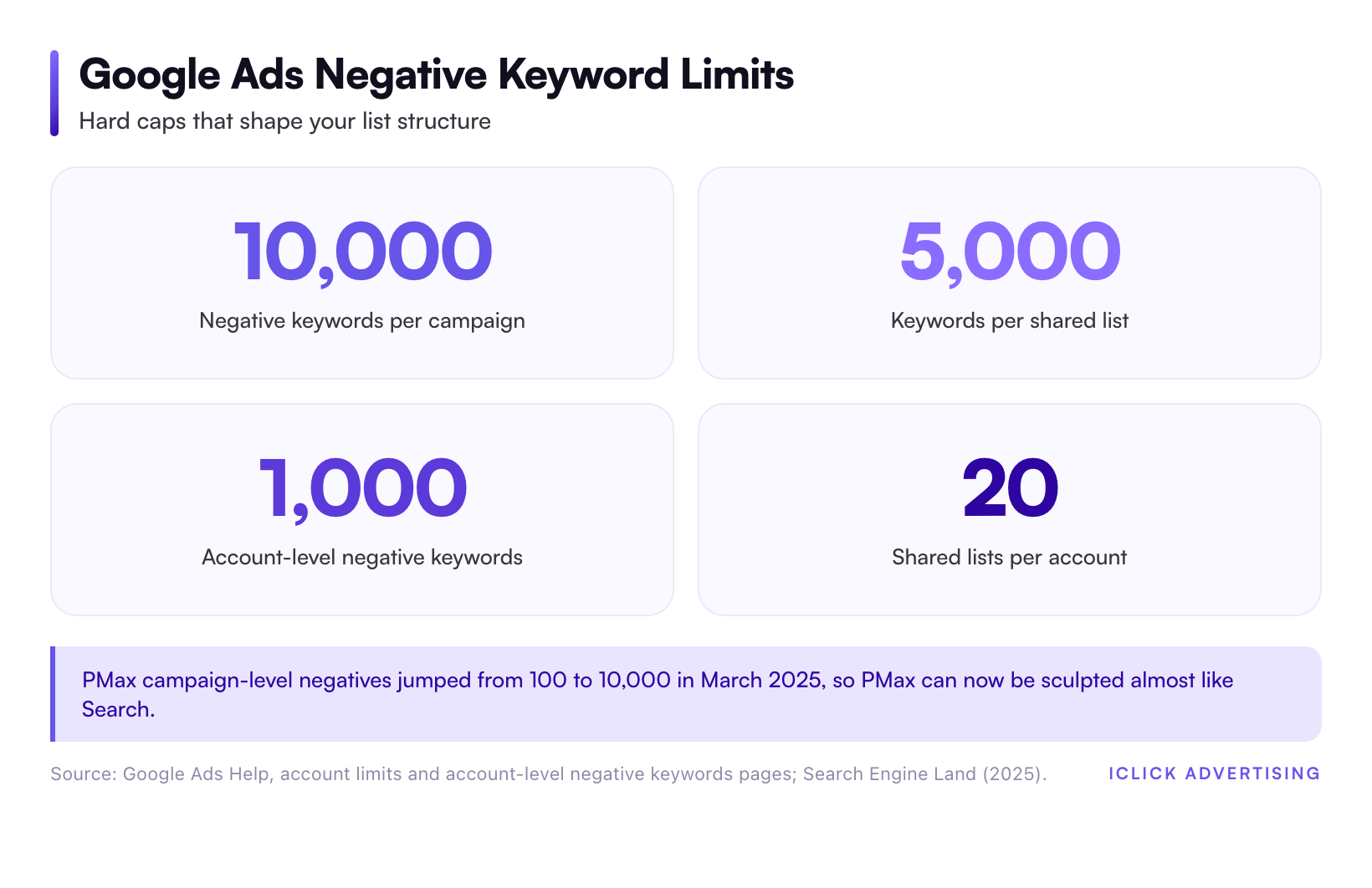
The PMax change matters most. Before 2025, PMax gave you almost no query control. Now you can shape it nearly as tightly as Search. Google notes that PMax negatives apply to Search and Shopping inventory only (Google Ads Help). They do nothing for YouTube or Display placements inside the same campaign.
Microsoft Advertising mirrors part of this structure. It allows 20 negative keyword lists per account, 5,000 keywords per list, and one shared list per campaign.
A Four-Layer Negative Keyword Strategy
A good negative keywords strategy is not one giant list. It is four layers, and each layer has a different job. Build them from the top down.
Layer one: Account-level exclusions
This list blocks terms you never want in any campaign. It usually covers three groups:
- Employment intent: jobs, careers, salary, hiring, and internship.
- Research intent that never converts for you: definition, template, pdf, and course.
- Brand safety terms specific to your category.
Stay well under the 1,000 cap and review the list every quarter. One wrong term here blocks every campaign at once.
Layer two: Themed shared lists
Shared lists group negatives by reason. A typical build has four to six lists: competitors, free and cheap intent, wrong geography, wrong product, and informational terms. Attach each list only to the campaigns where it applies.
Naming matters more than people think. “NEG | Free intent | All Search” tells the next manager exactly why a list exists. A list called “Negatives 3” gets deleted by accident.
Layer three: Campaign-level negatives
These terms are valid somewhere in the account, just not in this campaign. A guitar brand’s acoustic campaign negates “electric.” A probate law campaign negates “criminal” and “divorce.” The terms stay available to the campaigns that should own them.
Layer four: Ad group sculpting
This is where query sculpting happens. You use tight negatives to push each query to the ad group with the best ad and landing page. The next section shows how.
Query Sculpting: Routing Traffic, Not Just Blocking It
Blocking waste is defense. Sculpting is offense. It decides which campaign, ad group, and ad a good query lands in.
Sculpting inside a Search campaign
Take a personal injury firm with two ad groups: “car accident lawyer” and “truck accident lawyer.” Broad match lets the car ad group pick up “18 wheeler accident attorney.” That query deserves the truck ad and the truck landing page.
The fix is a pair of phrase negatives, “truck” and “18 wheeler,” in the car ad group. Now the truck ad group wins those queries every time.
The stakes are high in legal. In iClick’s own benchmark data from accounts we managed in 2024 and 2025, personal injury Search clicks averaged $6.75 (iClick 2026 PPC benchmarks). A misrouted click at that price costs real money, and it usually converts worse on the wrong page.
Sculpting between Search, Shopping, and Performance Max
Campaign overlap is the bigger problem in 2026. Our benchmarks page reports that PMax cannibalizes Shopping in 80%+ of the accounts we manage. That figure is iClick portfolio data, not an industry average.
Three controls help most:
- Brand exclusions in PMax. Keep branded queries in a dedicated brand Search campaign, where you control bids and copy.
- Campaign-level negatives in PMax. Exclude the high-intent terms you already cover with exact match Search, so PMax hunts for new demand instead.
- Shared lists across campaign types. Attach the same themed lists to Search and PMax, so a term you block in one doesn’t leak through the other.
If you’re unsure which campaign type should own which queries, our Google Ads campaign types decision tree maps it out. For channel-level setup, see the Google Ads channel hub.
How to Mine the Search Terms Report Every Week
Negatives only work if you keep adding them. Here is the weekly routine we recommend.
- Pull 30 days of search terms, sorted by cost. Google says the search terms report now gives more visibility across all match types. Since the AI Max launch, it also shows the headlines and URLs that served.
- Flag terms with spend and zero conversions, using the threshold below.
- Classify each term. Irrelevant terms get negated. Relevant terms in the wrong ad group get sculpted. Relevant terms that underperform need a better ad or page, not a negative.
- Pick the narrowest match type that solves it. Use exact for one bad query, phrase for a bad modifier, and broad only for a word that is always wrong.
- Log every change. Record the date, term, match type, level, and reason.
Set a zero-conversion threshold from real numbers
Don’t negate a term after five clicks. Across iClick-managed accounts, Google Search converts at 3.48% on average. At that rate, you expect one conversion roughly every 29 clicks.
A cleaner rule uses cost. Divide average CPC by conversion rate to get expected cost per conversion. When a term spends twice that amount with zero conversions, it becomes a strong negative candidate.
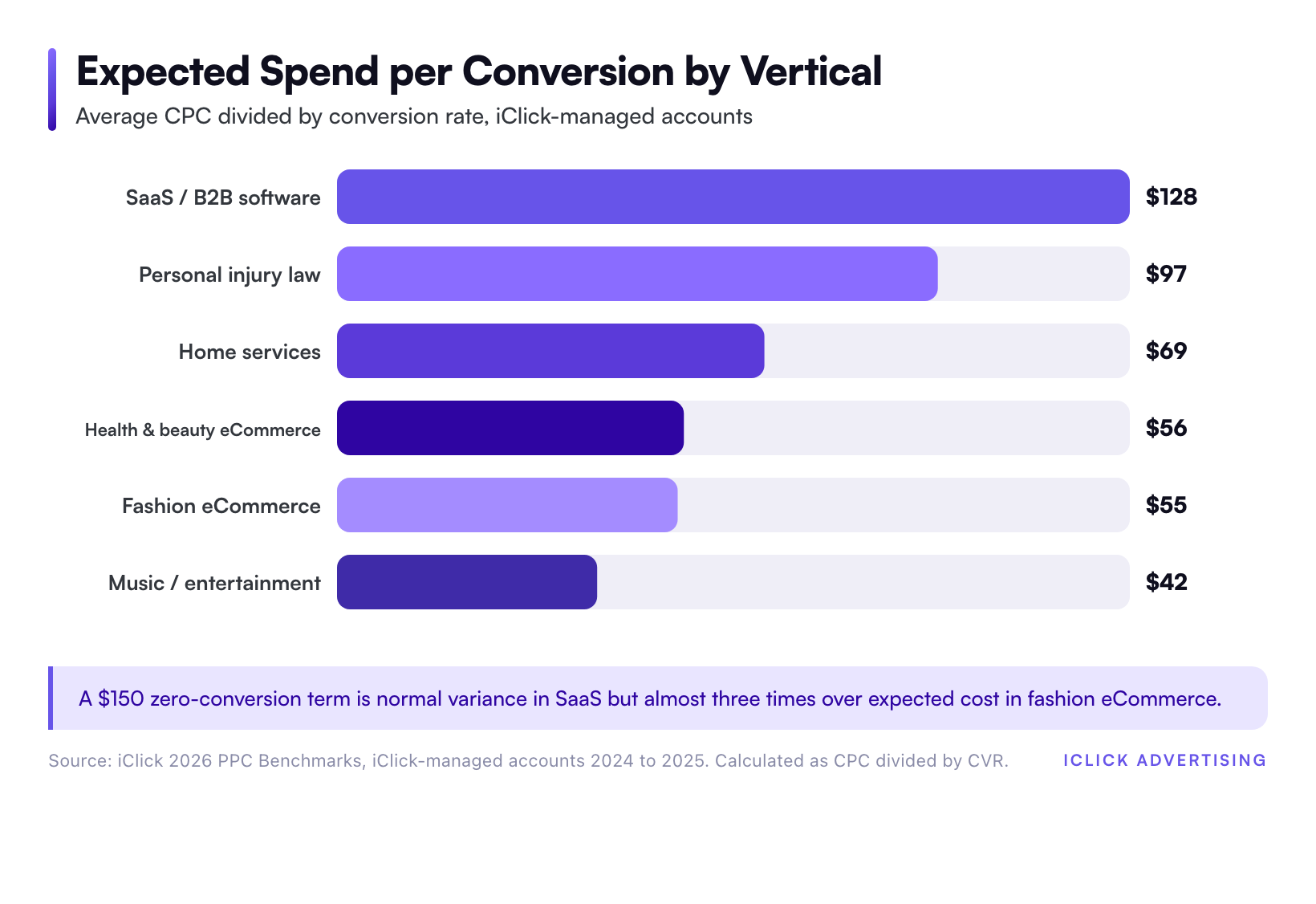
Here is how that plays out with iClick’s 2026 benchmark tables:
- SaaS and B2B software: $4.88 CPC at 3.80% conversion rate, so about $128 per expected conversion.
- Personal injury law: $6.75 CPC at 6.98%, so about $97.
- Home services: $3.60 CPC at 5.20%, so about $69.
- Fashion eCommerce: $1.15 CPC at 2.10%, so about $55.
So a SaaS term at $150 with zero conversions is still inside normal variance. A fashion term at $150 is almost three times over its expected cost. Same spend, opposite decision.
Negate on intent fast, on performance slowly
Every negative removes data that Smart Bidding could learn from. A query with obvious wrong intent, like “personal injury lawyer salary,” should go today. A relevant query with thin data should get more time. Negate on intent mismatch fast, and negate on performance only after it clears your threshold.
Negative Keywords Beyond Google Search
The same logic applies on other channels, but the mechanics change.
Microsoft Advertising
Microsoft supports phrase and exact negatives only, as covered above. It also offers a negative keyword conflict report that lists negatives that block your own keywords. Run it after every bulk import.
YouTube and Display
Keywords do far less work here. Google’s help center says that for Display and Video campaigns, a maximum of 1,000 negative keywords is considered at the account level. Placement and topic exclusions carry more weight.
Relevance on YouTube comes mostly from targeting and creative. Our YouTube ads for eCommerce creative frameworks cover the creative side. The YouTube Ads channel page covers targeting and setup.
Five Negative Keyword Mistakes We See in Audits
- Blocking your best query. A law firm that negates “free” also blocks “free consultation,” often one of its highest-intent searches.
- Assuming close variants are covered. They aren’t. “Cheap” does not block “affordable” or “discount.”
- Leaving PMax without negatives. The cap is 10,000 per campaign now. An empty list is a choice, not a limitation.
- Importing Google lists into Microsoft unchecked. Negative broad terms don’t exist there, so coverage changes.
- Keeping no change log. When conversions drop, you can’t tell whether a new negative caused it.
Where to Start This Week
Open your search terms report and sort by cost. Check the top 50 terms against the four layers above. Then calculate your own expected cost per conversion and flag anything past twice that number.
Most accounts find their first wasted spend within an hour. The harder part is the structure: lists that are named, layered, and shared across Search and PMax.
Want a Second Set of Eyes on Your Negatives?
Our Free Written Audit reviews your search terms, negative keyword lists, and campaign overlap as part of a 47-point written PDF. You get it in five business days, with no sales call. Request your Free Written Audit.
Sources
- Search Engine Journal: Google Revisits 15% Unseen Queries Statistic (March 28, 2025)
- Google Ads & Commerce Blog: AI Max for Search campaigns (May 6, 2025)
- Google Ads & Commerce Blog: Dynamic Search Ads are upgrading to AI Max (April 15, 2026, updated June 11, 2026)
- Google Ads Help: About negative keywords
- Google Ads Help: About your Google Ads account limits
- Google Ads Help: About account-level negative keywords
- Google Ads Help: Negative keywords in Performance Max campaigns
- Search Engine Land: Google Ads expands PMax negative keyword limits (2025)
- Microsoft Learn: Negative Keywords (Microsoft Advertising API)
- iClick 2026 PPC Benchmarks (iClick-managed accounts, 2024 to 2025)
Frequently asked questions
What is a negative keywords strategy?
A negative keywords strategy is a structured plan for excluding searches you don’t want to pay for. It covers which terms to block, at what level (account, shared list, campaign, or ad group), and with which match type. A good strategy also routes relevant queries to the right ad group, a practice called query sculpting, instead of only blocking waste.
Do negative keywords still work with broad match and AI Max?
Yes, and they matter more. Broad match and AI Max expand your reach to queries you never wrote, while negatives stay literal. Google’s help center says negatives won’t match close variants or other expansions, though they do handle misspellings. That means you must add synonyms and plural forms yourself if you want them blocked.
Can you add negative keywords to Performance Max campaigns?
Yes. Performance Max supports campaign-level negative keywords, and Search Engine Land reported the cap rose from 100 to 10,000 per campaign in March 2025. Account-level negatives and shared lists also apply. PMax negatives only affect Search and Shopping inventory, not YouTube or Display placements.
How often should I add negative keywords?
Review the search terms report weekly for active accounts, and monthly for low-spend ones. Negate clearly irrelevant intent right away. For relevant terms with no conversions, wait until spend reaches about twice your expected cost per conversion. Review account-level and shared lists every quarter so old exclusions don’t block new products.
Should I use negative broad, phrase, or exact match?
Use the narrowest match type that solves the problem. Negative exact blocks one specific query. Negative phrase blocks a modifier in a fixed order. Negative broad blocks any query containing all the words, so reserve it for terms that are always wrong. Microsoft Advertising supports only phrase and exact negatives.