

TL;DR: Only accounts you created and administer are truly yours. Google Ads uses five access levels, Admin, Standard, Billing, Read-only, and Email-only, and if your agency built your account under its own manager account, you may hold none of the control. Check your access level in under 5 minutes.
What “Owning” a Google Ads Account Actually Means
Google Ads account ownership trips up most business owners, who assume they own the account because they pay the bill. That is not how Google structures ownership. Ownership lives at the account level, not the invoice level, and it is controlled by who holds administrative rights, not who enters a credit card number every month.
Ownership vs. Access: Two Different Questions
Two questions matter here, and they have different answers. Who created the account? And who currently holds Admin access to it? If your agency created your Google Ads account under its own manager account, often called an MCC, short for “My Client Center,” the agency is the account owner by default. You can pay every invoice on time for three straight years and still not own the account running your own campaigns.
Per Google’s own documentation, a manager account becomes the owner of a client account only when someone with administrative access grants that ownership, and the client account keeps its data even after ownership changes hands. Ownership is not permanent. It can be transferred, and it can be removed by unlinking the manager account, but only the party currently holding it can trigger that change (Google Ads Help, “About ownership of client accounts,” support.google.com/google-ads/answer/7456532).
The Five Access Levels in Google Ads, and What Each One Controls
Google Ads assigns every user on an account one of five access levels. The level you hold determines what you can see and change, regardless of who technically owns the account (Google Ads Help, “About access levels in your Google Ads account,” support.google.com/google-ads/answer/9978556).
| Access Level | What It Controls | Can Manage Other Users? |
|---|---|---|
| Admin | Full control: campaigns, billing, product links, user access | Yes |
| Standard | Edit and manage campaigns, build conversions from Analytics | No |
| Billing | View and edit billing, manage payments profile | No |
| Read-only | View campaigns, billing, and reports only | No |
| Email-only | Receive notification emails and reports only | No |
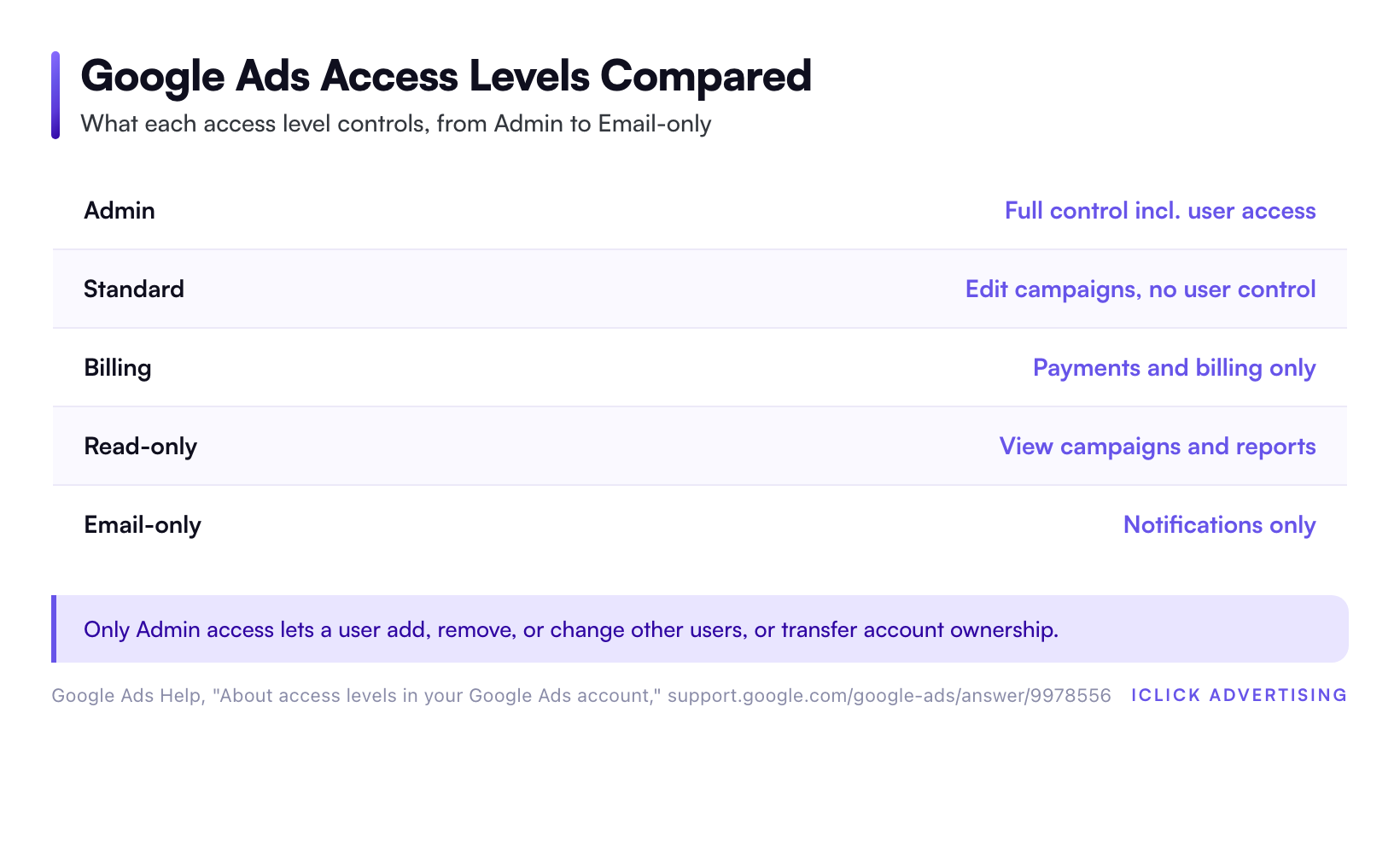
Admin is the only level that lets a user add or remove other people, change someone else’s access level, or transfer ownership. If your agency holds Admin and you hold Standard or Read-only, they decide who gets in and who gets locked out. You do not.
How Manager Accounts (MCC) Change the Ownership Picture
Agencies run client campaigns through a manager account, Google’s term for the login that lets one team control several client accounts from a single dashboard. How that manager account connects to your account decides whether you keep control of your own data, or hand it over without realizing it.
The Setup That Protects You: You Create the Account, the Agency Links to It
In a clean setup, you create the Google Ads account yourself, under your own email address and your own billing profile. Your agency then requests a link from its manager account to yours. You approve that link, and you can approve or revoke ownership as a separate step from the link itself. Google allows manager account hierarchies up to six levels deep, but ownership at every level still traces back to whoever holds Admin on your account (Google Ads Help, “About linking accounts to your manager account,” support.google.com/google-ads/answer/7456530).
The Setup That Exposes You: The Agency Creates and Owns the Account
In a riskier setup, the agency creates the account for you under its own manager account, using its own email as the original Admin. You get Standard or Read-only access, sometimes nothing more than emailed performance reports. The account, its conversion history, its remarketing audiences, and its Quality Score history all live inside the agency’s MCC. If you leave, none of it follows you automatically, and rebuilding it under a new account can take months.
This is exactly the kind of structural red flag we cover in our guide to hiring a PPC agency. One question belongs at the top of that list: who will own the account when this contract ends?
How to Check Who Owns Your Google Ads Account: A 5-Step Process
- Sign in at ads.google.com. Click the tools icon, then “Setup,” then “Access and security.”
- Find your own name or email on the user list. Note the access level listed directly next to it.
- Check whether you see “Admin.” Anything else, Standard, Read-only, Billing, or Email-only, means someone else controls the account, not you.
- Ask your agency directly which email created the account and which manager account it sits under. A straight answer takes thirty seconds. A dodge is itself an answer.
- If you cannot get access to check, call Google Ads support. Bring your account ID, a payment profile in your name, and whatever access you currently hold. Google can help resolve access issues, though it will not arbitrate a commercial contract dispute between you and your agency.
If you want a second set of eyes on this before you make a decision, a free written Google Ads audit from iClick checks account ownership and access structure alongside performance, at no cost.
What It Actually Costs You When You Don’t Own the Account
Ownership disputes rarely surface on day one. They surface when you try to leave. Losing account access mid-switch means losing conversion tracking history, remarketing audiences built over years, and Quality Score history that took months to earn. A new agency has to rebuild those signals from scratch under a fresh account, with no shortcut back to what the old account already knew.
The stakes are higher than they used to be, because agency relationships now run longer. The average client-agency relationship lasted 7 years in 2025, more than double the 3.2-year average recorded in 2016, according to a joint study released in April 2025 by the Association of National Advertisers and the American Association of Advertising Agencies (ANA/4As, “Client-Agency Relationship Tenure Report,” ana.net/content/show/id/pr-2025-04-tenure). The same study found independent agencies keep clients for 7.3 years on average, versus 5.8 years at holding company agencies. Clients without mandatory contract review periods, 60% of those surveyed, stayed an average of 8.1 years, compared to 3.8 years for clients locked into frequent reviews.
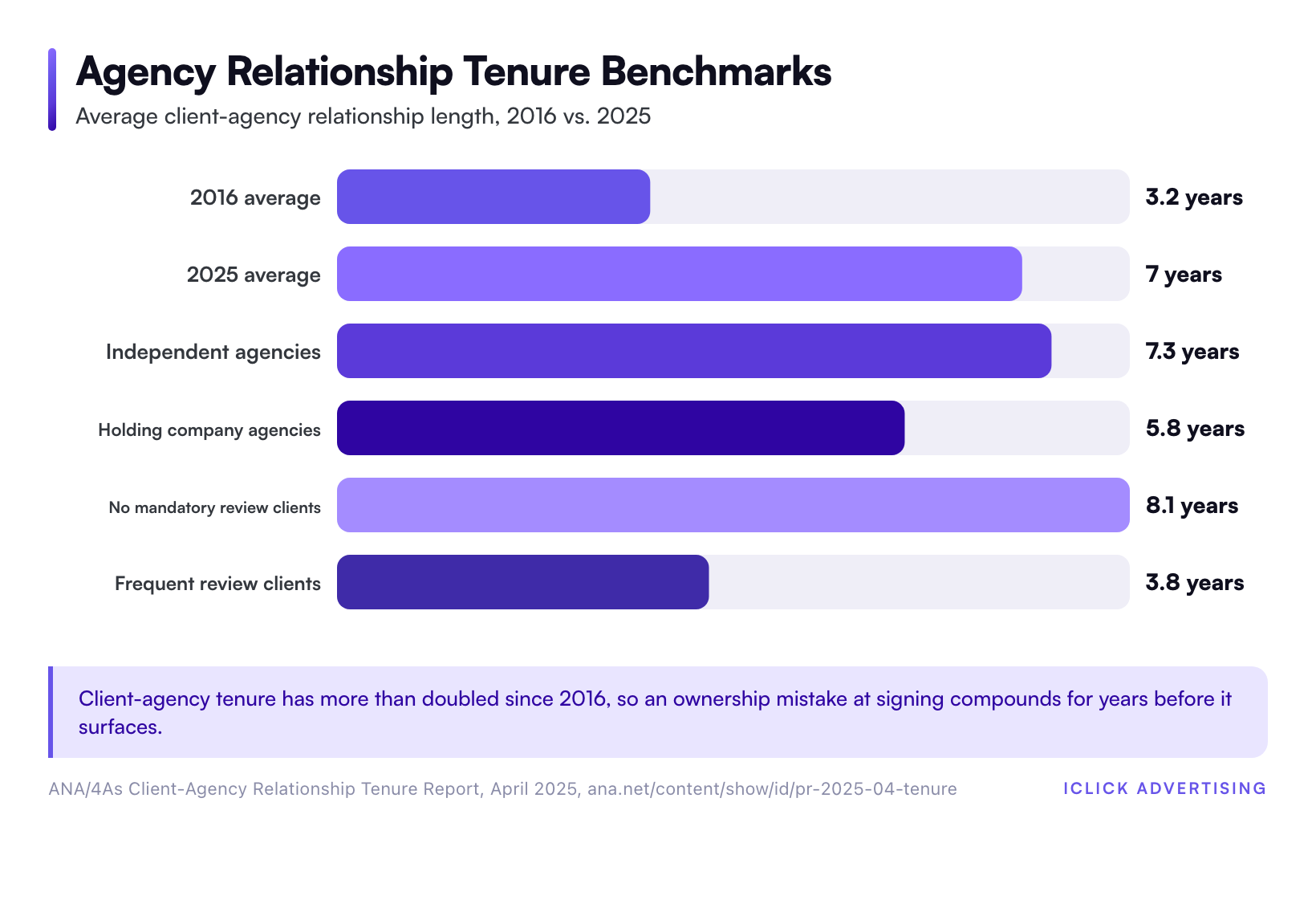
Seven years is a long time to run campaigns inside an account you do not control. That is the real cost of skipping the ownership question at signing: not one bad month, but years of accumulated data sitting somewhere you cannot reach if the relationship ends badly.
Pricing structure feeds into this too. Agencies that lock in ownership often bundle it into a flat retainer that is hard to compare against competitors. See what PPC management costs for typical fee structures.
What to Do If Your Agency Won’t Hand Over Access
Start in writing. Email your account manager and ask for Admin access on the account you pay for, with a specific date attached. Keep the request narrow: you want Admin access, not a full account transfer, and not an explanation of why it is complicated.
If the agency stalls, escalate to whoever signed the contract on the agency side. Reference your service agreement directly. Most agreements state that client-owned assets, including ad accounts, transfer or remain accessible on request. If yours does not say that, you have just found the problem you will need to fix before you sign your next one.
If the agency still refuses, contact Google Ads support with your account ID, a payment profile tied to your business, and whatever access level you currently hold, even Read-only. Google has processes for resolving ownership questions when a client can prove a legitimate connection to the account. Google will not settle a contract dispute for you, but it can restore your access to data that is rightfully yours.
How to Structure Account Ownership Before You Sign With an Agency
The cheapest way to fix this problem is to never create it. Before you sign with any PPC agency, put three things in writing.
- You create the account. Not the agency. Your business name, your email address, your billing profile, from day one.
- The agency receives Standard access through a manager account link, not Admin. Admin stays with you, or with a second trusted person on your team as backup.
- The contract states plainly that you own every account, audience list, and conversion data set created during the engagement, and that access transfers within a set number of business days of termination.
If you want a structural review of a contract already in front of you, or of an account you already have, our Google Ads audit checklist covers what a competent audit checks, ownership included.
Get a Second Opinion Before You Decide Anything
If you are not sure who owns your Google Ads account right now, do not guess. iClick runs a free written Google Ads audit that checks account ownership, access levels, and campaign performance in one pass, no obligation attached. Book a call and we will tell you exactly what you have, and what you are missing.
Related on iClick
Sources
- ANA/4As, “New ANA and 4As Report Reveals Client-Agency Relationship Tenure Has Doubled Since 2016,” April 2025
- Google Ads Help, “About access levels in your Google Ads account”
- Google Ads Help, “Manager Accounts (MCC): About ownership of client accounts”
- Google Ads Help, “Manager Accounts (MCC): About linking accounts to your manager account”
Frequently asked questions
Can an agency legally keep my Google Ads account after I stop working with them?
No law automatically hands you the account just because it advertises your business. Control depends on account structure: who created it, and who holds Admin access. If your prior agency built the account under its own manager account, they control it technically, even though the campaign data and conversion history describe your business.
What is the difference between a Google Ads manager account and account ownership?
A manager account, or MCC, is the login agencies use to manage several client accounts at once. Linking your account to an agency’s manager account does not automatically transfer ownership. Ownership is a separate setting that must be granted by someone with Admin access, and it can be revoked by unlinking the manager account at any time.
How do I get Admin access to my own Google Ads account?
Sign in at ads.google.com, open Access and security under Setup, and check your listed access level. If you are not Admin, ask whoever holds that role, usually your agency, to upgrade you. If they refuse, contact Google Ads support with your account ID and a payment profile tied to your business.
Should I ever let an agency create my Google Ads account for me?
No. Create the account yourself, under your own email and billing profile, then let the agency request a manager account link. This keeps Admin access with you by default, so you never have to negotiate ownership back from a vendor if the relationship ends.
What should my contract say about who owns the Google Ads account?
It should state plainly that you own every account, audience list, and conversion data set created during the engagement, and that the agency will hand over full access within a set number of business days of termination, no conditions attached.