TL;DR: YouTube ads work for SaaS when your product is easy to show, search demand is thin, and deal size can absorb a longer path. Gartner found 65% of B2B buyers were influenced by YouTube in a recent purchase. Optimize to trials, not demos alone, and judge results with a geo holdout, not last click.
Why most SaaS YouTube tests get killed early
Most SaaS teams launch YouTube the same way they launch Search. They set a demo conversion goal, pick Target CPA, and wait. Six weeks later, cost per demo looks worse than Search, and the test gets killed.
The problem is usually not the channel. It is the job the team gave it. YouTube rarely closes a demo on its own. Its real job is to put your product in front of buyers before they build a shortlist.
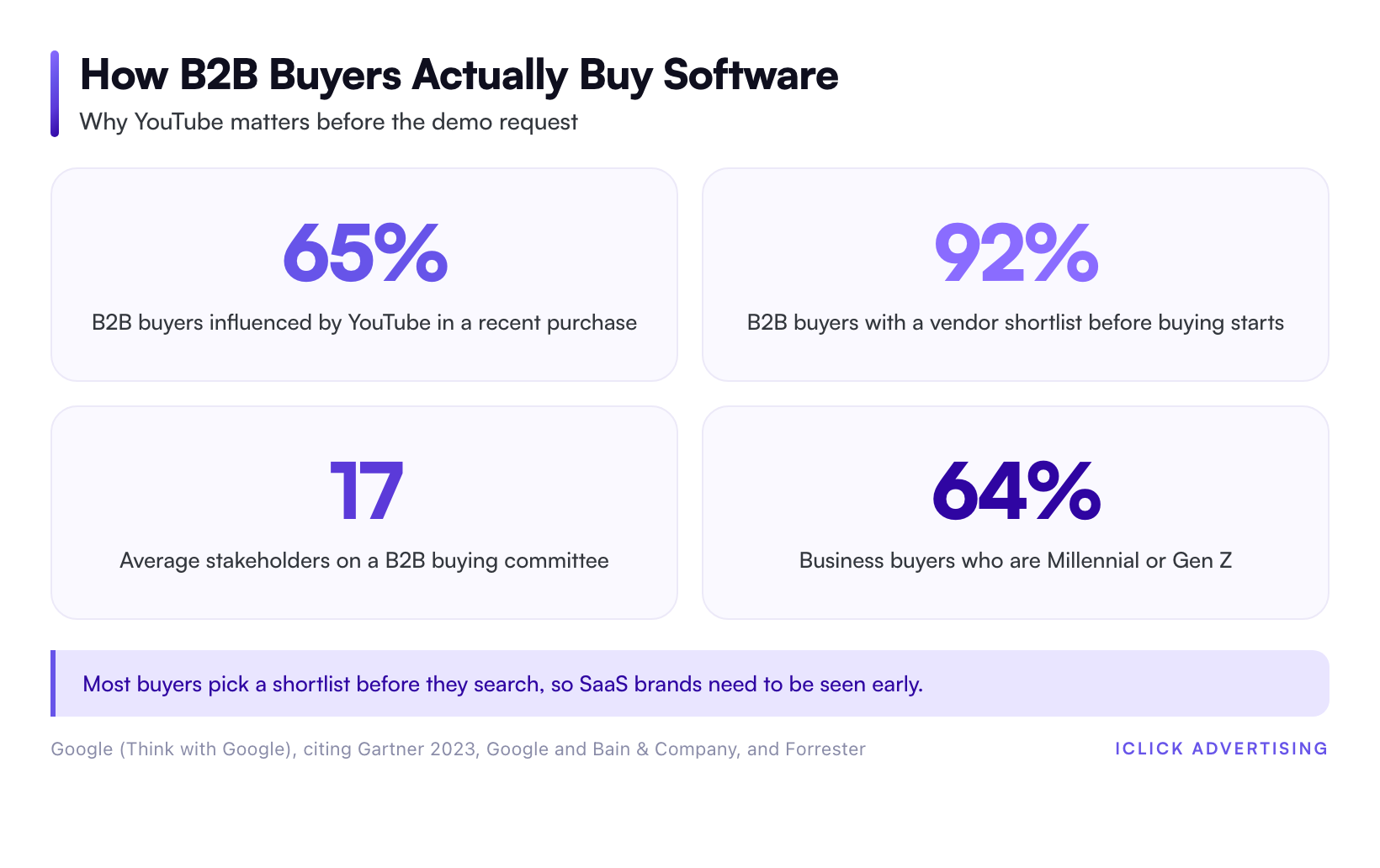
That timing matters in SaaS. Research from Google and Bain & Company found that 92% of B2B buyers already have a shortlist of preferred vendors before they start the buying process. If you are not on that list, your Search ads are bidding for a buyer who has mostly decided.
Buyers are watching, too. A 2023 Gartner report, cited by Google, found that 65% of B2B buyers were influenced by YouTube during a recent purchase decision. Forrester data cited in the same Google piece puts 64% of business buyers in the Millennial or Gen Z bracket.
So the audience is there. The real question is whether your account can turn that attention into pipeline you can measure.
If you want the fundamentals of how Google’s auction decides who sees which ad, start with our plain-English guide to how Google Ads works. This post assumes you know the basics and want a decision.
When YouTube drives demos
In the SaaS accounts we manage, YouTube earns its budget under three conditions. You want at least two of them in place before you spend a dollar.
1. Your product is easier to show than to explain
Visual products win on video. Think Loom, Canva, Miro, or Notion. A 30-second screen recording shows the “aha” moment faster than any headline can.
If your product is a dashboard, a workflow builder, or a design tool, video does selling that Search copy cannot. Buyers see the before and after in one scroll.
If your product is an API, a compliance layer, or backend infrastructure, video has less to show. That doesn’t rule YouTube out. It shifts the creative toward founder explainers and customer proof, which convert more slowly.
2. People search for the problem, not your category
Some SaaS categories have thin search demand. Buyers don’t know the category name yet, so they search the pain instead. Think “inventory spreadsheet keeps breaking” or “sales reps won’t update CRM.”
That is where YouTube helps most. It creates demand that shows up later as branded search and direct traffic. Categories with deep existing demand, like “project management software,” get less lift because buyers are already searching.
3. Your deal size can absorb a longer path
YouTube adds touches before the demo. Google and Bain research puts the average B2B buying committee at 17 cross-functional stakeholders. Every one of them may need to see you before a deal closes.
Say your average contract is $15,000 a year. That deal can pay for several touches per stakeholder. A $29 a month self-serve plan usually cannot.
Here is a quick rule. If one extra closed deal per month covers the full test budget, the math can work. If not, put the money into Search and product-led growth first.
Quick fit check
Score your product against these four signals. Two or more in the middle column means a test is worth running.
| Signal | Good fit for YouTube | Poor fit for YouTube |
|---|---|---|
| Product | Visual interface you can screen-record | API or backend with little to show |
| Search demand | Buyers search the problem, not the category | Category keyword already has deep volume |
| Deal size | Annual contract covers many touches | Low monthly self-serve price |
| Conversion data | Trials or tours give steady weekly volume | Only a few demos a month |
When YouTube doesn’t drive demos
The same four failure patterns show up again and again. Each one is fixable, but only if you catch it before the budget runs out.
- Demo as the only conversion. A cold viewer who met you 30 seconds ago rarely books a sales call. Bidding to demos alone starves Smart Bidding of signal.
- Too little conversion volume. Automated bidding needs steady conversion data. An account logging a handful of demos a month gives the algorithm almost nothing to learn from.
- Recycled TV-style brand spots. A polished 60-second brand film with the logo at the end loses most viewers at the skip button.
- Judging on last click. YouTube viewers often convert later through branded Search. Last-click reports hand that demo to Search and make YouTube look like waste.
If two or more of these describe your account today, fix them first. Otherwise you are paying to learn a lesson you can read here for free.
How to set up YouTube ads for SaaS, step by step
The setup below is the default we use for SaaS accounts spending $20,000 or more a month on Google. Adjust the numbers to your own funnel.
Step 1: Pick the right campaign type
Video action campaigns are gone. Google stopped new ones in April 2025 and began auto-upgrading existing ones to Demand Gen in July 2025. The final upgrades were scheduled to finish by April 2026.
For demo-focused SaaS, Demand Gen is now the default conversion-driven YouTube option. Use Video reach or Video views campaigns only when the goal is pure awareness in a new market.
If you are unsure which type fits your goal, our decision tree for Google Ads campaign types in 2026 walks through every option.
Step 2: Load video and image assets together
Google’s own data backs this one. Advertisers who uploaded both video and image assets to Demand Gen saw 20% more conversions at the same cost per action than those who uploaded video only. That figure comes from Google internal data for January and February 2024.
So don’t run video-only Demand Gen unless you have a clear reason. Pair every video with square and landscape product screenshots.
Step 3: Build a micro-conversion ladder
Give Smart Bidding more signal than demos alone. Track three levels of intent:
- Top rung: pricing page views or completed product tours.
- Middle rung: free trial starts or gated template downloads.
- Bottom rung: demos booked and qualified by sales.
Bid to the middle rung first. Import qualified demos from HubSpot or Salesforce as offline conversions. Shift the bid target to the deeper rung once it has steady weekly volume.
Step 4: Build audiences from intent, not job titles
YouTube’s B2B targeting is weaker than LinkedIn’s. You can’t target by company size or job title with the same precision. Work around that with signals you own.
- Customer Match lists of trial users who never converted.
- Custom segments built from competitor names and problem keywords people search on Google.
- Visitors to your pricing, integrations, and comparison pages.
Exclude current customers and your own employees. Both burn impressions and pollute your conversion data.
Step 5: Choose formats by billing model
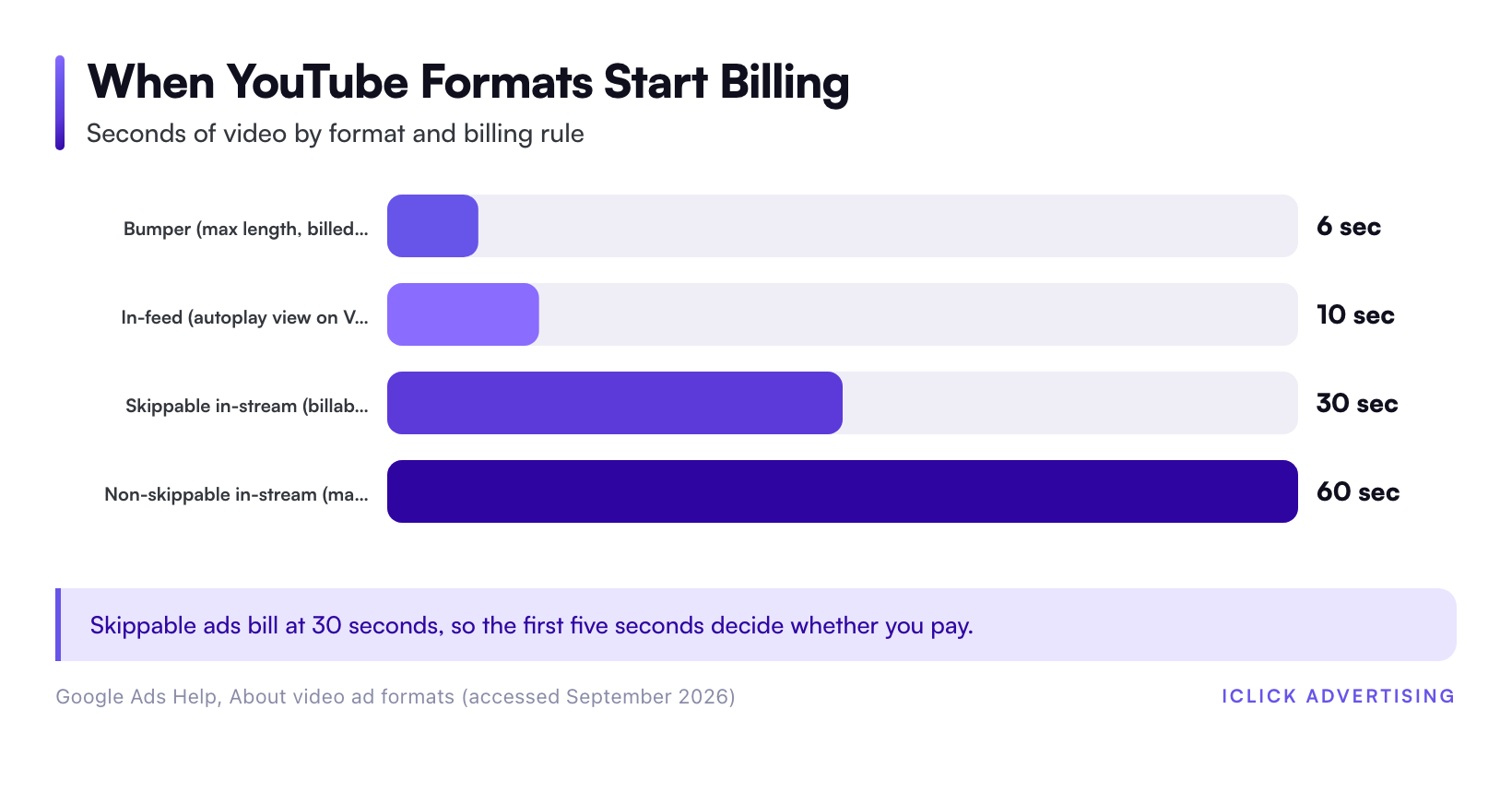
Each YouTube format bills differently. That shapes what your creative must do in the first few seconds. Google Ads Help documents the rules below.
| Format | Length | You pay when | Best SaaS use |
|---|---|---|---|
| Skippable in-stream | No maximum (under 3 minutes recommended) | Viewer watches 30 seconds, the full ad if shorter, or interacts | Product walkthroughs and customer stories |
| Non-skippable in-stream | 60 seconds or shorter | Per impression (Target CPM) | Retargeting trial users |
| Bumper | Five to six seconds | Per impression (Target CPM) | One-line feature reminders |
| In-feed | No maximum | Viewer clicks to watch, or 10 seconds of autoplay on Video view campaigns | Tutorials and how-to content |
Creative that earns the demo
The skippable in-stream rule gives you a simple creative brief. You pay at 30 seconds, so the first five seconds must earn the next 25. Everything after that is a bonus for qualified viewers.
The five-second hook
Open on the problem, in the buyer’s own words. “Your reps spend every Friday updating Salesforce.” Show the product on screen by second three.
Skip the logo animation. The skip button doesn’t care about your brand guidelines.
The 30-second product cut
Build your core ad as a 30-second screen recording with voiceover. Stick to one problem, one workflow, and one result.
Close with a single ask that matches your ladder. That is usually a free trial or an interactive product tour, not “book a demo.”
Founder and customer proof
For products that are hard to show, a founder talking straight to camera beats slick animation. Customer clips work too. Name the company, the role, and the number that customer cares about.
Our guide to YouTube ads creative frameworks for eCommerce covers hook structures in more depth. The hook logic carries over to SaaS. Only the offer changes, from “buy now” to “try it.”
Expect competition in the feed. Wyzowl’s 2026 State of Video Marketing report found that 91% of businesses use video as a marketing tool. It also found 82% of marketers report a good ROI from video. A mediocre video won’t stand out in that crowd.
How to measure YouTube without fooling yourself
Last click will tell you YouTube doesn’t work. Often that is wrong. Sometimes it is right. You need a test that can tell the difference.
Start with your Search baseline
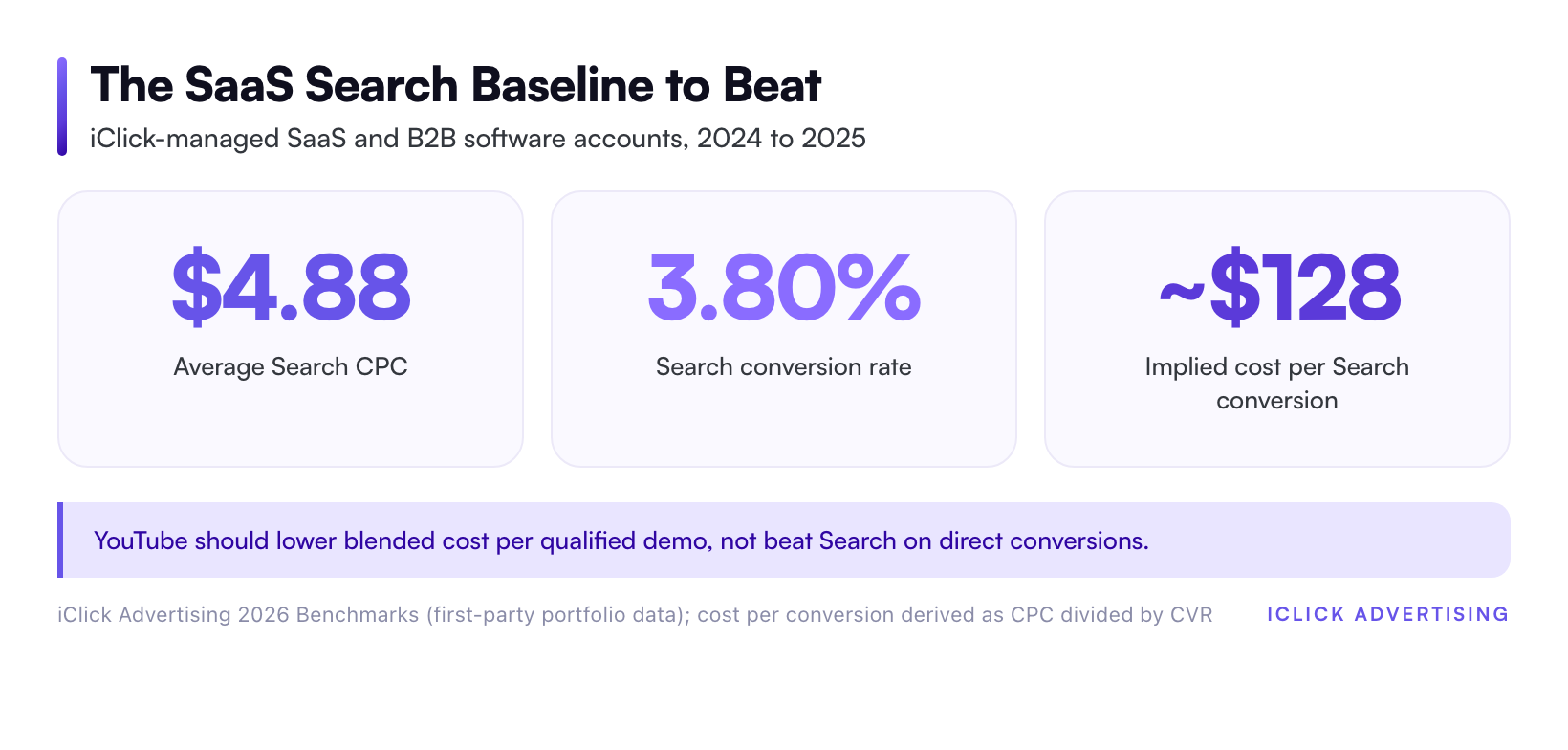
iClick’s 2026 benchmark data for SaaS and B2B software accounts shows a $4.88 average CPC and a 3.80% conversion rate. That works out to roughly $128 per conversion from Search. Your numbers will differ, so run the same math on your own account.
That figure is your bar. YouTube doesn’t need to beat it on direct conversions. It needs to lower your blended cost per qualified demo across Search, YouTube, and direct traffic combined.
Run a geo holdout
Split your markets into matched groups of states or metro areas. Run YouTube in one group and hold it back in the other for six to eight weeks.
Then compare branded search volume, direct traffic, trial starts, and qualified demos between the groups. If the test markets show more branded search and more qualified demos at a lower blended cost, YouTube is working. If the lines stay flat, cut the budget and move it back to Search.
Watch these leading indicators weekly
- Branded search impressions in test markets versus holdout markets.
- View-through conversions, treated as a signal, not proof.
- Trial-to-demo rate for users who saw a video ad.
- Pipeline value from demos booked within 30 days of a video view.
What good looks like when the fit is right
iClick’s published B2B SaaS results include a 30% lower CAC, 60% more trial signups, and 2x demos. Those results come from the full channel mix, not YouTube alone. They show what happens when every channel is judged on pipeline instead of last click.
Talent Room’s CMO, Oliver Auerbach, put it plainly: iClick “2x’d our demo requests without increasing spend” in Q1. That quote is not a YouTube-only result either. It is the standard every channel in a SaaS account should meet: more demos at the same or lower spend.
How much to spend before you judge it
A YouTube test on a tiny budget proves nothing. It won’t exit the learning phase, and it won’t move branded search enough to measure.
A sensible starting point is 10% to 15% of your Google budget, held steady for at least eight weeks. Pull it from your weakest non-brand Search campaigns, not from brand or top performers.
Set kill criteria before launch and write them down. For example: if branded search in test markets doesn’t rise and blended cost per qualified demo doesn’t fall by week eight, stop. A written rule keeps the decision honest when the dashboard gets noisy.
YouTube is one of several channels worth testing once Search is healthy. See how it stacks up against LinkedIn, Microsoft Ads, and TikTok on our YouTube advertising channel hub and the wider set of paid media channel guides.
Check your account before you add a channel
YouTube amplifies whatever tracking and bidding setup you already have. If your conversion ladder is thin or your Search baseline is unclear, video spend will magnify the gaps.
Our Free Written Audit reviews your tracking, bidding signals, and Search baseline against a 47-point checklist. You get a written PDF in five business days, with no sales call. Request your free written PPC audit.
Sources
- Google (Think with Google), B2B marketing: Connecting with new and existing business buyers (cites Gartner 2023, Forrester, Google and Bain & Company)
- Google Ads Help, Video Action Campaigns are being upgraded to Demand Gen
- Google Ads Help, About video ad formats
- Wyzowl, Video Marketing Statistics 2026 (State of Video Marketing report)
- iClick Advertising, 2026 PPC Benchmarks (first-party portfolio data)
- iClick Advertising, Case Studies
Frequently asked questions
Do YouTube ads work for B2B SaaS?
Yes, when the fit is right. YouTube works best for SaaS products that are easy to show on screen, sit in categories with thin search demand, and carry deal sizes that can absorb a longer buying path. A 2023 Gartner report cited by Google found 65% of B2B buyers were influenced by YouTube during a recent purchase decision.
What campaign type should SaaS companies use for YouTube ads?
Use Demand Gen for conversion-focused YouTube campaigns. Google stopped new Video action campaigns in April 2025 and began upgrading existing ones to Demand Gen in July 2025. Load both video and image assets, since Google data shows that pairing drove 20% more conversions at the same cost per action than video alone.
Should I optimize YouTube ads for demo bookings?
Not at first. Cold viewers rarely book a sales call after one video, and too few demos starve Smart Bidding of signal. Bid to a middle step such as free trial starts or product tour completions. Import qualified demos from your CRM as offline conversions, then move the target deeper once volume is steady.
How do I measure whether YouTube ads are driving SaaS pipeline?
Run a geo holdout. Show YouTube ads in one group of matched markets and hold them back in another for six to eight weeks. Compare branded search, direct traffic, trials, and qualified demos between groups. Last-click reports undercount YouTube because viewers often convert later through branded Search.
How long should a SaaS YouTube ads test run?
Plan for at least eight weeks on a meaningful budget, such as 10% to 15% of your Google spend. Shorter or smaller tests rarely exit the learning phase or move branded search enough to measure. Write down your kill criteria before launch so the stop or scale decision stays objective.