TL;DR: AI assistants now answer product questions from feeds, not web pages. Adobe Analytics recorded a 693% year over year jump in generative AI referral traffic to United States retail sites over the 2025 holidays. This guide gives you a seven-step audit to make your catalog readable, quotable, and buyable inside those assistants.
What AI-assistant shopping actually means for your product data
A shopper opens ChatGPT and types “best acoustic guitar under $800 for small hands.” No results page appears. No 10 blue links. The assistant returns three products, one short reason for each, and a buy button.
That answer did not come from your homepage copy. It came from structured product data.
AI assistants do not shop your site the way a person does. They read indexed product catalogs, then check details against your live pages. If your feed is thin, stale, or missing attributes, you are absent at the exact moment of intent.
Google states that its Shopping Graph holds more than 50 billion product listings, and 2 billion of those refresh every hour (Google, November 13, 2025). That is the pool your 400 SKUs compete inside.
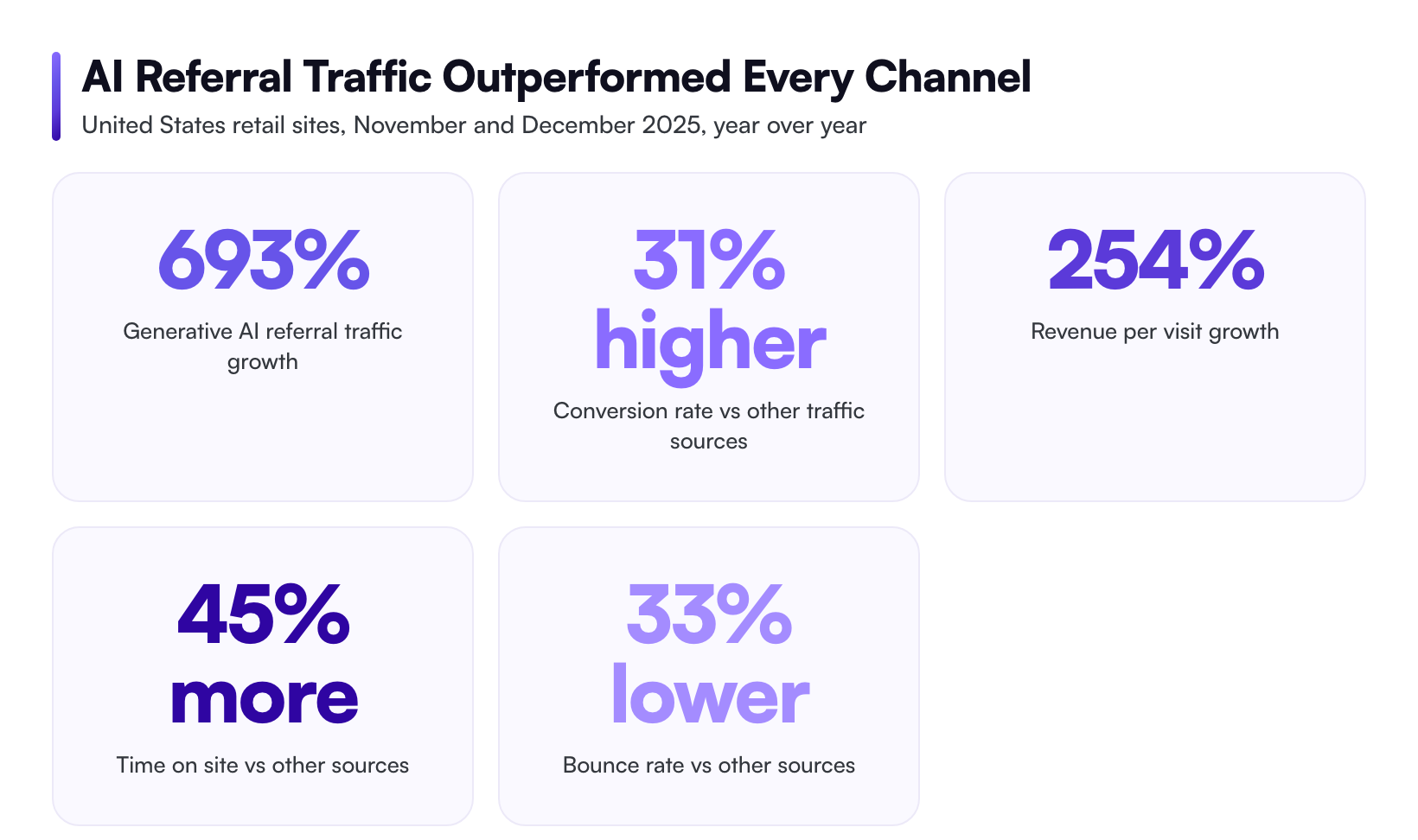
The payoff is measurable. Adobe Analytics found that traffic from generative AI sources to United States retail sites rose 693% year over year across November and December 2025. Those visitors converted 31% more often than traffic from other sources. Revenue per visit climbed 254% (Adobe Analytics, reported January 13, 2026).
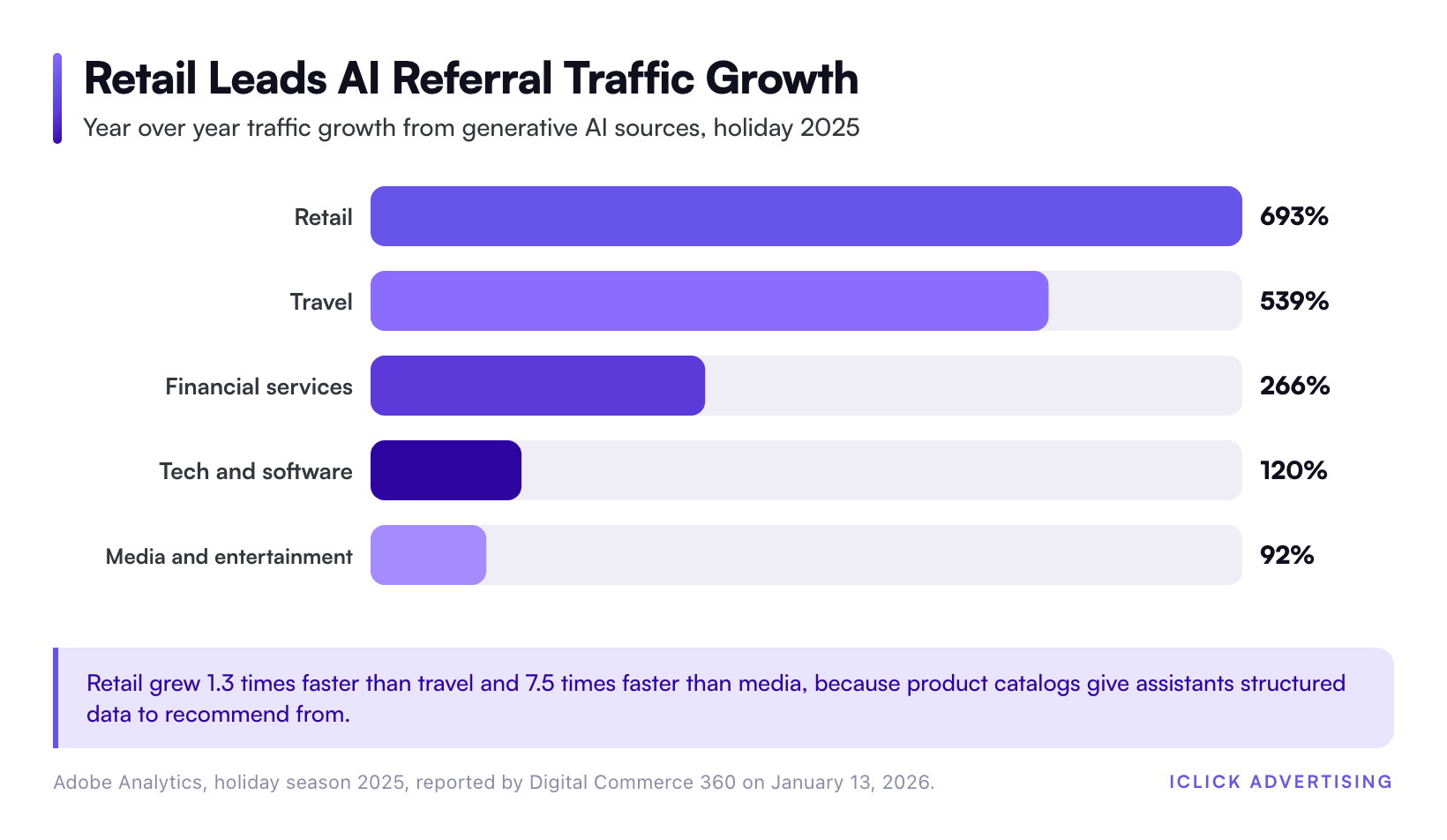
Retail led every other category on that growth. Travel grew 539%, financial services 266%, tech and software 120%, and media and entertainment 92%. Product catalogs are the fuel, which is why retail moved first and moved fastest.
We manage more than $61M in ad spend at iClick, and we run this readiness check before we touch a single bid. For the wider strategy context, read our AI in PPC playbook.
The three doors AI assistants use to find your products
Every assistant reads from one of three places. Fix all three or you get partial coverage.
Door 1: Google’s Shopping Graph
Your Merchant Center feed is the entry point. AI Mode, AI Overviews, and Gemini all ground product answers in the Shopping Graph, and the Shopping Graph is populated by feeds.
Google’s product data specification lists eight attributes as required on every row: id, title, description, link, image_link, availability, price, and brand. Titles cap at 150 characters. Descriptions cap at 5,000.
Google is also raising the image bar. The specification sets a 500 by 500 pixel minimum effective January 31, 2027. Audit your image library now rather than during Q4.
The same feed feeds your paid campaigns. If you want the detail on how those campaign types consume it, see Google’s AI ads stack, explained: AI Max, Performance Max, and Demand Gen.
Door 2: ChatGPT’s product feed and Instant Checkout
OpenAI and Stripe co-developed the Agentic Commerce Protocol. It has its own product feed specification, separate from Google’s.
OpenAI requires item_id, title, description, url, brand, image_url, price, and availability. It also requires two flags most merchants have never heard of: is_eligible_search and is_eligible_checkout. You must supply a valid GTIN or MPN unless you explicitly set identifier_exists to no.
Feeds upload as tab-delimited .txt or .tsv files, or comma-delimited .csv files. Gzip compression is supported. Instant Checkout is currently limited to approved partners, so getting the feed clean early is what puts you in the queue.
Door 3: Your own pages and crawler rules
Assistants verify feed claims against your live page. Three things break that check.
- Blocked crawlers. Check robots.txt for GPTBot, OAI-SearchBot, ChatGPT-User, PerplexityBot, and Google-Extended. Many sites blocked these in 2023 and never revisited the decision.
- Client-side rendering. If price and stock status only appear after JavaScript runs, some crawlers see an empty page.
- Missing Product schema. Schema.org Product markup with offers, price, priceCurrency, and availability gives assistants a second, machine-readable confirmation.
| Surface | Primary data source | Identifier requirement | Checkout inside the assistant | Fix first |
|---|---|---|---|---|
| Google AI Mode and AI Overviews | Merchant Center feed via Shopping Graph | GTIN or MPN plus brand | Yes, agentic checkout for eligible merchants | Feed approval rate |
| ChatGPT | OpenAI product feed spec | GTIN or MPN, or identifier_exists set to no | Yes, Instant Checkout for approved partners | Eligibility flags |
| Perplexity and other answer engines | Crawled pages plus partner feeds | Schema.org Product markup | Limited | Crawler access |
| Meta AI surfaces | Commerce Manager catalog | Catalog item ID plus GTIN | In-app checkout by market | Catalog match rate |
Meta runs the same play with different plumbing. We break that down in Meta’s AI ads stack, explained: Advantage+ and the Andromeda algorithm.
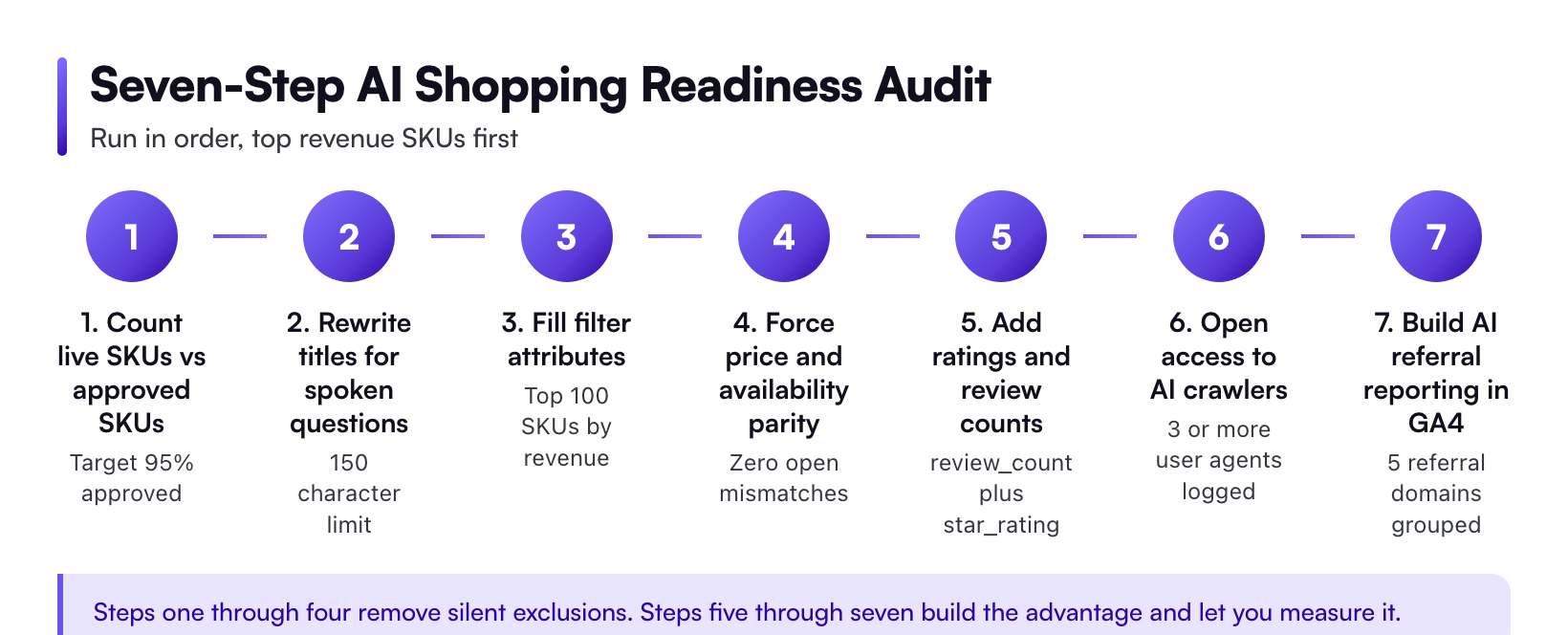
The seven-step AI shopping optimization audit
Step 1: Count what is actually live
Start with one number. How many SKUs sell on your site, and how many are approved and serving in Merchant Center? Not submitted. Approved.
Most brands are shocked by the gap. Disapprovals, expired offers, and excluded variants quietly remove inventory from every AI surface at once.
Step 2: Rewrite titles for spoken questions
Old title: “ZAG-88 Natural”. New title: “Zager ZAG-88 Parlor Acoustic Guitar, Solid Spruce Top, Small Body”.
Front-load brand, then product type, then the two attributes buyers actually name. Shoppers ask assistants full questions, so your title needs to contain the words in those questions. Keep it under 150 characters and drop promotional text like “free shipping”, which Google disallows.
Step 3: Fill the attributes that act as filters
Assistants narrow by attribute before they rank. Blank fields mean silent exclusion.
- GTIN, MPN, and brand
- color, size, size_type, and material
- gender and age_group for apparel
- product_highlight for the three to five specs that decide the sale
- shipping and return policy fields
An out-of-stock filter costs you nothing. A missing color field costs you every query that names a color.
Step 4: Force price and availability parity
Feed says $749. Page says $799. That single mismatch triggers disapproval on Google, and it makes an assistant drop your product rather than quote a wrong price.
Set up automated item updates or scheduled fetches so pricing syncs at least daily. For SKUs with fast-moving stock, push updates hourly.
Step 5: Add ratings and review counts
OpenAI’s feed specification recommends review_count and star_rating. Google supports product ratings through review feeds and approved aggregators.
This matters more in assistant answers than in classic search. An assistant recommending three products needs a reason to pick yours, and social proof is the cheapest reason you can supply.
Step 6: Open the door to AI crawlers
Pull your robots.txt and read it line by line. Then pull 30 days of server logs and count hits from each AI user agent. If a crawler is not visiting, no amount of feed work helps.
Also confirm your product pages render price and stock in the initial HTML response. Server-side rendering is the safe default for catalog pages.
Step 7: Rebuild measurement before you need it
AI referrals often land in your analytics as direct traffic. You cannot report on a channel you cannot see.
Build a custom channel group in GA4 that captures chatgpt.com, perplexity.ai, gemini.google.com, copilot.microsoft.com, and claude.ai as referral sources. Track sessions, conversion rate, and revenue per visit against your site average. Adobe’s 31% conversion advantage is your benchmark for whether this traffic deserves more attention.
Readiness benchmarks worth holding yourself to
Targets keep the audit honest. Here is what we consider passing.
- Feed approval rate: 95% or higher of live SKUs approved and serving
- GTIN coverage: 100% on branded resale inventory
- Attribute completeness: every recommended attribute filled on your top 100 SKUs by revenue
- Price parity errors: zero open disapprovals for price or availability mismatch
- Image compliance: 100% at 500 by 500 pixels or larger, ahead of the January 31, 2027 requirement
- Crawler access: confirmed log hits from at least three AI user agents in the last 30 days
Want a scored version instead of a checklist? Take the AI-Readiness Score quiz and you will get a number plus the two fixes that move it most.
Four mistakes we find in almost every audit
Treating the feed as an IT task. Feeds are merchandising. The person who knows why a customer picks the parlor body over the dreadnought should own the titles.
Optimizing one door. A clean Merchant Center feed does nothing for ChatGPT if you never built the OpenAI feed. Different specs, different flags, different eligibility.
Excluding low-margin SKUs. Long-tail items answer specific questions. Specific questions are where assistant traffic converts.
Waiting for the channel to get big. Feed cleanup takes weeks and helps your existing Shopping and Performance Max campaigns immediately. There is no scenario where the work is wasted.
If you are weighing whether to build this capability internally or hire it out, we wrote an honest take in Will AI replace PPC agencies? An agency’s honest answer.
Your first 30 days
Week 1. Export your live SKU list. Pull the Merchant Center diagnostics report. Document the gap. Read robots.txt and check server logs for AI crawler hits.
Week 2. Fix disapprovals in order of revenue impact. Rewrite titles for your top 100 SKUs. Close every price and availability mismatch.
Week 3. Fill missing attributes on those same 100 SKUs. Add review data. Ship Product schema on product templates.
Week 4. Build the OpenAI-format feed, including the two eligibility flags. Stand up your GA4 AI referral channel group. Set a baseline you can compare against in 90 days.
That is one focused month, and it improves every paid channel you already run.
Get a written read on your AI shopping readiness
Most brands do not need a new platform. They need someone to open the feed, count the gaps, and rank the fixes by revenue.
That is what our free written audit does. A real analyst reviews your Merchant Center feed, your product page rendering, your crawler access, and your campaign structure. You get a written document listing what is broken, what it is costing you, and the order to fix it. No call required to receive it, and no obligation after.
Request your free written PPC and feed audit. If you would rather have a team own the execution, look at our AI PPC management service.
Related on iClick
Sources
- Google, Google Shopping launches agentic checkout and more AI shopping tools (November 13, 2025)
- Digital Commerce 360, Generative AI shifts online holiday shopping traffic in 2025, citing Adobe Analytics (January 13, 2026)
- Adobe, AI traffic surges across industries, retail sees biggest gains
- Adobe, Traffic to U.S. retail websites from generative AI sources jumps 1,200 percent (March 17, 2025)
- OpenAI Developers, Agentic Commerce Product Feed Specification
- OpenAI, Buy it in ChatGPT: Instant Checkout and the Agentic Commerce Protocol
- Google Merchant Center Help, Product data specification
Frequently asked questions
Is AI shopping optimization different from regular ecommerce SEO?
Yes. Ecommerce SEO optimizes pages for ranking. AI shopping optimization optimizes structured feed data for retrieval. Assistants read catalogs first, then verify against your page. That means feed attribute completeness, GTIN coverage, and price parity matter more than keyword density or backlink profiles. Both jobs use the same product knowledge, but they touch different files.
Do I need a separate product feed for ChatGPT and Google?
Yes, for now. Google Merchant Center and OpenAI’s Agentic Commerce Protocol use different specifications. OpenAI requires fields Google does not, including is_eligible_search and is_eligible_checkout. Most feed management tools can generate both from one source catalog, so the work is a mapping exercise rather than a second data project.
How do I see AI assistant traffic in Google Analytics?
Build a custom channel group in GA4 that groups chatgpt.com, perplexity.ai, gemini.google.com, copilot.microsoft.com, and claude.ai as referral sources. Without it, most of that traffic lands in direct or unassigned. Then compare conversion rate and revenue per visit against your site average to judge whether the channel deserves more investment.
Will fixing my feed for AI assistants hurt my existing Shopping campaigns?
No. It helps them. Google Shopping, Performance Max, and Demand Gen all consume the same Merchant Center feed that powers the Shopping Graph. Better titles, complete attributes, and zero disapprovals improve query matching for paid campaigns immediately. The AI visibility gain arrives on top of that, not instead of it.
How long before AI assistant traffic shows up after a feed cleanup?
Merchant Center reprocesses within 24 to 72 hours for most changes. Assistant surfaces lag longer because they re-index on their own schedule. Expect two to four weeks before referral data moves in any readable way, and 90 days before you have enough volume to judge conversion quality against your site average.