TL;DR: Accept Google Ads recommendations that fix broken things: tracking, disapprovals, conflicting negatives, and missing assets. Test anything that changes bidding or match types. Ignore budget raises and reach expansion. Optmyzr’s study of 17,380 accounts found only 5.5% accept recommendations at all, and the most-accepted ones were hygiene fixes.
What Google Ads Recommendations Actually Are
Google Ads recommendations are automated suggestions on the Recommendations page of your account. Google says the page “checks your account’s performance history, your campaign settings, and trends across Google” to generate them.
That sentence explains both their value and their bias. The system sees your data. It also reflects Google’s goals, and Google earns more when you spend more.
Some recommendations fix real problems. Others push spend, broader targeting, or more automation. Your job is to tell them apart before you click Apply.
This guide sorts them into three buckets: accept, test first, and ignore. It’s part of our wider AI in PPC playbook, which covers where machine decisions help and where they hurt.
Optimization Score Is Not a Performance Metric
Every recommendation carries a score bump. Google defines optimization score as “an estimate of how well your Google Ads account is set to perform,” on a scale from 0% to 100%.
Note the word estimate. The score measures how closely your account matches Google’s suggestions. It does not measure revenue, CPA, or ROAS.
You do not have to apply a recommendation to raise the score. Dismissing one also counts. Google’s help page confirms you can see “the total score attributed to dismissed recommendations.”
That matters for agencies. Google Partners must keep a minimum optimization score of 70% on their manager account. Google’s Partner requirements say this threshold gives partners room to accept or reject recommendations based on client goals.
So a partner can hit 70% by dismissing bad advice. A high score earned that way is fine. A high score earned by accepting everything is a risk.
What the Data Says About Accepting Recommendations
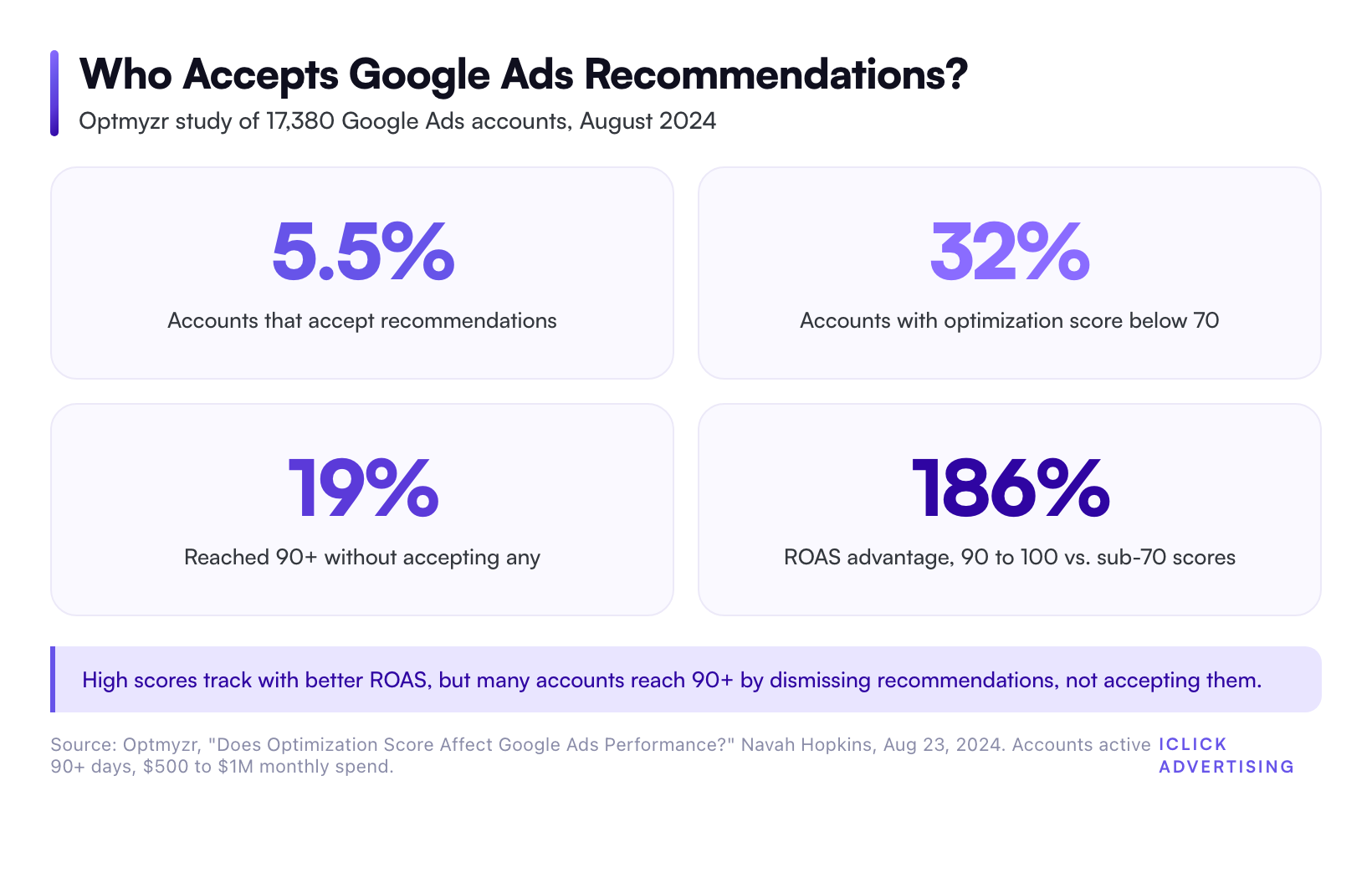
Optmyzr published the best public data on this question in August 2024. Navah Hopkins analyzed 17,380 Google Ads accounts. Each had run at least 90 days and spent $500 to $1M a month.
The findings were blunt:
- Only 5.5% of accounts accepted Google recommendations. About 95% did not.
- 32% of accounts had an optimization score below 70.
- 19% reached a score of 90 or higher without accepting any Google recommendations.
- Accounts scoring 90 to 100 beat sub-70 accounts on ROAS by 186%.
The top-scoring accounts also had the cheapest CPAs. The best-performing group accepted recommendations and scored 90 to 100.
But look at what they accepted. The most common accepted recommendations were hygiene fixes: conflicting negatives, missing assets, and cleanup alerts. And almost one in five accounts hit 90 or higher without accepting anything.
The lesson: fix what matters, dismiss the rest, and let the score follow.
The Quick Verdict: Accept, Test, or Ignore
Here is how we sort the most common recommendation types. Use it as a default, then check each one against your own data.
| Recommendation | Verdict | Why |
|---|---|---|
| Fix conversion tracking or enhanced conversions | Accept | Bad data poisons every automated bid |
| Fix disapproved ads or policy issues | Accept | Dead ads earn nothing |
| Remove conflicting negative keywords | Accept | You are blocking your own keywords |
| Add sitelinks, callouts, and images | Accept (write them yourself) | More ad real estate, low risk |
| Improve responsive search ads | Accept with edits | Good prompt, weak auto-generated copy |
| Switch to broad match | Test first | Can scale volume or flood you with junk |
| Change bid strategy or targets | Test first | Resets learning, shifts CPA |
| Upgrade to Performance Max or AI Max | Test first | Can cannibalize existing campaigns |
| Raise your budget | Usually ignore | Rarely tied to your margins |
| Add new keywords | Usually ignore | Often broad, off-intent terms |
| Expand to Display or Search Partners | Usually ignore | Cheap clicks, weaker intent |
| Remove redundant keywords | Review line by line | May delete your control keywords |
Recommendations to Accept
These recommendations fix broken things. They rarely change strategy, so the downside is small.
Conversion Tracking and Enhanced Conversions
Smart Bidding is only as good as the conversions you feed it. If Google flags a tracking gap, fix it first.
This includes enhanced conversions, consent mode, and offline conversion imports. For a law firm, that means importing signed cases, not just form fills. For an eCommerce brand, it means passing real order values.
One caveat: check what Google wants to count. A suggestion to add page views or engaged visits as a primary conversion will inflate your numbers. It also trains bidding on the wrong goal.
Disapproved Ads and Policy Fixes
A disapproved ad serves zero impressions. Fix these the same day.
This is doubly true in restricted categories like health, legal, and adult products. In those verticals, clearing policy flags fast is part of keeping an account live. Our work with Lynk Pleasure, a restricted-category brand, produced a 4.7x ROAS with zero account suspensions.
Conflicting Negative Keywords
This recommendation catches negatives that block your own active keywords. It is almost always right. Review the list, confirm the conflict, and remove or narrow the negative.
Missing Assets
Sitelinks, callouts, structured snippets, and image assets make your ad bigger. Bigger ads earn more clicks at the same position.
Accept the prompt, but write the assets yourself. Auto-generated sitelinks often point to thin pages or repeat your headline.
Responsive Search Ad Improvements
Google will push you toward “Excellent” ad strength with more headlines and more keyword insertion. The prompt is useful. The suggested copy usually is not.
Add distinct headlines that carry real offers, prices, and proof. Pin only where compliance requires it. Ad strength is a checklist score, not a conversion predictor.
Recommendations to Test Before You Accept
These recommendations change how the system spends your money. They can work. They can also reset months of learning in one click.
Test them with a campaign experiment, a 50/50 split, and at least two to four weeks of data.
Broad Match With Smart Bidding
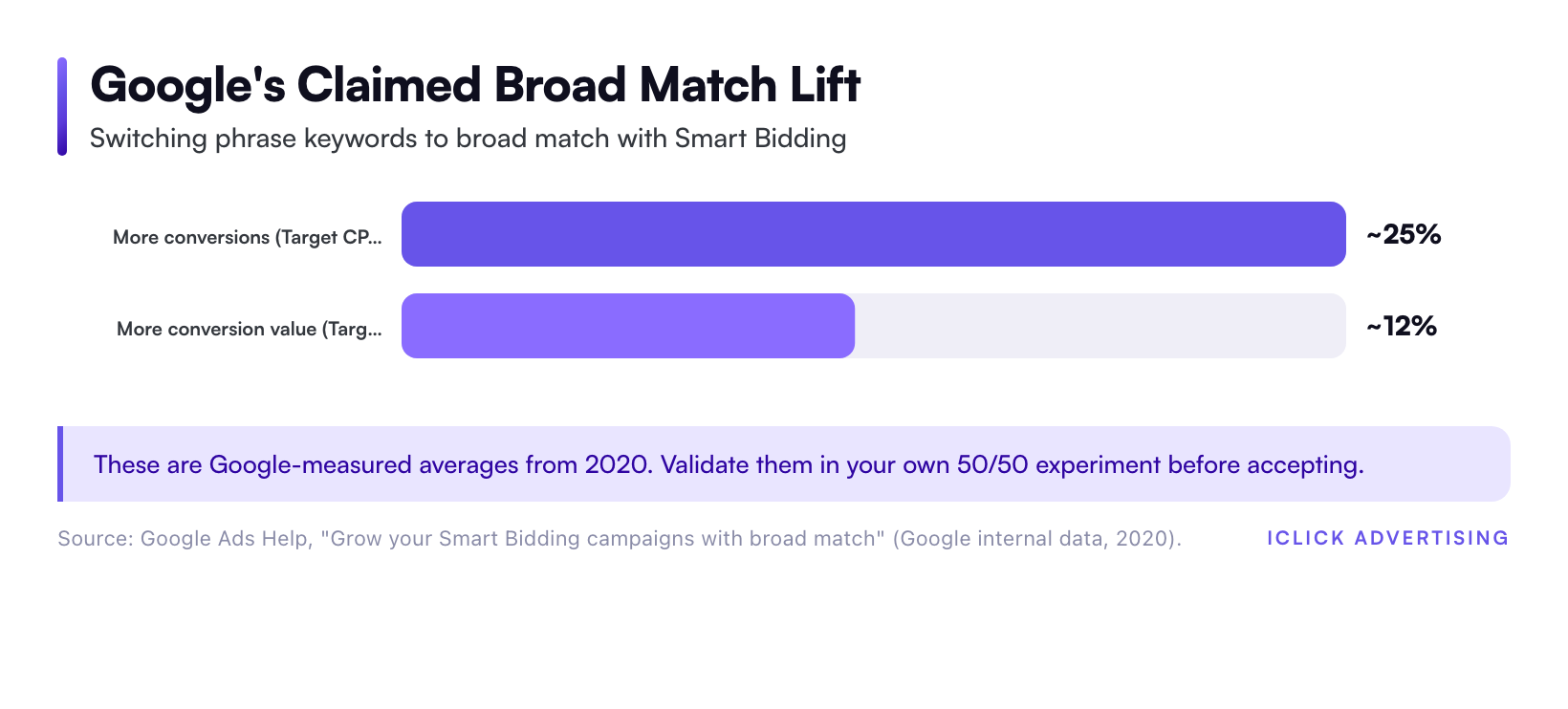
This is the recommendation Google pushes hardest. Google’s help documentation states that advertisers who change phrase keywords to broad match “can see ~25% more conversions (in Target CPA campaigns) and ~12% more conversion value (in Target ROAS campaigns) while meeting targets.”
The source line on that claim reads “Google internal data, 2020.” It is an average across advertisers, measured by Google, six years ago.
Broad match can work well when three things are true. Your conversion tracking is clean. Your campaign has enough conversion volume for Smart Bidding to learn. And someone maintains your negative keyword list every week.
If any of those is missing, broad match finds cheap, off-intent searches, and the algorithm happily buys them. Run it as an experiment. Judge it on cost per qualified lead or ROAS, not raw conversions.
Bid Strategy and Target Changes
Google will suggest switching from Maximize Clicks to Maximize Conversions, or loosening a Target CPA. Each switch triggers a new learning period.
A looser target almost always means more volume at a higher cost. That can be the right call if you have margin to spend. Decide based on your unit economics, not the projected conversions in the recommendation card.
Performance Max and AI Max Upgrades
Google now recommends consolidating into Performance Max and turning on AI Max for Search. Both can find new demand. Both can also eat traffic your existing campaigns already win.
In iClick-managed accounts, PMax cannibalizes Shopping in more than 80% of accounts, according to our 2026 PPC benchmarks. That is our own portfolio data, not an industry average.
Before accepting, set brand exclusions, feed-level controls, and a holdout. Our breakdown of Google’s AI ads stack, including AI Max, Performance Max, and Demand Gen, covers where each fits.
Recommendations to Ignore (Most of the Time)
These recommendations mostly serve reach and spend. Dismiss them, and your score still goes up.
Raise Your Budget
Google shows a “limited by budget” warning with projected extra conversions. The projection assumes your marginal clicks convert like your average clicks. They usually don’t.
Raise budgets when your CPA or ROAS at current spend has room, and you have tested the next tier. Never raise it because a card says you are missing impressions.
Add New Keywords
Keyword suggestions skew broad and generic. For a probate law firm, that can mean terms like “free will template” or “what is probate.” Those searchers want information, not a lawyer.
Pull ideas from your search terms report instead. Those are queries that already triggered your ads and converted.
Expand Reach With Display and Search Partners
Adding the Display Network to a Search campaign lowers average CPC. It also lowers intent. Keep Display in its own campaign, with its own budget and creative.
Search Partners deserve a test in some verticals. Turn them on through an experiment, not a recommendation click.
Remove Redundant or Non-Serving Keywords
This one is not always wrong. But “redundant” in Google’s view can include the exact match keyword you use as a control. It can also include a low-volume term that converts at twice your average rate. Review line by line.
How to Test a Recommendation the Right Way
Google Ads has a built-in tool for this: Experiments. It splits traffic between your original campaign and a trial version, so both run in the same auctions on the same dates.
Set it up in four steps:
- Pick one recommendation per experiment. Two changes at once tell you nothing.
- Choose a 50/50 split so both arms get equal traffic.
- Define success before launch: cost per qualified lead, ROAS, or new-customer revenue.
- Run until each arm has enough conversions to compare, then decide.
Ignore the first one to two weeks of a bidding test. That is the learning period, and early numbers swing hard.
Watch lagging signals too. A law firm should check signed cases, not just calls. An eCommerce brand should check refund rates and repeat purchases, not just first-order ROAS.
If the trial wins, apply it from the Experiments page. If it loses, end it and dismiss the matching recommendation. Your optimization score rises either way.
Turn Off Auto-Apply Recommendations
Auto-apply lets Google push recommendations live without a click. Google’s documentation says eligible types span ads and assets, bidding, keywords and targeting, and measurement. That covers most of the high-risk items above.
Google also notes that some types “may be automatically applied frequently while others may never be.” You can’t predict which.
Our default: turn auto-apply off for bidding, keywords, and targeting. Find it under Recommendations, then Auto-apply. Keep it on only for low-risk hygiene items you would accept anyway, and review change history weekly.
A Weekly Recommendation Review Routine
Recommendations refresh constantly, and dismissed ones can come back. A short weekly pass keeps them from piling up.
- Open Recommendations and filter by category.
- Apply every tracking, policy, and conflicting-negative fix.
- Write any missing assets yourself, then mark the suggestion done.
- Move broad match, bidding, and PMax suggestions into a test log with a start date.
- Dismiss budget, keyword, and reach expansion items, and note why.
- Check change history for anything auto-applied.
Judge every accepted change against a baseline. For reference, iClick’s portfolio benchmarks for Google Search show a 4.23% CTR, a 3.48% conversion rate, and a $2.32 average CPC. Those come from well-optimized accounts we manage, so they make a fair bar for your own before-and-after comparison.
Where Human Judgment Still Wins
Google’s recommendation engine can’t see your margins, your close rate, or your sales team’s capacity. It doesn’t know when a cheap lead turns into a case that never signs.
That gap is why we run accounts with AI tools but human decisions. Our AI PPC management service is built on that split. At McEldrew Purtell, a catastrophic injury firm, the account delivered 697% more conversions, a 53% lower CPA, and double the call volume in 90 days.
For the longer version of that argument, read Will AI Replace PPC Agencies? An Agency’s Honest Answer. The same logic applies on Meta, where Meta’s Advantage+ and the Andromeda algorithm push automation even harder.
Get a Second Opinion on Your Recommendations Tab
If your account has months of accepted recommendations and a CPA that keeps climbing, something in that history is costing you money. Our free written PPC audit is a 47-point PDF delivered in five business days, with no sales call. It shows which applied recommendations to roll back and which to keep.
Related on iClick
Sources
- Optmyzr: Does Optimization Score Affect Google Ads Performance? (Navah Hopkins, Aug 23, 2024)
- Google Ads Help: About optimization score
- Google Ads Help: About recommendations
- Google Ads Help: Google Partners program requirements
- Google Ads Help: Grow your Smart Bidding campaigns with broad match (Google internal data, 2020)
- Google Ads Help: About auto-apply recommendations
- iClick Advertising: 2026 PPC Benchmarks (first-party portfolio data)
- iClick Advertising: Case Studies
Frequently asked questions
Should I accept all Google Ads recommendations?
No. Accept recommendations that fix broken things, such as conversion tracking, disapproved ads, conflicting negatives, and missing assets. Test bidding, broad match, and Performance Max suggestions in an experiment first. Dismiss most budget, new keyword, and reach expansion suggestions. Optmyzr’s 2024 study of 17,380 accounts found the most-accepted recommendations were hygiene fixes like these.
Does dismissing a Google Ads recommendation lower my optimization score?
No. Dismissing a recommendation raises your optimization score, just like applying it. Google’s help documentation shows the score attributed to dismissed recommendations separately. Dismissed recommendations can reappear later if Google decides they have become relevant again, so a weekly review keeps your score steady without forcing changes you don’t want.
Does a higher optimization score improve Google Ads performance?
Not directly. Optimization score measures how closely your account matches Google’s suggestions, not revenue or CPA. Optmyzr found accounts scoring 90 to 100 beat sub-70 accounts on ROAS by 186%. But 19% of accounts reached 90 or higher without accepting any recommendations, because dismissals count toward the score too.
Should I turn off auto-apply recommendations in Google Ads?
For most accounts, yes, at least for bidding, keywords, and targeting. Google’s documentation says auto-apply covers ads and assets, bidding, keywords and targeting, and measurement, and some types may apply frequently. Leave it on only for low-risk hygiene items you would accept anyway, and check change history every week.
Why do Google Partners care about optimization score?
Google Partners must keep a minimum 70% optimization score on their registered manager account. Google states the threshold lets partners accept or reject recommendations based on each client’s goals. A good agency reaches 70% by applying useful fixes and dismissing the rest, not by accepting everything Google suggests.