TL;DR: Merchant Center doesn’t display a single score from 0 to 100, but you can calculate one from your item and account diagnostics. One documented case found Google’s “updated every 24 hours” feed promise was actually nine days stale, a gap that quietly buries healthy catalogs. Here’s what feeds the score and how to fix it.
What the Merchant Center Catalog Health Score Actually Measures
Google does not show you a single number labeled “catalog health score.” What it shows is the Needs Attention tab: a list of item-level and account-level issues, each ranked by click potential, inside Merchant Center Next. That distinction matters, because plenty of feed tools and agencies market a 0 to 100 score as if Google publishes it. Google does not.
What Google does publish are two separate, official scoring systems. The Store Quality program rates shipping speed, returns, payment options, and site performance on a Low to Exceptional scale. The Merchant Excellence Score, sometimes called MerchX, is a 0 to 100 benchmark Google account teams use internally to compare your store against category competitors. Neither one is the same as catalog health.
“Catalog health” is the term agencies use for a composite score built from Merchant Center’s actual diagnostics: item disapprovals, account warnings, missing identifiers, and data mismatches. At iClick, we calculate it the same way you’d calculate a credit score, by weighting the issues that cost you the most impressions the heaviest.
How to Build a Catalog Health Score From Merchant Center Data
Merchant Center’s diagnostics documentation splits every issue into two tiers. Understanding the split is the first step to scoring your own catalog.
Item-Level Issues
These affect one product at a time. A mismatched price, a missing GTIN, or an image that violates policy will flag a single SKU without touching the rest of your feed. Item-level issues are the bulk of what drags a real score down, because they compound across thousands of SKUs.
Account-Level Issues
These affect every product in your feed at once. Misrepresentation, unacceptable business practices, or repeated unresolved warnings can escalate to a full account suspension. One account-level suspension erases your entire catalog’s visibility, regardless of how clean the rest of your data is.
Warnings vs. Disapprovals
A warning means the product still shows, but Google flags that performance may be limited. A disapproval means the product stops serving entirely. The dangerous part: a disapproved product does not trigger an account-level alert, does not send an email, and does not appear as a line item in your campaign reports. It just drops out of the auction. GoDataFeed’s audit of apparel catalogs found that roughly 1 in 5 Shopping listings, about 20%, carry at least one active disapproval at any given time (GoDataFeed, 2024 to 2025 audit data).
What a Healthy Score Looks Like
Because Google does not define official bands, here is how we bucket it for client accounts based on issue severity and the share of SKUs affected.
| Score Range | What It Means | Typical Cause |
|---|---|---|
| 0 to 39 | Critical: active revenue loss | Account-level warning or mass disapprovals |
| 40 to 69 | Needs work: silent impression loss | Missing identifiers, stale pricing, weak titles |
| 70 to 89 | Healthy: minor cleanup only | Isolated item-level warnings |
| 90 to 100 | Excellent: fully eligible catalog | Clean feed, current data, no open issues |
Five Places Catalog Health Breaks in Real Accounts
Missing or Invalid GTINs
Google requires a GTIN for most new listings and validates every value against the GS1 database. Products with missing or incorrect identifiers do not get outright rejected in most categories, but they do get limited visibility, which shows up in your data as fewer impressions with no obvious error to explain it.
Titles That Do Not Match Search Intent
Dennis Moons at Store Growers analyzed 151 product titles across 120 advertisers in 13 industries and found that 43% exceed the recommended 70-character length, and only 44% include the brand name at all (Store Growers, January 8, 2026). In one client case from that same research, rewriting titles to front-load brand, product type, and key attributes produced a 39% increase in impressions within weeks, with click-through rate holding steady.
Stale Price and Availability Data
Merchant Center’s automatic feed refresh is documented as updating “every 24 hours.” A January 2026 audit by Luis Rijo at ppc.land found a real account where the last product update was nine days old at the time of checking, not one (ppc.land, January 13, 2026). Stale availability data means you are paying for clicks on products that are already out of stock.
Disapprovals Nobody Flags
As covered above, disapproved items do not raise a red flag anywhere in your reporting. If you only check Merchant Center when a campaign underperforms, you are checking too late.
Classic Merchant Center Habits That No Longer Apply
Classic Merchant Center was fully retired on September 30, 2024, when Google completed the migration to Merchant Center Next for every account. If your team, or an old guide you’re following, still references the classic Diagnostics tab, feed naming, or terminology, the workflow has changed enough to hide new issue types.
Why This Score Moves Your Shopping and Performance Max Numbers
Both standalone Shopping campaigns and Performance Max pull from the same product feed and the same listing group signals. A catalog health problem does not stay contained to one campaign type, it throttles both at once. PMax makes this harder to catch because Google does not expose per-product performance the way classic Shopping campaigns do. For a full breakdown of when each campaign type is the better fit, see Google Shopping vs. Performance Max: Which Should Run Your Product Ads?. And if you’re trying to figure out whether your current return is even competitive, our breakdown of good ROAS for eCommerce, with benchmarks by category, margin, and channel, is the place to start.
A Four-Step Process to Audit and Fix Catalog Health
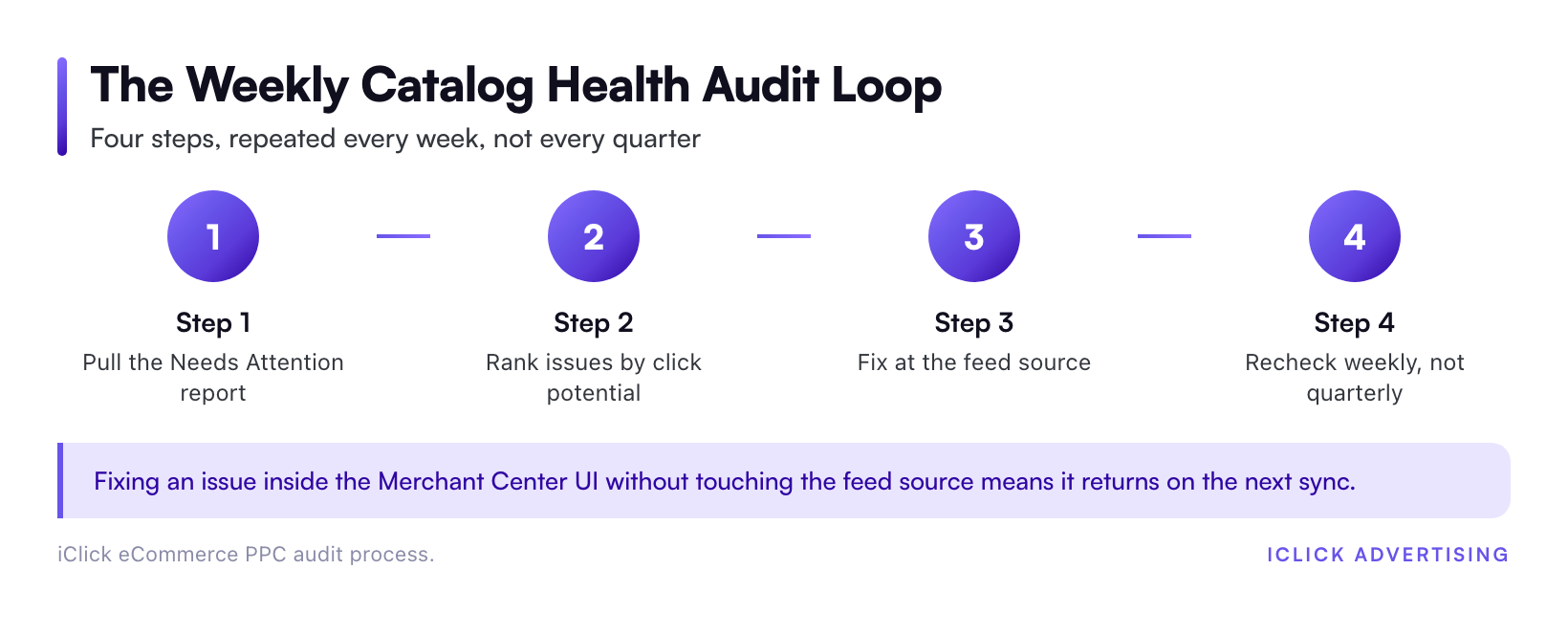
Step 1: Pull the Needs Attention Report
Go to Products, then Diagnostics, then the Needs Attention tab. Export the full list of item-level and account-level issues before you touch anything.
Step 2: Rank by Click Potential, Not Alphabetically
Merchant Center already ranks issues by estimated lost click potential. Fix the top 10% of issues by that ranking first. That’s usually where most of the lost revenue sits.
Step 3: Fix at the Feed Source, Not in the Merchant Center UI
Manual overrides inside Merchant Center get overwritten the next time your feed syncs from Shopify, your PIM, or your custom feed file. Fix the underlying data source, whether that’s product titles in your CMS or GTINs in your inventory system, so the correction survives the next sync.
Step 4: Recheck Weekly, Not Quarterly
Disapprovals and account warnings do not wait for your quarterly reporting cycle. A weekly check catches a new policy violation before it costs you a month of impressions. Once fixes are live, run the projected impact through our ROAS calculator to see what recovered impressions are worth in dollar terms.
Where Catalog Health Fits Into Your Broader eCommerce PPC Strategy
Catalog health is not a standalone project, it is one input into how you structure Shopping, PMax, and search spend across an account. Our eCommerce PPC playbook covers where feed quality sits relative to bidding strategy and account structure, and Inside the eCommerce PPC Playbook: How We Structure $61M of Ad Spend walks through the framework in more depth. The specifics shift by vertical: Shopify sellers deal with different feed sync issues than DTC brands running their own custom feeds, and Health and Wellness brands face additional product data restrictions on top of standard Merchant Center policy. Our eCommerce PPC services page breaks down how we handle each.
Get a Second Set of Eyes on Your Catalog
A catalog health problem rarely announces itself. It shows up as a slow decline in impressions that looks like normal seasonality until you check the Needs Attention tab. If you want a specific, dollar-level read on what your current catalog issues are costing you, request a free written audit. We’ll pull your actual diagnostics data and tell you exactly what to fix first.
Related on iClick
Sources
- GoDataFeed: Disapproved Products Don’t Show Up in Your Ad Data (2024 to 2025 audit data, published July 8, 2026)
- Store Growers: Product Title Optimization Tips From Analyzing 151 Shopping Ads, Dennis Moons, January 8, 2026
- ppc.land: Google Merchant Center’s 24-Hour Update Promise Fails by Nine Days, Luis Rijo, January 13, 2026
- Google Merchant Center Help: Merchant Center Next, Upgrading All Retailers by September (retired Classic Merchant Center September 30, 2024)
- Google Merchant Center Help: Issues in Merchant Center
- Google Merchant Center Help: About the Store Quality Program
- Google Merchant Center Help: GTIN Requirements
Frequently asked questions
Does Google Merchant Center show a catalog health score anywhere in the interface?
No. Merchant Center shows item-level and account-level issues in the Needs Attention tab, ranked by click potential. It does not display one aggregate 0 to 100 number. The Store Quality program and Merchant Excellence Score are separate, official Google scores, and neither one measures the same thing as catalog data health.
How often should I check my catalog health?
Weekly, at minimum. Disapprovals and account warnings do not show up in campaign reports, so a problem can run for weeks before it affects a metric you’re already watching. A weekly Needs Attention pull catches new issues before they compound across your full SKU count.
Does poor catalog health hurt Performance Max as much as standalone Shopping campaigns?
Yes, and it’s often harder to catch in PMax. Both campaign types pull listings from the same Merchant Center feed, so a disapproved or flagged product loses eligibility in both. PMax gives you less per-product visibility, which means feed problems tend to surface later and look like generic performance decline.
What’s the difference between a warning and a disapproval in Merchant Center?
A warning means the product keeps showing, but Google flags that its performance may be limited. A disapproval means the product stops serving entirely. Disapprovals do not trigger an account alert or appear in campaign reports, so they’re the more dangerous of the two to miss.
Do I need a GTIN for every product in my feed?
For most new listings, yes. Google requires a GTIN for the majority of product categories and validates it against the GS1 database. Custom or handmade products without a manufacturer-assigned GTIN are the main exception. Missing or invalid GTINs do not always cause outright disapproval, but they do limit visibility.