
TL;DR: Over 95% of Google Merchant Center suspensions cite Misrepresentation, and most trace to missing site pages or a feed that disagrees with your landing page. Reviews take 3 to 7 business days, and each failed appeal lengthens the cool down. Fix the whole account before you appeal once.
What a Merchant Center suspension actually means
Google enforces at three levels, and most store owners treat them as one problem. They are not the same, and the fix is different at each level.
An item disapproval removes one product. An account warning gives you a deadline. An account suspension pulls your entire catalog out of Shopping ads and free listings at once.
| Enforcement level | What stops serving | Common trigger | Time you get |
|---|---|---|---|
| Item disapproval | One product | Missing GTIN, image overlay, price mismatch | No deadline. The product simply stays out. |
| Account warning | Nothing yet, though products can drop to limited visibility | Repeated item-level violations | A stated fix window in the warning email |
| Account suspension | Every product, every Shopping ad, every free listing | Misrepresentation, repeated violations, or an egregious breach | None. It is immediate. |
Google’s own documentation is blunt about the last row. Egregious violations trigger suspension with no prior warning at all.
That is why prevention is worth more than any recovery playbook. A suspension does not phase in. Revenue goes to zero on a Tuesday morning with no email you could have acted on.
How often Merchant Center suspensions actually happen
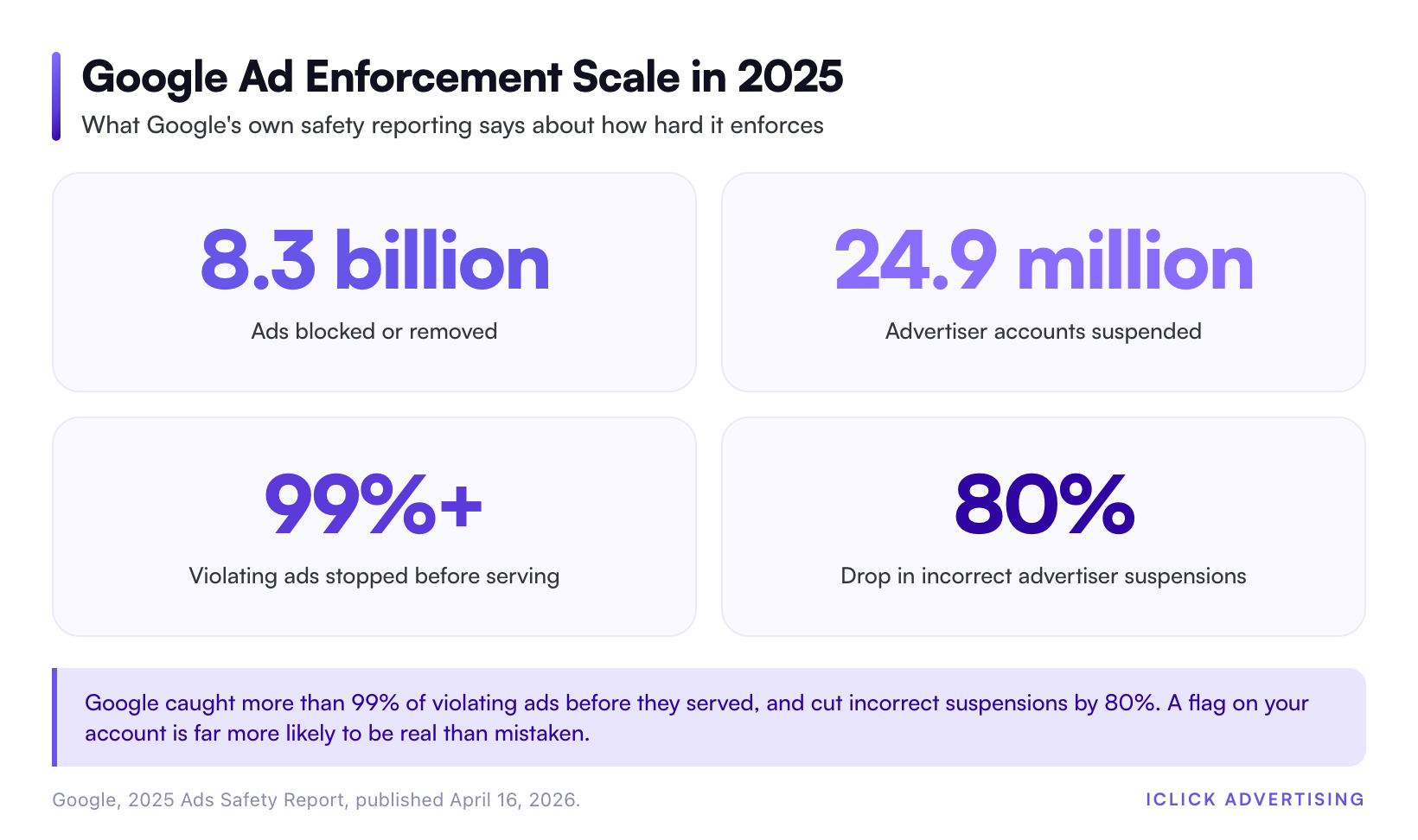
Google published its 2025 Ads Safety Report on April 16, 2026. In one year it blocked or removed more than 8.3 billion ads and suspended 24.9 million advertiser accounts. More than 99% of policy-violating ads were caught before they ever served.
Those are Google Ads numbers. Google does not publish Merchant Center suspension volume separately.
StubGroup, an agency that specializes in Google suspension recovery, published its own estimate on September 1, 2026. It puts 2025 at 5 to 10 million Merchant Center suspensions. From the same analysis, over 95% of Merchant Center suspensions cite Misrepresentation.
One figure in Google’s report deserves attention. Google says incorrect advertiser suspensions fell 80% in 2025. Enforcement is getting more accurate, not more forgiving. Blaming a false positive is a worse bet every year.
Misrepresentation: the one policy that catches almost everyone
Misrepresentation is not about lying. It is about Google being unable to verify that you are a real business that will deliver what you sold.
Google’s Misrepresentation policy names five unacceptable practices: scamming, impersonation, false pretenses, phishing, and promoting unavailable offers. Most suspended stores are doing none of those. They just failed the verification test.
What Google checks on your site
Read the policy page closely and the requirements are concrete:
- An About page that explains what your company does, with current contact information.
- A return and refund policy that is clear, complete, and easy to find before purchase.
- Full cost disclosure before and after purchase, including membership fees, contract terms, and anything else that changes what the customer pays.
- Your own branding, not another brand’s identity or an implied certification you do not hold.
- Products you actually stock, at offers that are actually live.
Notice how many of those live on your website, not in your feed. A store can have a perfect product feed and still get suspended for a missing returns page.
The other suspension buckets
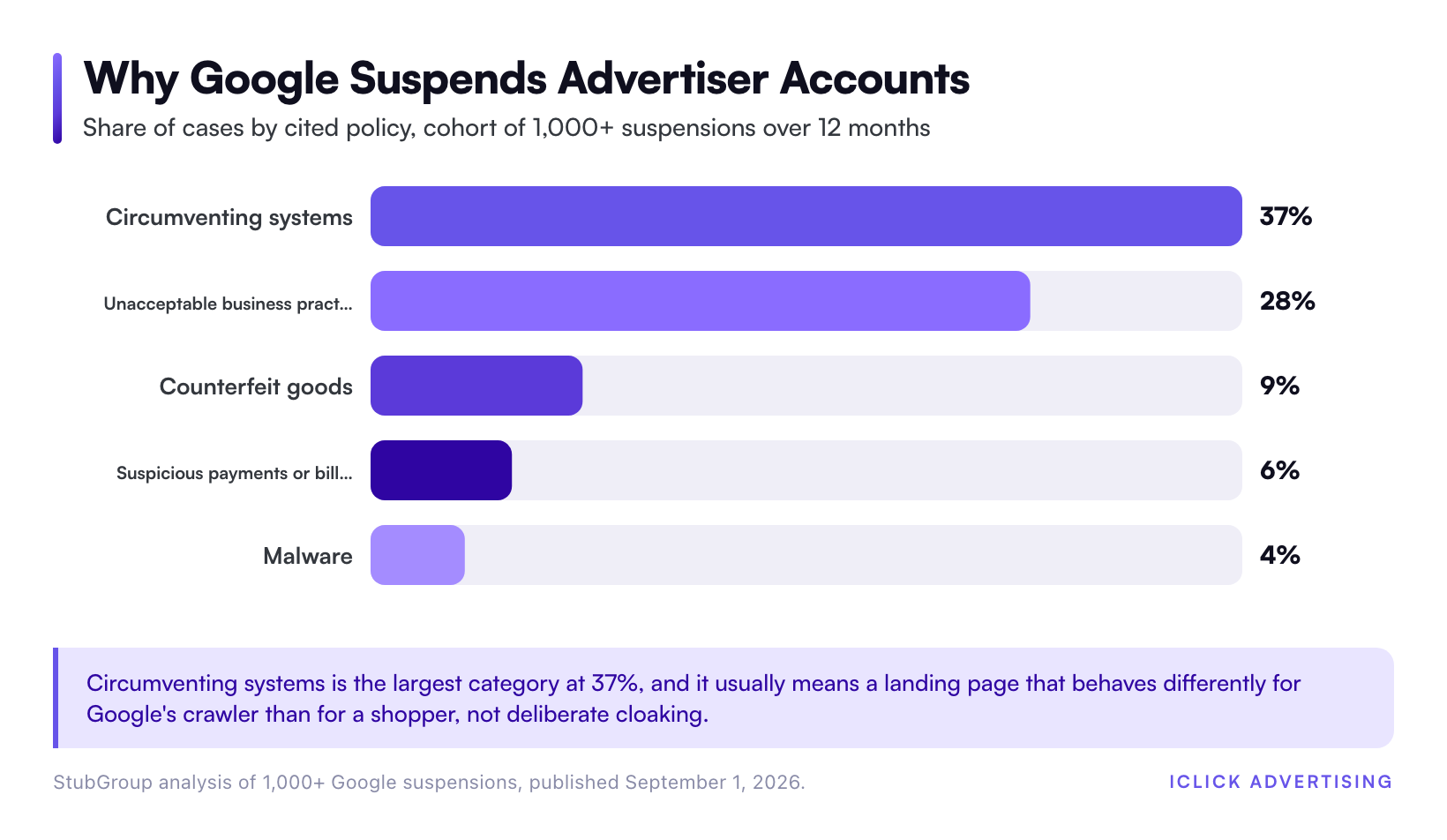
StubGroup reviewed a cohort of more than 1,000 Google suspensions over 12 months and published the cause breakdown. Circumventing systems led at 37% of cases. Unacceptable business practices followed at 28%, counterfeit goods at 9%, suspicious payments or billing at 6%, and malware at 4%.
Circumventing systems is the one people misread. It rarely means deliberate cloaking. More often it means a landing page that behaves differently for Google’s crawler than for a shopper, because of geo-redirects, age gates, or an aggressive bot filter.
Feed and landing page mismatch is the quiet killer
Item disapprovals are the early warning system for account suspensions. Ignore enough of them and Google escalates.
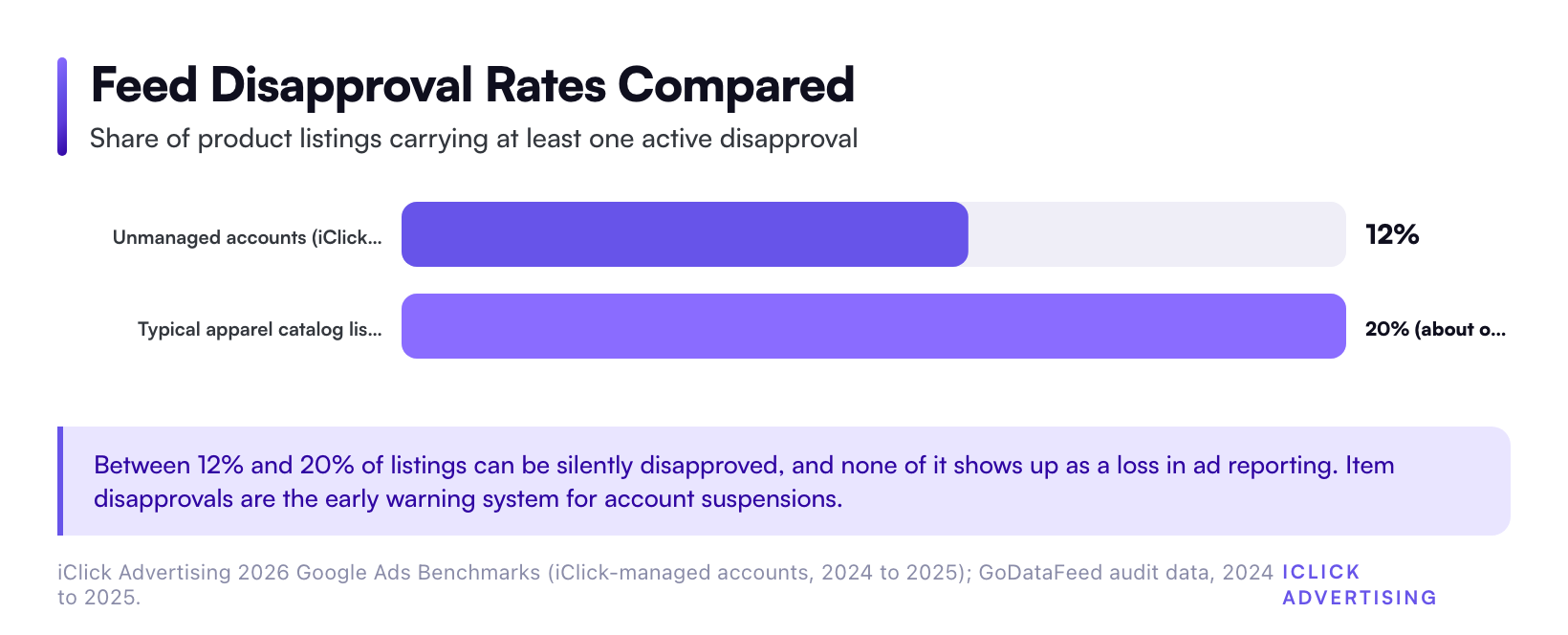
GoDataFeed’s 2024 to 2025 audit data found a striking rate in apparel. Roughly one in five Shopping listings carries at least one active disapproval. Most merchants never see it, because a disapproved product does not show up as a loss in ad reporting. It simply stops existing.
Our own portfolio points the same direction. Across iClick-managed accounts in 2024 and 2025, unmanaged accounts averaged a 12% feed disapproval rate. Well-managed Shopping accounts held 480% ROAS at a 0.86% click-through rate and a 1.91% conversion rate. The gap between those two states is mostly feed discipline, not bidding.
Four mismatches cause most of it: price differing between feed and landing page, missing GTIN or brand on branded products, promotional text or watermarks burned into product images, and shipping or returns claims the site does not back up.
Price is the most common and the most avoidable. If your site shows a sale price to logged-in users, or applies a discount at checkout, your feed price and your landing page price disagree. Google reads that as misrepresentation.
The prevention checklist
Site pages Google needs to find in under 30 seconds
Put these in your footer, on every page, as crawlable HTML and not inside a JavaScript modal:
- About us, with a real company description.
- Contact us, with an email address, a phone number, and a physical business address.
- Return and refund policy, with a stated window and a stated process.
- Shipping policy, with costs and delivery estimates that match your feed.
- Terms of service and privacy policy.
- Secure checkout on HTTPS across the whole purchase path.
This is a two-hour job. It prevents the single most common suspension reason in eCommerce PPC.
Feed hygiene that survives a policy review
Turn on automatic item updates in Merchant Center. Price and availability changes on your site then propagate before Google flags a mismatch. Add structured data for price, availability, and condition to every product page.
Then check the Products tab weekly, not monthly. Google’s account reviews take 3 to 7 business days. A weekly check means you find problems inside your own control loop instead of inside Google’s.
Restricted categories: assume you will get flagged
If you sell supplements, wellness devices, adult products, or anything carrying a health claim, your baseline risk is different. Most accounts in these verticals churn quarterly through policy issues.
Two of our accounts show what the disciplined version looks like. Lynk Pleasure, a restricted-category store, reached 4.7x ROAS and a 180% increase in new customers with zero account suspensions. The Enhanced Male, in men’s wellness, held stable account health through sustained scale.
Neither result came from clever appeals. Both came from three habits:
- Every ad and landing page reviewed against platform policy before launch.
- Spend spread across campaigns, so one suspension could not zero out revenue.
- Account hygiene done monthly, ahead of policy updates rather than after them.
If your category sits on Google’s restricted list, that pre-launch review is not optional overhead. It is the cheapest insurance available.
Recovery: the first 48 hours
Step 1: Find the real violation, not the email subject line
The suspension email tells you the policy. It rarely tells you the trigger. Open Merchant Center, go to Diagnostics, and list every account-level issue and every item-level issue.
Cross-check against the policy page Google cited. If the notice says Misrepresentation, walk the five checks above line by line. Do it on your live site, in an incognito window, from the country you sell into.
Step 2: Fix everything, not just the flagged page
This is where most appeals fail. Merchants fix the one item Google named, then appeal the same day.
Google reviews the account, not the item. If it finds a second violation during the review, the appeal fails and your cool down gets longer. Fix the whole surface first.
Step 3: Document the fix before you appeal
Screenshot every page you changed, with a timestamp. Export the before and after feed for any attribute you corrected. Note the exact URL of each new policy page.
You are not submitting this file to Google. You are building it so your appeal is specific, and so you can tell whether a second failure is a new problem or the same one.
Step 4: Appeal once, properly
Google’s documentation is explicit about the cost of guessing. Account reviews take up to 3 to 7 business days. With each unsuccessful re-review, Google may increase the cool down period, and the request button is disabled while a cool down is active.
So a fast, sloppy appeal is not free. It buys you a longer wait for the next one. Spend the extra day on the fix.
Step 5: Keep revenue alive while you wait
A Merchant Center suspension kills Shopping ads, Performance Max product inventory, and free listings. It does not kill Search, Meta, or email.
Shift budget to Search campaigns on your brand and your best converting non-brand terms. Push retargeting to Meta. If Performance Max was carrying most of your revenue, this is the week you learn why channel concentration is a risk. Our benchmark data shows Performance Max cannibalizes Shopping in more than 80% of accounts. That means one Merchant Center problem can take down the majority of your paid revenue. The trade-off between those two campaign types is covered in Google Shopping vs Performance Max: Which Should Run Your Product Ads?
What a suspension costs per day
Run the math on your own account before you decide how much prevention is worth.
Wish Rock Relaxation spends more than $80,000 a month with us at 10x ROAS. At that rate, every dark day costs roughly $26,000 in revenue. Zager Guitars scaled from $300,000 to $1.5 million a month, which puts a single suspended week in the six figures.
Your number will differ. Take your monthly Shopping and Performance Max revenue, divide by 30, and multiply by the 3 to 7 business days a review takes. That is your floor, and only if the first appeal works. Use the Google Ads ROAS Calculator to sanity check the revenue side against your margin.
When to stop appealing and rebuild
Two situations justify a new account rather than a fifth appeal.
First, if the business model genuinely conflicts with policy, no appeal fixes that. Change the model or change the channel.
Second, if you have failed three appeals with genuinely different fixes each time, the cool down math stops working in your favor. Get a second set of eyes on the account before you touch anything else.
What does not work is opening a new Merchant Center account to escape a suspension while the old one stands. Google treats that as circumventing systems, the largest single category in StubGroup’s cohort at 37% of cases. It converts a recoverable suspension into a much harder one.
Suspension prevention is one layer of a larger system. The campaign architecture around it is in our eCommerce PPC playbook, and the account-level version is in Inside the eCommerce PPC Playbook: How We Structure $61M of Ad Spend. Category revenue targets are in Good ROAS for eCommerce: Benchmarks by Category, Margin, and Channel. The vertical detail for Shopify stores, DTC brands, and health and wellness sellers sits on our eCommerce PPC agency page.
Get a second opinion before Google gives you one
Most suspensions we see were visible in the account weeks earlier. A rising item disapproval count, a returns page nobody updated after a platform migration, a feed rule that broke during a theme change.
Our free written audit is a 47-point review delivered as a PDF in five business days. No sales call. It covers Merchant Center diagnostics, feed attribute accuracy, landing page policy compliance, and campaign structure. It also flags the suspension risks you are carrying right now.
Request your free written PPC audit and find the problems before an enforcement email does.
Related on iClick
Sources
- Google, 2025 Ads Safety Report (April 16, 2026)
- Google Merchant Center Help, Fixing Merchant Center warnings and account suspensions for policy violations
- Google Merchant Center Help, Misrepresentation policy
- StubGroup, Google Ads Suspensions: Trends and Stats (September 1, 2026)
- GoDataFeed, Disapproved Products Don’t Show Up in Your Ad Data (audit data 2024 to 2025)
- iClick Advertising, 2026 Google Ads Benchmarks (iClick-managed accounts, 2024 to 2025)
- iClick Advertising case study, The Enhanced Male
Frequently asked questions
How long does a Merchant Center suspension last?
Google’s documentation says account reviews take up to 3 to 7 business days once you request one. If the review fails, Google may add a cool down period before you can appeal again, and that period grows with each unsuccessful attempt. A clean first appeal is usually a one-week outage. A sloppy one can stretch for months.
Can I open a new Merchant Center account instead of appealing?
No. Google treats a replacement account as circumventing systems, the largest suspension category in StubGroup’s cohort of more than 1,000 cases at 37%. Google links accounts by domain, payment details, and business identity. The new account usually gets suspended too, and the original case becomes harder to win. Fix the existing account.
Why was I suspended for Misrepresentation when I am not misrepresenting anything?
Misrepresentation is a verification failure, not an accusation of fraud. Google checks for an About page, complete contact details, a discoverable returns policy, and full cost disclosure before purchase. Missing any of those reads as an unverifiable business. Most suspended stores we audit are legitimate and simply have thin policy pages.
Does a Merchant Center suspension affect Performance Max?
Yes. It removes your product inventory from Performance Max as well as from Shopping ads and free listings. Our benchmark data shows Performance Max cannibalizes Shopping in more than 80% of accounts, so one Merchant Center problem can take down most of your paid revenue. Search and Meta campaigns keep running.
How often should I check for feed disapprovals?
Weekly. GoDataFeed’s 2024 to 2025 audit data found roughly one in five listings in a typical apparel catalog carries an active disapproval, and disapproved products never appear as losses in ad reporting. Google’s own reviews take 3 to 7 business days, so a weekly check keeps problems inside your control loop.