TL;DR: Performance Max’s High-Value Mode lets you bid more for new customers who look like your best buyers, but it only works once your Customer Match list clears Google’s 90-day, $50,000 lifetime spend threshold. Set it up wrong and you inflate reported ROAS instead of profit. Here is the exact setup sequence.
What High-Value Mode Actually Changes in Performance Max
Performance Max already bids toward conversions. High-Value Mode, which Google documents as “High Value New Customer Mode” inside customer lifecycle goals, adds a second signal: which of those conversions come from customers worth paying more to acquire. It works by pairing your Performance Max campaign with a Customer Match list built from your best existing buyers.
According to Google Ads Help, customer lifecycle goals give you three settings inside a Performance Max campaign’s customer acquisition section, and each one changes how aggressively the algorithm chases new buyers.
| Mode | What it does | Bidding requirement |
|---|---|---|
| New Customer Value Mode | Bids higher for new customers without cutting off returning ones | Target ROAS or Maximize Conversion Value, plus a Purchase conversion goal |
| High Value New Customer Mode | Uses a Customer Match list to set different bid priorities for high-value prospects, regular new customers, and existing ones | Same as New Customer Value Mode, plus a qualifying Customer Match list |
| New Customer Only Mode | Bids exclusively for new customers, ignoring repeat purchase value entirely | Any bidding strategy; Purchase goal recommended for reporting accuracy |
Google rolled High Value New Customer Mode out to all advertisers on January 23, 2025, framing it as a way to let “Google AI… predict which new users are likely to maximize lifetime value for your business and bid more for them,” according to the official Google Ads and Commerce blog.
How Customer Match Feeds the Bidding Model
You upload a list of your best customers, segmented by lifetime value, average order value, or repeat purchase rate, through Customer Match. Google hashes the list and matches it against signed-in users across Search, YouTube, Gmail, and Display. Matched users become reference points for what a valuable customer looks like to your business.
You then assign an incremental monetary value to that segment. If a matched customer converts, Google adds your assigned value on top of the real order value in its reporting. An $852.71 order from a matched high-value customer with a $250 incremental value attached gets reported as a $1,102.71 conversion, according to an analysis published by Search Engine Land on July 17, 2025. That distinction matters more than it sounds, and it comes back later in this guide.
Eligibility: What You Need Before You Turn This On
Customer Match has two tiers of access. Any policy-compliant account can use it for Observation and Exclusions. Full functionality, meaning Targeting, bid adjustments, and using the list as a bidding signal inside High-Value Mode, requires 90 days of Google Ads account history and $50,000 or more in total lifetime spend, per Google Ads Help.
Three more requirements sit underneath that spend threshold:
- A Purchase conversion goal with accurate order values flowing back into Google Ads. Bad conversion values produce bad bidding decisions, no matter how good the audience signal is.
- Value-based bidding, either Target ROAS or Maximize Conversion Value, for New Customer Value Mode and High Value New Customer Mode. Maximize Conversions is not compatible with either.
- Enough conversion volume for Smart Bidding to actually learn. A Smarter eCommerce analysis of more than 4,000 Performance Max campaigns across 500-plus advertiser accounts, published April 2, 2025, found campaigns need at least 30 monthly conversions, ideally 60 or more, to reliably hit their target ROAS.
Match rate matters too. Google’s own documentation on Customer Match match rates notes that coverage depends on how many hashable fields, such as email, phone, and mailing address, you include per record. A thin list with only email addresses will match a smaller share of your audience than one with all three fields populated.
If you do not yet qualify for Customer Match, you are not locked out of customer acquisition goals entirely. New Customer Value Mode and New Customer Only Mode do not require a Customer Match list, only the value-based bidding strategy and Purchase conversion goal covered above. Add Customer Match once your account clears the spend threshold, and upgrade to High Value New Customer Mode at that point.
If your account structure and conversion tracking are still shaky, fix those first. Our eCommerce PPC playbook covers the account foundation this feature depends on, including conversion value accuracy and campaign segmentation.
How to Set Up High-Value Mode with Customer Match
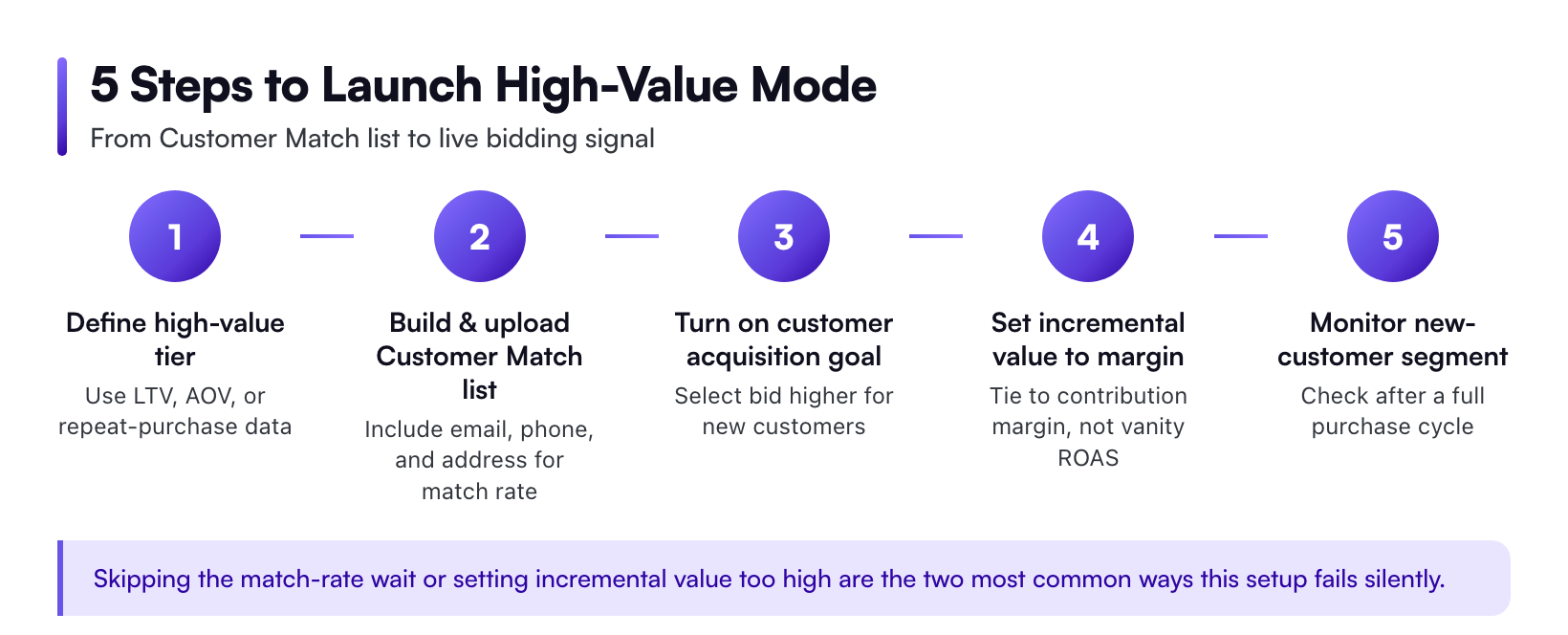
Step 1: Define What “High-Value” Means for Your Store
Do not guess. Pull real purchase data. A subscription skincare brand’s high-value customer might be the one who reorders inside 45 days, not the one who spent $300 once and never came back. A Shopify apparel brand might define it by average order value alone. Use whichever metric actually predicts long-term revenue for your business, not the metric that is easiest to pull.
Step 2: Build and Upload Your Customer Match Seed List
Export the segment from your CRM, CDP, or Shopify customer list. Include email, phone, and mailing address fields wherever you have them. More matchable fields raise your match rate, and a thin list undermines the entire exercise before it starts.
Step 3: Let the Match Rate Stabilize
Give the list a few days to process before touching bids. A list that matches poorly gives Google too few reference points to learn from, and the campaign will behave as if High-Value Mode was never turned on.
Step 4: Turn On the Customer Acquisition Goal
Inside campaign settings, open the Goals section, expand Customer Acquisition, and select the option to adjust bidding to help acquire new customers. Choose your uploaded Customer Match audience as the value signal for high-value prospects.
Step 5: Set the Incremental Value to Match Real Margin
This is where accounts go wrong. Advertisers assign an incremental value that sounds aggressive, then wonder why blended ROAS reporting looks inflated a month later. Tie the number to actual contribution margin, not to a target you want the dashboard to hit. Model it first with a ROAS calculator before locking in a bid adjustment you cannot unwind without losing learning data.
Step 6: Give It a Full Purchase Cycle Before Judging Results
Performance Max needs time to relearn around a new signal. Judging results after two weeks tells you nothing except that Smart Bidding is still exploring.
Step 7: Check Whether It Is Actually Working
Pull the new customer segment inside Google Ads reporting. Open the campaign, click Segment, and choose the new-versus-returning customer breakdown. Compare cost per acquisition and order volume for the new customer segment before and after you turned the feature on, not blended account-level numbers, since blended figures hide what actually changed.
Cross-check against your own backend data too. The July 2025 Search Engine Land analysis found real discrepancies between what advertisers see inside Google Ads and what their eCommerce platform records for the same window, so treat platform segment reports as a starting point, not a final answer.
The ROAS Inflation Trap
Here is the catch nobody mentions in the setup flow. When Google reports a converted high-value customer, it adds your assigned incremental value on top of the real order value. Your Google Ads dashboard ROAS climbs. Your actual bank deposit does not move by the same amount.
Treat the in-platform number as a bidding signal, not a profit report. Pull real order values from your eCommerce platform or GA4 and compare them against platform-reported ROAS before deciding a campaign is working. Our guide to good ROAS for eCommerce, with benchmarks by category, margin, and channel, is a better place to set your real target than the number Performance Max shows you after launch.
Common Mistakes That Waste the Signal
- Setting the incremental value too high. It inflates reported ROAS without inflating profit, and it can push Smart Bidding to overpay for the segment.
- Running Maximize Conversions instead of value-based bidding. Neither New Customer Value Mode nor High Value New Customer Mode functions on a strategy that ignores order value.
- Uploading a list before checking match rate. A poorly matched list gives the algorithm almost nothing to learn from.
- Judging results inside two weeks. Performance Max needs a full purchase cycle to adjust to a new bidding signal.
- Never segmenting new-versus-returning reporting. Without that split, you cannot tell whether the feature moved the metric that matters.
A Concrete Example: Limited Drops and Repeat Buyers
Picture a merch store built around a touring artist. Most buyers show up once, grab a hoodie during a single tour date, and never return. A smaller group buys every drop, including tour hoodies and tour-exclusive vinyl colorways. That second group is the high-value segment High-Value Mode was built for.
Feed Customer Match a list built from repeat buyers across the last two tour cycles, not just last month’s drop. Assign the incremental value based on what a repeat buyer is worth over a full year, not the value of their most recent order. Performance Max will then bid harder on prospects who resemble that repeat-buyer profile the next time a new drop goes live, instead of chasing anyone who clicks a tour merch ad once.
A one-time-purchase category behaves differently. A home goods brand selling a single mattress every eight years has almost no repeat-purchase signal to build a high-value definition around, so average order value or margin per SKU becomes the more useful input than repeat purchase rate.
What Realistic Results Look Like
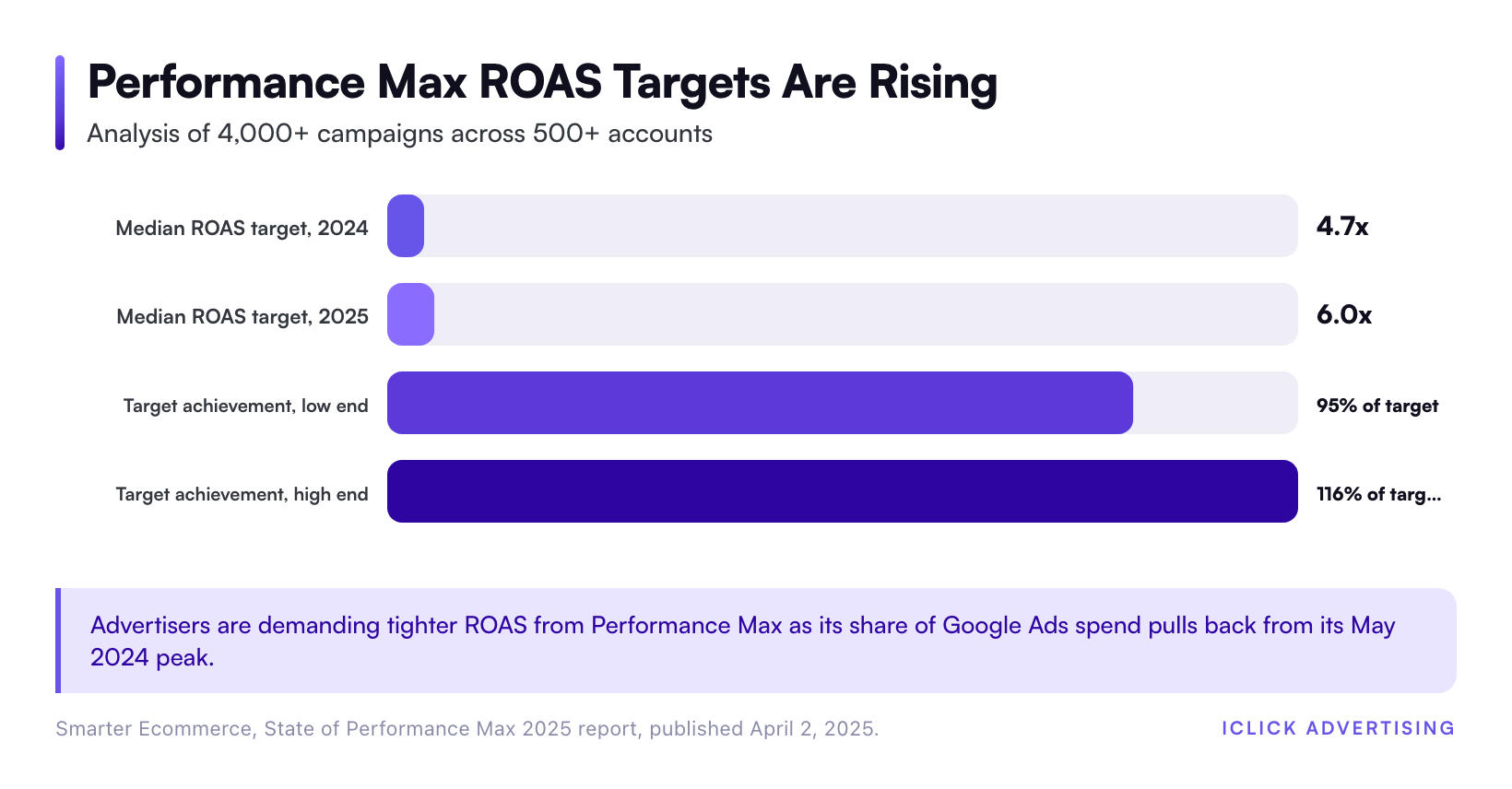
Expectations matter here because Performance Max has been getting less forgiving as a channel. The Smarter eCommerce report found Performance Max’s cost share of Google Ads spend peaked at just under 82 percent in May 2024 and declined by roughly 6 percentage points through early 2025, as advertisers diversified spend and demanded tighter efficiency.
Median ROAS targets set by advertisers in that same dataset rose from 4.7x to 6.0x over the analysis period. Campaigns that cleared the 30-monthly-conversion threshold typically landed between 95 percent and 116 percent of their target ROAS, a tighter band than most advertisers expect from an automated bidding product.
Those numbers will differ by vertical. A DTC subscription brand with a 45-day reorder cycle will see High-Value Mode behave differently than a one-time-purchase home goods store. If you sell across multiple verticals, check the eCommerce industry breakdowns we maintain for Shopify, DTC, and Health & Wellness accounts, since repeat purchase behavior in each drives a different definition of “high-value.”
Where This Fits Your Broader Performance Max Strategy
High-Value Mode is not a standalone lever. It sits inside a bigger decision about how you split budget between Performance Max and standalone Shopping campaigns, and how tightly you structure feed segments underneath it. If that decision is not settled yet, read Google Shopping vs Performance Max: which should run your product ads before layering acquisition goals on top of a channel mix that is still in flux.
We break down the full structure behind this, including where customer acquisition goals sit relative to brand, non-brand, and prospecting segments, in Inside the eCommerce PPC Playbook: how we structure $61 million of ad spend. High-Value Mode works best as one layer inside that structure, not a replacement for it.
If your account cannot yet clear the $50,000 Customer Match threshold, or your conversion values are not reliable enough to trust an automated bid premium, that is worth fixing before you touch this feature at all. A second set of eyes on your current setup, tracking, and account structure will tell you whether you are actually ready. That is exactly what our free written PPC audit covers: a specific, line-by-line read on whether your account can support High-Value Mode today, or what needs to change first.
Related on iClick
Sources
- About Customer Match – Google Ads Help
- About customer lifecycle goals – Google Ads Help
- Kick off 2025 with new Performance Max features – Google Ads & Commerce Blog
- How to use Performance Max for high-value customer acquisition and retention – Search Engine Land
- State of Performance Max 2025 – Smarter Ecommerce
- About Customer Match match rates – Google Ads Help
Frequently asked questions
What’s the difference between Customer Match and High-Value Mode?
Customer Match is the audience upload, a list of your best customers matched against signed-in Google users. High-Value Mode, officially High Value New Customer Mode, is the bidding setting that uses that list to bid more for prospects who resemble those customers. You need Customer Match data before High-Value Mode has anything to work from.
How much do I need to spend before I can use Customer Match for bidding?
Google requires 90 days of account history and $50,000 or more in total lifetime spend before Customer Match can influence Targeting, Observation for bidding, or bid adjustments. Accounts under that threshold can still use Customer Match for exclusions and basic observation, per Google Ads Help.
Will High-Value Mode work with Maximize Conversions bidding?
No. New Customer Value Mode and High Value New Customer Mode both require value-based bidding, either Target ROAS or Maximize Conversion Value, plus a Purchase conversion goal with accurate order values. Maximize Conversions ignores order value entirely, so it cannot support either mode. Switch bidding strategies first.
Why did my ROAS jump right after turning on High-Value Mode?
It is likely reporting inflation, not new profit. Google adds your assigned incremental value on top of the real order value whenever a matched high-value customer converts, which raises the reported number without changing what actually lands in your bank account. Check real order values separately.
How long should I wait before judging results?
Give it at least one full purchase cycle, longer for categories with slow repeat cycles. Performance Max needs time to relearn bidding around a new signal, and judging results after a week or two only tells you Smart Bidding is still exploring, not whether the feature works.