


TL;DR: Merchant Center promotions can take up to 72 hours to clear Google’s review, and Cyber Week 2025 drove $44.2 billion in U.S. online sales, per Adobe. Build promotion assets and Merchant Center promotions now, submit them about a week before Thanksgiving, and end shipped offers before USPS’s December 17 Ground Advantage cutoff.
Why Promotion Setup Has to Happen Before Black Friday Week
Black Friday 2026 lands on November 27. Cyber Monday follows on November 30. Your promotions need to be live and approved before either date.
A lot of money is at stake. Adobe Analytics reported $44.2 billion in U.S. online spending across Cyber Week 2025, up 7.7% year over year. Cyber Monday alone hit a record $14.25 billion, and Black Friday reached $11.8 billion.
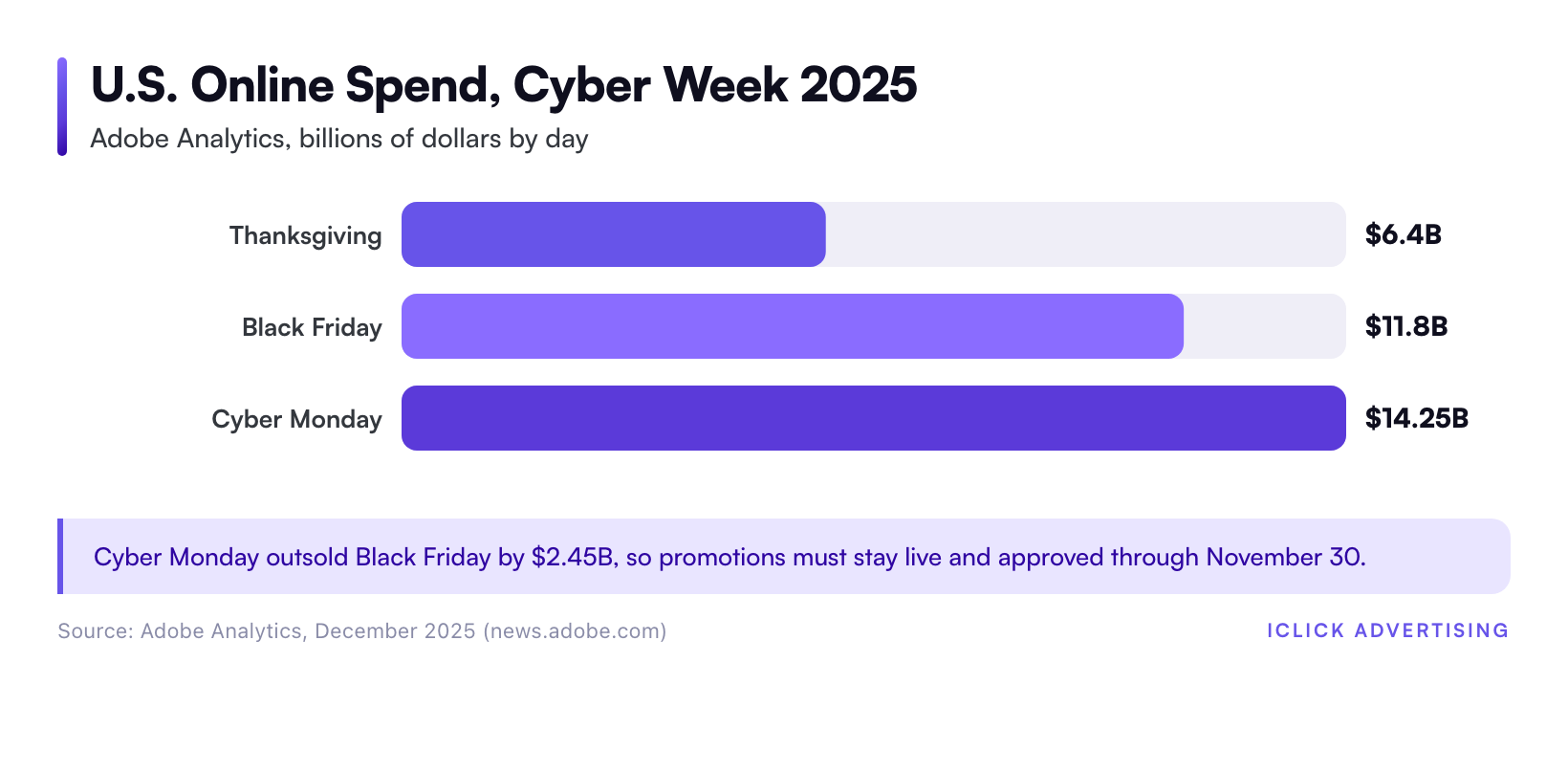
Shoppers compare offers fast on those days. A Shopping ad with a visible "20% off" tag stands out next to one without it. A Search ad with a promotion line takes up more space on the results page.
The catch is lead time. Google reviews Merchant Center promotions before they serve, and that review can take up to 72 hours. The policy check also runs only during weekday business hours. Thanksgiving week is the worst possible week to find a disapproval.
This guide covers both tools: promotion assets in Google Ads (many advertisers still call them promotion extensions) and promotions in Google Merchant Center. It ends with a plan for setting end dates and ad copy around holiday shipping cutoffs.
Promotion Assets vs. Merchant Center Promotions: What Each One Does
The two features sound alike, but they live in different places and follow different rules. Most eCommerce stores should run both. This table compares them using Google’s own help documentation.
| Feature | Google Ads promotion assets | Merchant Center promotions |
|---|---|---|
| Where it shows | Below text ads on Search, as a bold occasion label plus up to two lines of offer text | On product listings in Shopping ads and free listings, as an offer annotation |
| Where you build it | Google Ads, at account, campaign, or ad group level | Merchant Center promotion builder, a promotions data source, or the Merchant API |
| Review | Standard ad policy review | Policy review plus a SKU review at start time; typically done within 24 hours, up to 72 hours |
| Maximum length | Occasion windows apply (Black Friday: October 15 to December 15) | Must expire within 183 days of the start date |
| Offer format | Monetary or percentage discount | At least $5 or 5% off for discount offers |
| Cost | Free to add; you pay for no more than two clicks per impression | No separate fee; you pay for ad clicks as usual |
In short, promotion assets sell the offer in text ads, while Merchant Center promotions sell it on the product itself. Your product ads may run through both Standard Shopping and Performance Max. If so, read our Performance Max vs Standard Shopping comparison before you decide where promotional budget goes.
How to Set Up Promotion Assets in Google Ads
In Google Ads, open Assets, click the plus button, and choose Promotion. Each offer takes about five minutes to fill in. The decisions behind the form matter more than the clicks.
Step 1: Pick the Right Level
You can attach a promotion asset to the account, a campaign, or an ad group. Google uses the most specific one. An ad group asset overrides the campaign asset, and a campaign asset overrides the account asset.
Use that hierarchy on purpose. Put a sitewide offer, such as "15% off everything," at the account level. Then add category offers, such as "$50 off espresso machines," to the ad groups whose keywords match them.
Step 2: Choose the Occasion and Know Its Window
The occasion field is optional, but it adds a bold label like "Black Friday" next to your offer. Google’s documentation gives each occasion a fixed serving window.
- Black Friday: October 15 to December 15
- Christmas: November 1 to January 15
- Winter Sale: no fixed window
You can narrow those dates under Advanced options, but you cannot go outside them. If your offer runs past December 15, switch occasions or remove the occasion and set custom dates.
Step 3: Write the Promotion Details
Choose a monetary discount or a percentage discount. Then enter the item, the final URL, and any conditions, such as a promo code or an "orders over" threshold.
Be specific. "20% off Zero-Gravity Massage Chairs" beats "Holiday Savings" because it names the product the shopper searched for. Send the final URL to a page that shows the discount above the fold. Google’s promotion asset requirements expect the landing page to show the same offer.
If the offer needs a code, put it in the asset. Shoppers who see the code in the ad don’t have to hunt for it at checkout.
Step 4: Set Dates and Respect the Six-Month Rule
Always set an end date. An expired offer that keeps serving won’t match your landing page, and that mismatch invites a disapproval.
Google also pauses old assets automatically. Occasion-specific promotion assets must be created or edited within six months of their start date to serve. Assets left untouched for six months are paused. If you plan to reuse last year’s Black Friday asset, edit it now. Don’t assume it will switch back on.
Use the Days and hours setting for flash sales. A four-hour Cyber Monday doorbuster should show only during those four hours.
How to Set Up Merchant Center Promotions
Merchant Center promotions attach an offer directly to your product listings. On a crowded Shopping results page, that tag is one of the few ways to stand out without cutting your listed price.
That visibility matters. Shopping click-through rates are low across the board, so any visible difference on the listing is worth testing.
Check Eligibility First
Promotions are available in 13 countries, including the U.S., Canada, the UK, and Australia. You need an active Merchant Center account with at least one active product and a claimed website URL.
Look for Promotions under Settings, then Add-ons. It may already be active in your account. Accounts connected to a marketplace are generally not eligible, apart from those in a closed beta.
Pick an Offer Type Google Will Approve
Merchant Center is stricter about offer wording than Google Ads. Google’s own promotion guidelines set the rules below, and they cause most rejections.
- Minimum discount: at least $5 or 5% off.
- Tiered offers are allowed: for example, $10 off $50, $25 off $100, and $40 off $150.
- Ranges need a floor: "10% to 20% off" or "10%+ off" will pass. A standalone "Up to 50% off" is rejected unless it is an event promotion.
- Free gifts must be named: "Free travel case with any guitar" works. "Free gift with purchase" does not.
- Free shipping needs a code unless it is combined with another eligible offer.
- No restricted audiences: offers limited to a subset of shoppers are not allowed.
Buy one get one, cash back, gift cards, loyalty offers, and subscription discounts are also allowed. Write the title so a shopper understands the deal without clicking.
Choose How to Submit
Google offers three ways to submit. The promotion builder in Merchant Center works well for five or fewer offers. A promotions data source, such as a spreadsheet or feed, suits stores running dozens of category offers. The Merchant API fits teams that already sync product data through code.
Shopify stores can manage much of this through the Google & YouTube app, but check that promotion IDs survive the sync. For platform-specific setups, see our eCommerce PPC services by store type, which cover Shopify, DTC, and Health & Wellness brands.
Map Promotions to the Right Products
A promotion can apply to all products or only to specific ones. To target specific products, add a promotion_id attribute to your product feed. It must exactly match the ID in the promotion. A difference in spelling or case is one of the most common reasons a promotion never shows.
Clean feed data matters here too. A disapproved product can’t carry a promotion, no matter how good the offer is.
Build In Review Time
Merchant Center runs two reviews. A policy review happens shortly after you submit, during weekday business hours. A SKU review happens at the promotion’s start time. Google says review typically finishes within 24 hours of the start time but can take up to 72 hours.
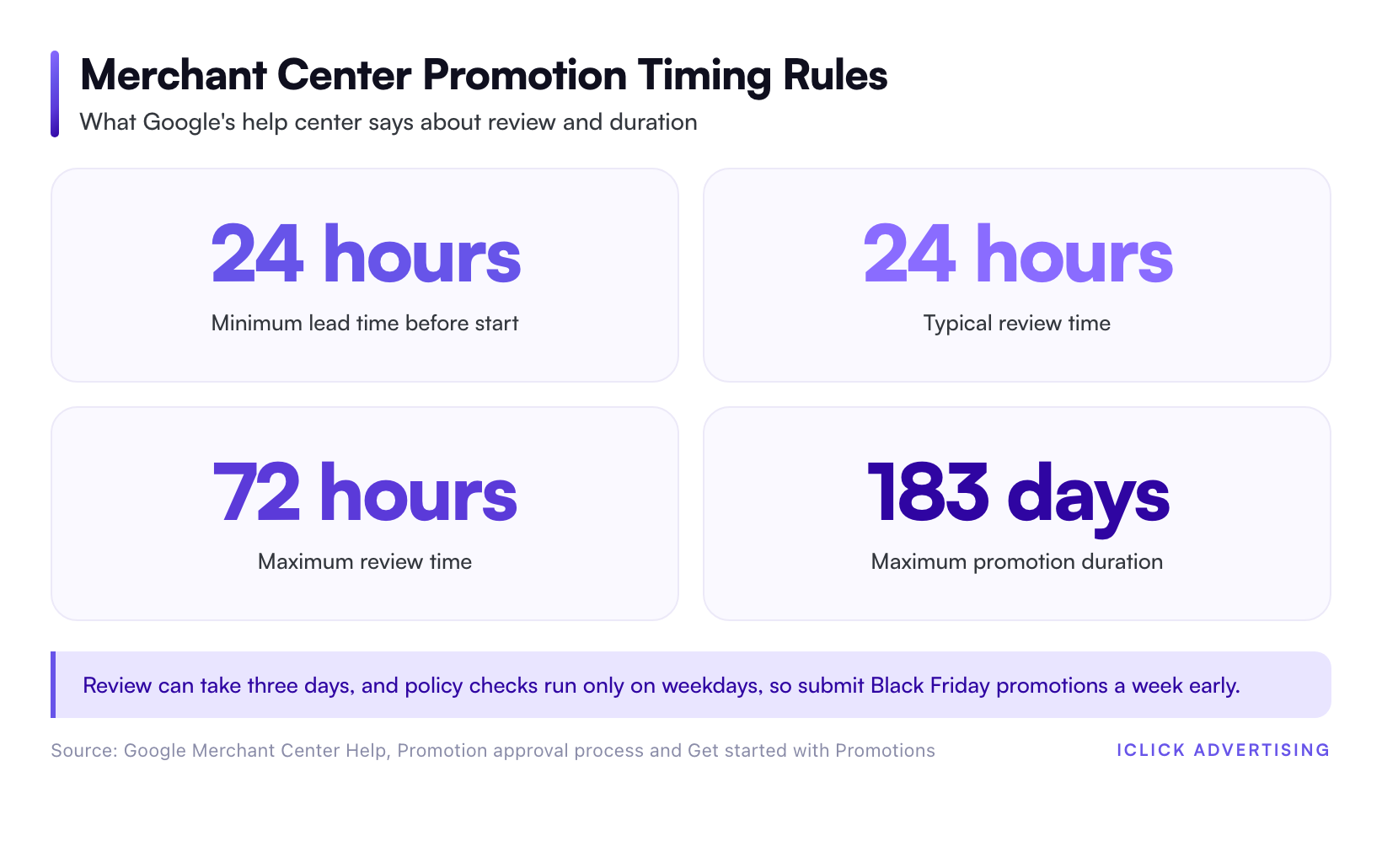
Google’s minimum lead time is 24 hours. Treat that as a floor, not a plan. For a Thanksgiving Day start on November 26, submit by Friday, November 20. That gives you a full business week to catch and fix a rejection.
Holiday Shipping Cutoffs: Reflect Them in Ad Messaging and End Dates
Most December promotion mistakes aren’t policy problems. They’re broken delivery promises. An ad says "Order for Christmas" on December 20, and the product arrives on December 29.
On September 23, 2026, the U.S. Postal Service published its recommended send-by dates for Christmas delivery in the contiguous U.S.
- USPS Ground Advantage and First-Class Mail: December 17
- Priority Mail: December 18
- Priority Mail Express: December 19
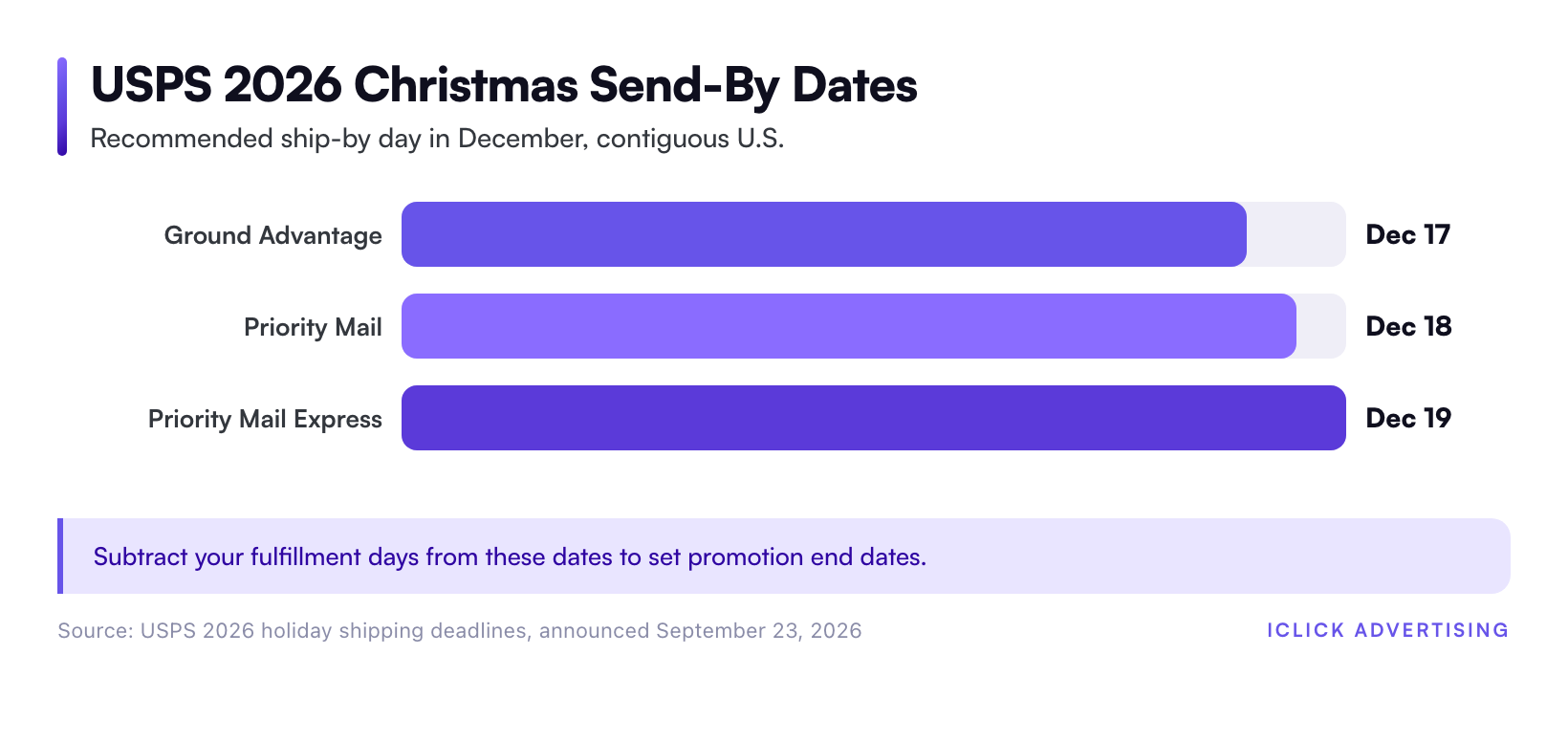
USPS calls these dates recommendations, not guarantees. Alaska, Hawaii, and U.S. territories have earlier cutoffs. Before you lock your dates, check the USPS holiday shipping page and your UPS or FedEx contract.
Set Promotion End Dates From Your Own Cutoff
Your cutoff is the carrier’s date minus your fulfillment time. Say your warehouse ships within two business days and you use Ground Advantage. Your last safe order day is about December 15.
End your "arrives by Christmas" promotion assets on that date, and give matching Merchant Center promotions the same end date. Schedule the replacement offers to start the next morning so your coverage has no gap.
Switch the Message, Not Just the Dates
After your ground cutoff, change the offer to match what you can still deliver. Plan three message phases in advance.
- Through your ground cutoff: lead with the discount and "Free shipping, arrives by Christmas."
- Between the ground and express cutoffs: lead with paid express shipping, such as "Order by Dec 19 with express."
- After the express cutoff: push digital gift cards, local pickup, or a "Gift now, ship in January" offer.
Build all three sets of promotion assets and Merchant Center promotions now. Each set needs its own review time, and policy reviews don’t run on weekends.
Your Pre-Black Friday Promotion Checklist
Work backward from the dates that can’t move. This schedule assumes a Thanksgiving start and a two-day fulfillment window.
| By this date | Task |
|---|---|
| November 13 | Confirm offers, margins, and promo codes with finance. Fix any feed disapprovals. |
| November 17 | Build promotion assets at the account, campaign, and ad group levels, with end dates. |
| November 20 | Submit all Merchant Center promotions for Thanksgiving through Cyber Monday. |
| November 24 | Check promotion statuses. Resubmit anything rejected. |
| December 1 | Submit December promotions, including gift card offers for after the cutoff. |
| December 15 | End "arrives by Christmas" messaging for ground shipping. |
Measure Whether the Promotion Paid for Itself
A promotion can lift revenue and still lose money. On a product with a 40% gross margin, a 25% discount cuts your margin dollars by more than half, before ad costs.
So judge the results on profit, not ROAS alone. Compare return on ad spend for promoted and non-promoted products over the same dates. Then subtract the cost of the discount from the promoted side.
Set your ROAS target from your own margin, not a published average. Our ROAS glossary entry shows how to work out a target for your own store.
Run the numbers before you submit the offer, not after the sale ends. Enter your margin, discount, and expected spend in the ROAS Calc to find your break-even ROAS at the promotional price.
Find Your Break-Even ROAS Before You Discount
Free tool: ROAS Calc. Enter your average order value, gross margin, and planned discount. In under a minute, you’ll see the minimum ROAS your Black Friday promotion needs to stay profitable.
Calculate your break-even ROAS now
Related on iClick
Sources
- Adobe: Cyber Monday Hits Record $14.25 Billion in Online Spending (December 2, 2025)
- Google Ads Help: About promotion assets
- Google Ads Policy: Promotion asset requirements
- Google Merchant Center Help: Promotion approval process
- Google Merchant Center Help: Get started with Promotions
- USPS: 2026 Holiday Shipping Deadlines
- Hawaii News Now: USPS announces recommended 2026 holiday mailing, shipping deadlines (September 23, 2026)
Frequently asked questions
Are promotion extensions the same as promotion assets?
Yes. In 2022, Google renamed ad extensions to assets, so promotion extensions are now called promotion assets in Google Ads. The feature works the same way. It adds an occasion label and up to two lines of offer details below your text ad. Many advertisers and tools still use the old name, so you will see both terms.
How long does Merchant Center take to approve a promotion?
Google says promotion review typically finishes within 24 hours of the promotion’s start time but can take up to 72 hours. The policy review runs only during weekday business hours. Submit at least 24 hours before the start. For Black Friday, aim for about a week early so you have time to fix a rejection.
Do promotion assets cost extra in Google Ads?
No. Promotion assets are free to add. You pay only when someone clicks your ad, as usual. Google charges for no more than two clicks per ad impression, even if a shopper clicks both the headline and the promotion. The asset can raise your click volume, so watch budgets on peak days.
Why was my Merchant Center promotion rejected?
The most common causes are vague wording, offers below the $5 or 5% minimum, standalone “up to” discounts, unnamed free gifts, and free shipping without a code. Another frequent cause is a promotion_id in the product feed that doesn’t exactly match the promotion. Also check that your landing page shows the same offer.
When should holiday promotions stop promising Christmas delivery?
Base the date on your carrier and fulfillment time. For 2026, USPS recommends shipping by December 17 for Ground Advantage, December 18 for Priority Mail, and December 19 for Priority Mail Express. Subtract your processing days from the carrier date. End “arrives by Christmas” promotion assets and Merchant Center promotions on that day.