


TL;DR: Black Friday Google Ads are won by loosening budget caps, not bid caps. Google lets a campaign spend up to 2x its average daily budget, so raise budgets before peak, hold your ROAS targets, add a 1 to 7 day seasonality adjustment, and check spend hourly. Cyber Monday 2025 hit $14.25 billion online, per Adobe.
Why Black Friday Breaks Normal Google Ads Settings
For Black Friday Google Ads campaigns, Cyber Week is the most expensive five days in eCommerce advertising. It is also the most profitable, if your account is set up for it.
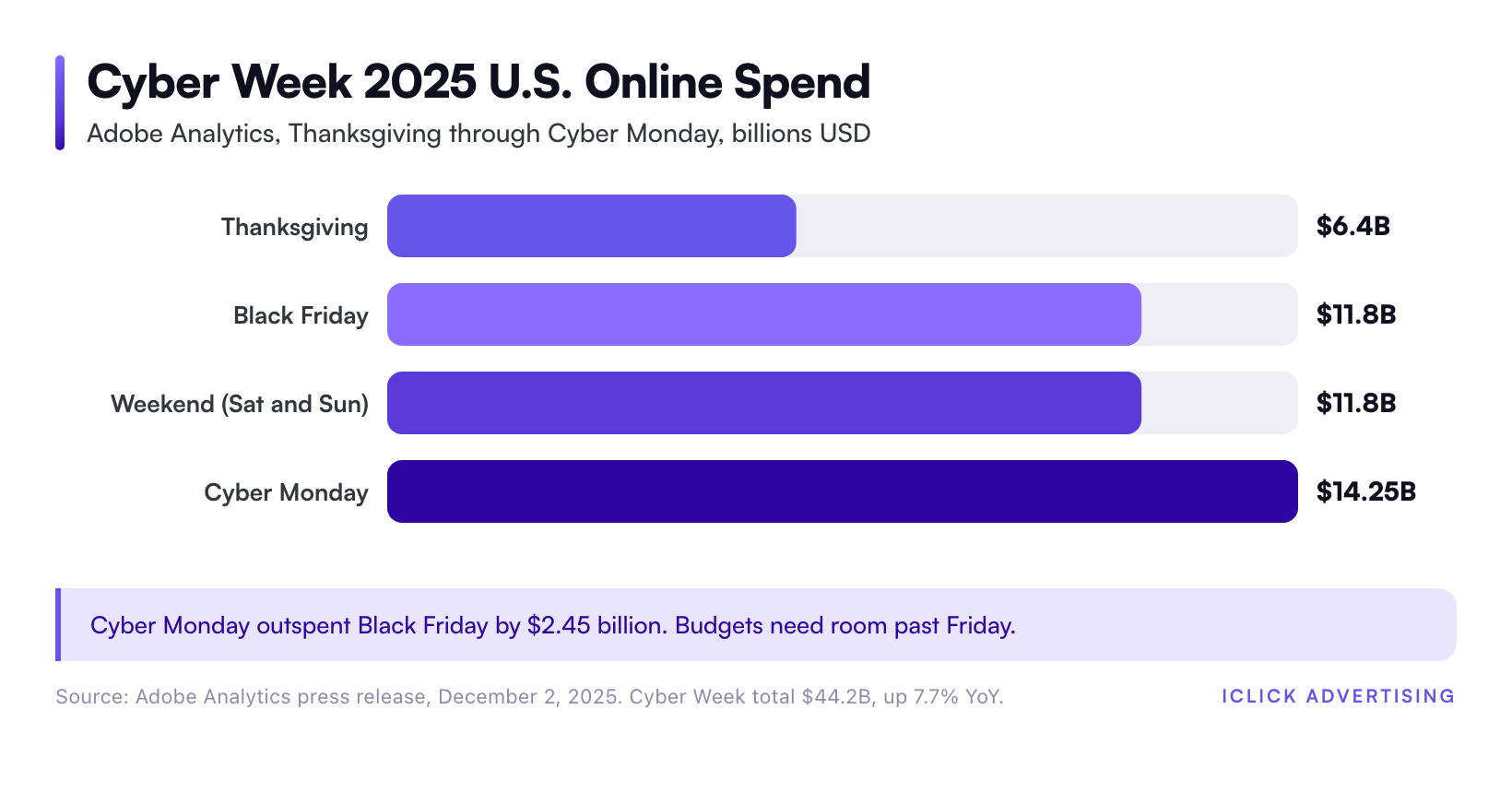
Adobe Analytics reported $44.2 billion in U.S. online spending across Cyber Week 2025, up 7.7% year over year. Black Friday alone drove $11.8 billion. Cyber Monday set the record at $14.25 billion (Adobe, December 2, 2025).
That demand arrives in a few days. Smart Bidding learns from the past, and the past looks nothing like Black Friday. Budgets sized for a normal Tuesday run out by lunch.
So the job splits in two. Before peak, you prepare the account so the algorithm has room to work. During peak, you watch a short list of signals and make small, fast changes.
This guide covers both. It sits inside our wider eCommerce PPC playbook, which explains the account structure these steps assume.
Pre-Peak Prep: What to Finish Two Weeks Out
Nothing you change on Black Friday morning matters as much as what you fixed two weeks earlier. Lock these items by mid-November.
Clean the product feed
Shopping and Performance Max can only sell products that are approved. Disapprovals spike when you change prices and sale annotations in bulk.
Feeds that nobody actively manages tend to carry disapprovals nobody has noticed, and peak is the worst time to find them. Run a full Merchant Center diagnostic now, then again after your sale prices go live.
- Load sale prices with the sale price and sale price effective date attributes, not by editing the base price.
- Check that landing page prices match the feed for your top 50 sellers.
- Confirm stock levels for hero products. An out-of-stock bestseller burns clicks fast.
Settle the campaign structure
Do not launch new campaigns in Cyber Week. A new campaign has no conversion history, and Smart Bidding will spend the peak learning.
Decide now how Shopping and Performance Max will share products. Without brand exclusions and clean asset group segmentation, Performance Max often takes traffic Shopping would have won, including cheap branded clicks. If you run both, read our Performance Max vs Standard Shopping comparison before you finalize the split.
Test conversion tracking
Place a real test order through every checkout path. Check that the conversion value includes the discount, not the full list price.
If tracking breaks during peak, Google offers data exclusions. Google’s help center recommends them for conversion data outages, such as tagging issues, site outages, and import errors. Know where that setting lives before you need it.
Write the promotion assets
- Promotion assets with the occasion set to Black Friday or Cyber Monday, with start and end dates.
- Responsive search ad headlines with the actual discount, such as “30% Off Sitewide” or “Free 2-Day Shipping.”
- Merchant promotions in Merchant Center, approved before the sale starts.
Budget Caps vs Bid Caps: What to Loosen During Peak
This is where most accounts lose money. During peak, you should loosen budget caps and mostly hold bid caps.
A budget cap limits how much you can spend in a day. A bid cap limits how much each conversion can cost: your Target ROAS, Target CPA, or a max CPC limit in a portfolio strategy.
Loosen budgets first
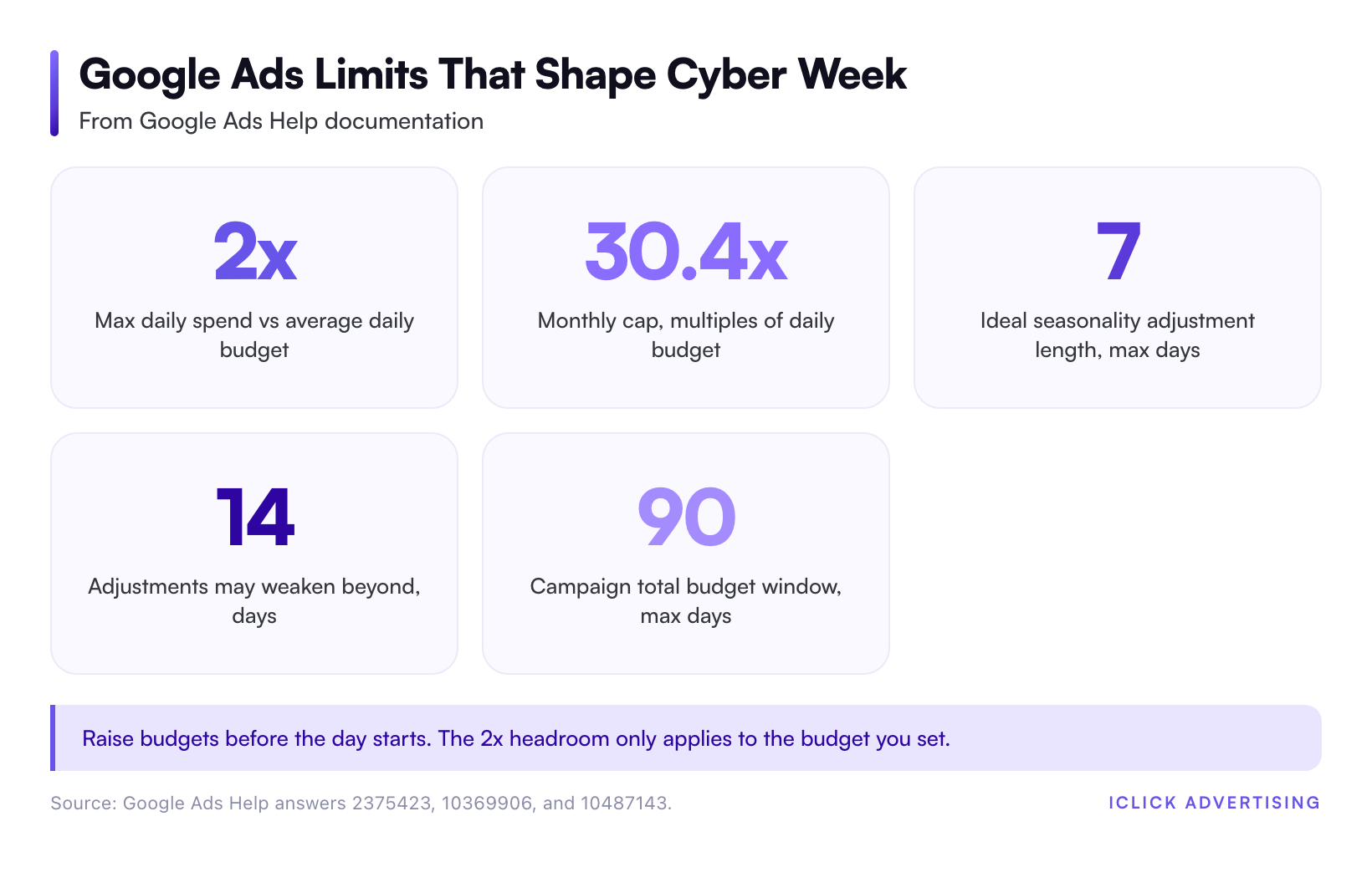
Google’s help documentation says a campaign might spend up to twice its average daily budget on a given day. Over a month, it will spend no more than 30.4 times that daily budget.
That means a $1,000 daily budget can spend up to $2,000 on Black Friday. But only if you raised it before the day started. Once a campaign is limited by budget at 11 a.m., it misses the afternoon and evening entirely.
Raise budgets on your proven campaigns three to five days before Thanksgiving. Size them for the demand you expect, not last month’s average. If a campaign hit its cap on last year’s Black Friday, it needs more room this year.
If finance needs a fixed number, Google’s campaign total budgets set a hard cap for a fixed window of 3 to 90 days on Search, Shopping, and Performance Max. That cap has no daily limit, so spend can follow demand inside the window.
Hold bid targets, mostly
Dropping your Target ROAS sharply on Black Friday tells Google you will accept worse returns. It usually takes the offer.
Conversion rates rise during sales, so the same target already buys more volume. Keep tROAS within about 10% of your normal setting on profitable campaigns. Use the Google Ads ROAS calculator to check your break-even ROAS at sale margins first. A 30% discount can move break-even sharply.
Do not borrow someone else’s ROAS benchmark for peak. Your break-even point depends on margin, so see what ROAS means and how to set a target before you set a peak target.
Use seasonality adjustments for the short spike
Seasonality adjustments tell Smart Bidding to expect a conversion rate change it cannot predict from history. Google says they are ideal for short events of 1 to 7 days. They may not work as well for periods longer than 14 days.
Google supports them for Search, Shopping, Demand Gen, and Display campaigns on Target ROAS and Target CPA. Performance Max supports them on all bid strategies. No negative adjustment is needed after the promotion ends.
Set one for Black Friday through Cyber Monday, not the whole month. Base the expected lift on last year’s conversion rate change, not a guess.
| Lever | Before peak | During peak | After Cyber Monday |
|---|---|---|---|
| Daily budget | Raise on proven campaigns | Raise again if limited by budget | Step down over three to five days |
| Target ROAS or CPA | Recheck break-even at sale margin | Hold within about 10% | Return to normal target |
| Seasonality adjustment | Schedule for 1 to 7 days | Leave alone | Ends on its own |
| New campaigns | Launch by early November or not at all | Do not launch | Plan for next season |
Black Friday Morning: The Hour-by-Hour Watch List
Black Friday is a day for watching, not rebuilding. Here is a schedule built on Eastern Time. Shift it if most of your buyers sit in another zone.
12 a.m. to 6 a.m.: confirm the switch flipped
- Sale prices live on site and in the feed.
- Promotion assets and merchant promotions showing.
- No new disapprovals in Merchant Center.
6 a.m. to 9 a.m.: check pacing
- Compare spend so far to your planned daily spend.
- Flag any campaign already at 30% of budget before 9 a.m. It will likely run dry by mid-afternoon.
- Check that conversions are recording. Zero conversions after three hours of spend points to tracking, not demand.
9 a.m. to 12 p.m.: fix budget limits
- Raise budgets on campaigns marked limited by budget that are hitting their ROAS target.
- Leave campaigns missing target alone. More budget will not fix a weak return.
- Scan search terms on brand and top category campaigns for new irrelevant queries.
12 p.m. to 3 p.m.: check inventory and impression share
- Pause or exclude products that sold out. Ads for unavailable products waste clicks.
- Check search impression share lost to budget on brand campaigns. Brand should be near zero.
- Review auction insights for new competitors bidding on your brand.
3 p.m. to close: protect the evening
- Evening is when many shoppers buy. Make sure your top campaigns have budget left for it.
- Log every change you made, with the time. You will need it for Cyber Monday decisions.
Adobe’s Cyber Monday 2025 data shows why the evening matters. In the peak hours of 8 p.m. to 10 p.m., consumers spent $16 million every minute.
The Cyber Week Daily Checklist
Run this checklist each day from Thanksgiving through the Tuesday after Cyber Monday. Plan on about 30 minutes per account.
Every morning
- Spend vs plan: yesterday’s spend, revenue, and ROAS against your daily plan.
- Budget status: any campaign limited by budget yesterday gets more room today, if it hit target.
- Feed health: new disapprovals, price mismatches, and stock outs in Merchant Center.
- Tracking: conversion counts in Google Ads against orders in Shopify or your store backend. A gap above 20% needs a look.
- Promotions: each day’s offer is live in ads, feed, and site.
Every afternoon
- Pacing: spend by 2 p.m. against the full day plan.
- Search terms: add negatives for bargain-hunting queries that do not convert.
- Mobile: check mobile conversion rate. Adobe reported 57.5% of Cyber Monday 2025 online sales came from mobile devices.
What not to touch
- Do not change bid strategies mid-week. It resets learning at the worst time.
- Do not restructure asset groups or ad groups.
- Do not judge a campaign on one bad morning. Conversions from peak-day clicks keep arriving for days.
Brands on Shopify, DTC brands, and health and wellness stores each have their own watch points. Shopify stores should also see our Shopify and Google Ads integration notes.
Cyber Monday Reallocation: Move Budget to What Worked
Cyber Monday is the biggest online day of Cyber Week. Adobe recorded $14.25 billion on Cyber Monday 2025, against $11.8 billion on Black Friday.
You also have four days of fresh data by Monday morning. Use it.
Sunday night: rank campaigns by marginal return
Pull Thanksgiving through Sunday results by campaign. Sort by ROAS against target, then by impression share lost to budget.
- Above target and budget-limited: these get the extra Monday budget first.
- Above target, not limited: hold budget. More money will not buy more volume.
- Below target: cut budget and move it up the list.
Monday: shift from discovery to capture
By Monday, many shoppers have already compared options. Brand search, remarketing audiences, and Shopping on hero products usually carry the day.
Shift budget toward those campaigns and away from broad prospecting. Keep enough room for the 8 p.m. to 10 p.m. peak Adobe identified.
Tuesday onward: step down slowly
Drop budgets over three to five days, not overnight. Cyber Monday clicks keep converting into Tuesday and Wednesday.
Return your ROAS targets to normal once the promotion ends. Then move straight into holiday shipping cutoff messaging.
After the Peak: Turn This Season Into Next Season’s Plan
Write down every hour a campaign went limited by budget. That list is next year’s budget plan.
Record the conversion rate lift you saw each day. It becomes next year’s seasonality adjustment value. Note which products sold out first and when.
We update this guide each season, so bookmark it. For year-round help, see our eCommerce PPC management page.
Get a Second Set of Eyes Before Peak
Most Black Friday losses start in mid-November. The usual causes are a feed full of disapprovals, a budget capped at last month’s level, or a ROAS target set below break-even.
Our Free Written Audit is a 47-point PDF review of your Google Ads account, delivered in five business days with no sales call. It flags the budget, bidding, and feed issues that cost the most in Cyber Week.
Request your Free Written Audit and fix those issues before the traffic arrives.
Related on iClick
Sources
- Adobe: Cyber Monday Hits Record $14.25 Billion in Online Spending (December 2, 2025)
- Google Ads Help: About seasonality adjustments
- Google Ads Help: About overdelivery and your average daily budget
- Google Ads Help: How budget changes take effect (campaign total budgets)
- Google Ads Help: About data exclusions
Frequently asked questions
Should I raise my Google Ads budget for Black Friday?
Yes, on campaigns that already hit your ROAS target. Google lets a campaign spend up to 2x its average daily budget in one day, but only relative to the budget you set. Raise budgets three to five days before Thanksgiving so Smart Bidding has room once demand spikes. Leave weak campaigns at normal levels.
Should I lower my Target ROAS during Black Friday?
Usually not by much. Conversion rates rise during sales, so your normal target already buys more volume. Cutting tROAS sharply tells Google to accept worse returns. Hold it within about 10% of normal, and recheck your break-even ROAS at sale margins first, since a large discount changes what you can afford.
How long should a Google Ads seasonality adjustment run?
Google says seasonality adjustments are ideal for short events of 1 to 7 days and may not work as well beyond 14 days. For Cyber Week, schedule one covering Black Friday through Cyber Monday. You do not need a negative adjustment afterward. Bidding returns to normal when the adjustment ends.
Can I launch new campaigns during Cyber Week?
Avoid it. A new campaign has no conversion history, so Smart Bidding spends the peak learning instead of selling. Launch any new structure by early November so it has two to three weeks of data. During Cyber Week, put extra budget behind campaigns with proven returns.
What time of day matters most on Cyber Monday?
Evening. Adobe Analytics reported that on Cyber Monday 2025, U.S. shoppers spent $16 million every minute between 8 p.m. and 10 p.m. Check pacing through the afternoon so your best campaigns still have budget left for that window. A campaign that runs dry at 4 p.m. misses the peak.