


TL;DR: Copilot ads run from your existing Microsoft Advertising campaigns, with automatic opt-in and no opt-out. Microsoft reports 73% higher click-through rates than traditional search, but offers no Copilot-only reporting. eCommerce brands with clean Shopping feeds should test first. Add a logo, fix your feed, and measure at the account level.
What Copilot ads are
Copilot ads are paid placements that appear inside Microsoft Copilot conversations. When a user asks Copilot a commercial question, an ad block can show below the AI answer.
They are not a separate ad product. Microsoft serves them from the same campaigns you already run in Microsoft Advertising. If you run Bing search or Shopping campaigns today, some of your ads may already be showing in Copilot.
That is the first thing most advertisers miss. You did not choose Copilot. Microsoft opted you in.
This guide covers the formats, the serving rules, what Microsoft has published, and who should test. For the wider picture of AI across paid media, see our AI in PPC playbook.
How Copilot ads are served through Microsoft Advertising
Microsoft’s help article “About ads in Copilot” is the main source here. It was last updated June 18, 2026. Four rules matter most.
1. Eligible campaigns are opted in automatically
Microsoft states that all eligible ad types are “automatically opted in.” It also states that advertisers “cannot opt out of serving ads,” and there is “no guarantee” that ads will show in Copilot.
So there is no Copilot toggle, no Copilot campaign type, and no Copilot bid. Your existing campaigns compete for the placement.
2. Ads are built from your existing assets
Microsoft says Copilot ads are “automatically created using your campaign’s existing assets, including text and images.” You do not write Copilot-specific copy.
Your headlines, descriptions, images, and logos are the creative. Weak assets on Bing become weak assets in Copilot.
3. Negative keywords still apply
Negative keyword matching works the same way it does for Bing web searches. Ads will not show against negatives set at the account, campaign, or ad group level.
Negatives are your main control. To keep a product line out of conversational queries, you have to exclude the query patterns themselves.
4. Policy follows Bing
Microsoft’s rule is simple: “If an ad can serve on Microsoft Bing, it can also serve in Copilot.” Microsoft also says it does not show ads in conversations its AI models flag as potentially harmful.
Restricted categories like legal, health, and finance follow the same policies they follow on Bing. Microsoft has not documented any extra approval layer for Copilot.
Copilot ad formats
Microsoft lists four groups of eligible ad types. A fifth format, Showroom ads, is a pilot built only for Copilot.
Search ads with a logo
Responsive search ads, dynamic search ads, and Performance Max ads in search placements can all serve in Copilot. There is one catch. Microsoft’s FAQ says “Search ads must include a logo to be eligible to show in Copilot.”
That logo can come from a logo extension or a business logo automated extension. No logo means no Copilot eligibility for search ads. Older Microsoft accounts often skipped logo extensions, so check yours first.
Product ads, Shopping, and Performance Max
Product ads from Shopping campaigns and Performance Max campaigns can serve in Copilot. For eCommerce brands, this is where most Copilot volume is likely to come from.
Shopping queries in Copilot tend to be long and specific, such as “best acoustic guitar under $1,500 for small hands.” Your feed titles and attributes decide whether you match those queries.
Multimedia ads
Multimedia ads, Microsoft’s large image format for search, are eligible. They give you more visual space than a text ad in the Copilot ad block.
Vertical ads
Two vertical formats are eligible: Property promotion ads and Tours and Activities ads. These matter mostly for hotels, travel brands, and attractions.
Showroom ads (pilot)
Microsoft announced Showroom ads in March 2025 as a format built only for Copilot. A user who asks about a product and shows purchase intent can be invited into an interactive, branded product experience.
The U.S. pilot started in April 2025 with select clients. At Cannes Lions in June 2025, Microsoft named Mercedes-Benz USA as a pilot brand building a Showroom ad for the Mercedes-Maybach. Microsoft has also said it plans to add brand agents, a virtual brand representative, to Showroom ads.
Microsoft has not published general availability, pricing, or minimum spend for Showroom ads. Treat the format as invite-only until that changes.
| Format | Eligible in Copilot | Requirement or note |
|---|---|---|
| Responsive search ads | Yes | Needs a logo extension or business logo automated extension |
| Dynamic search ads | Yes | Needs a logo |
| Performance Max (search placements) | Yes | Needs a logo |
| Product ads (Shopping and PMax) | Yes | Feed quality drives matching |
| Multimedia ads | Yes | Image assets required |
| Property promotion, Tours and Activities | Yes | Travel and hospitality only |
| Showroom ads | Pilot only | Select clients since April 2025 |
What Microsoft has published on performance
In August 2025, Microsoft Advertising published its largest set of Copilot ad numbers. The post was written by Kevin Klein, Head of Advertiser Analytics, and Paul Longo, GM of AI in Ads.
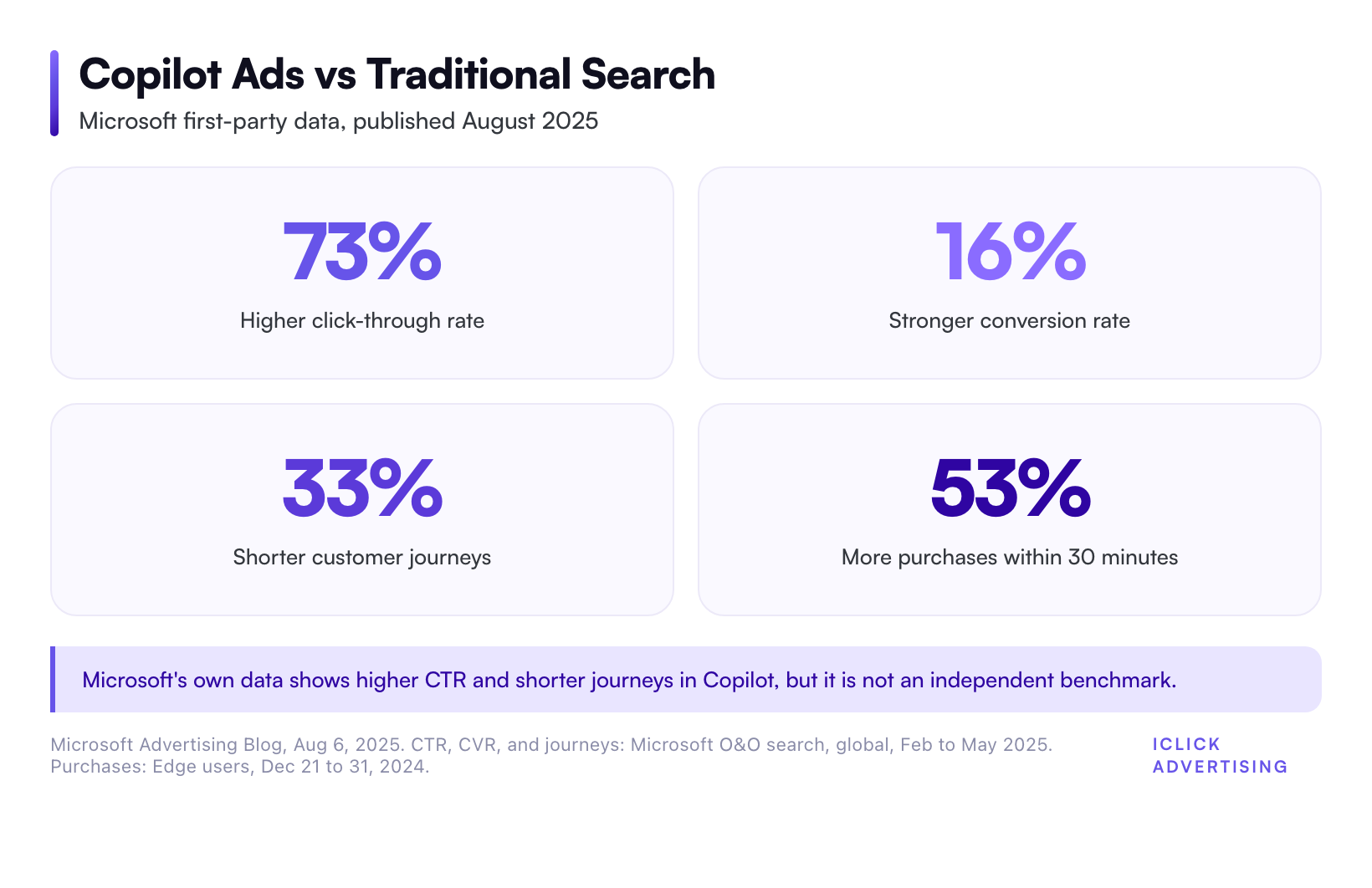
Compared with traditional search, Microsoft reported that ads in Copilot drove 73% higher click-through rates and 16% stronger conversion rates. It also reported customer journeys 33% shorter with Copilot.
A separate Edge analysis found a 53% increase in purchases within 30 minutes of a Copilot interaction. When the user’s intent was explicitly shopping-related, that figure rose to 194%.
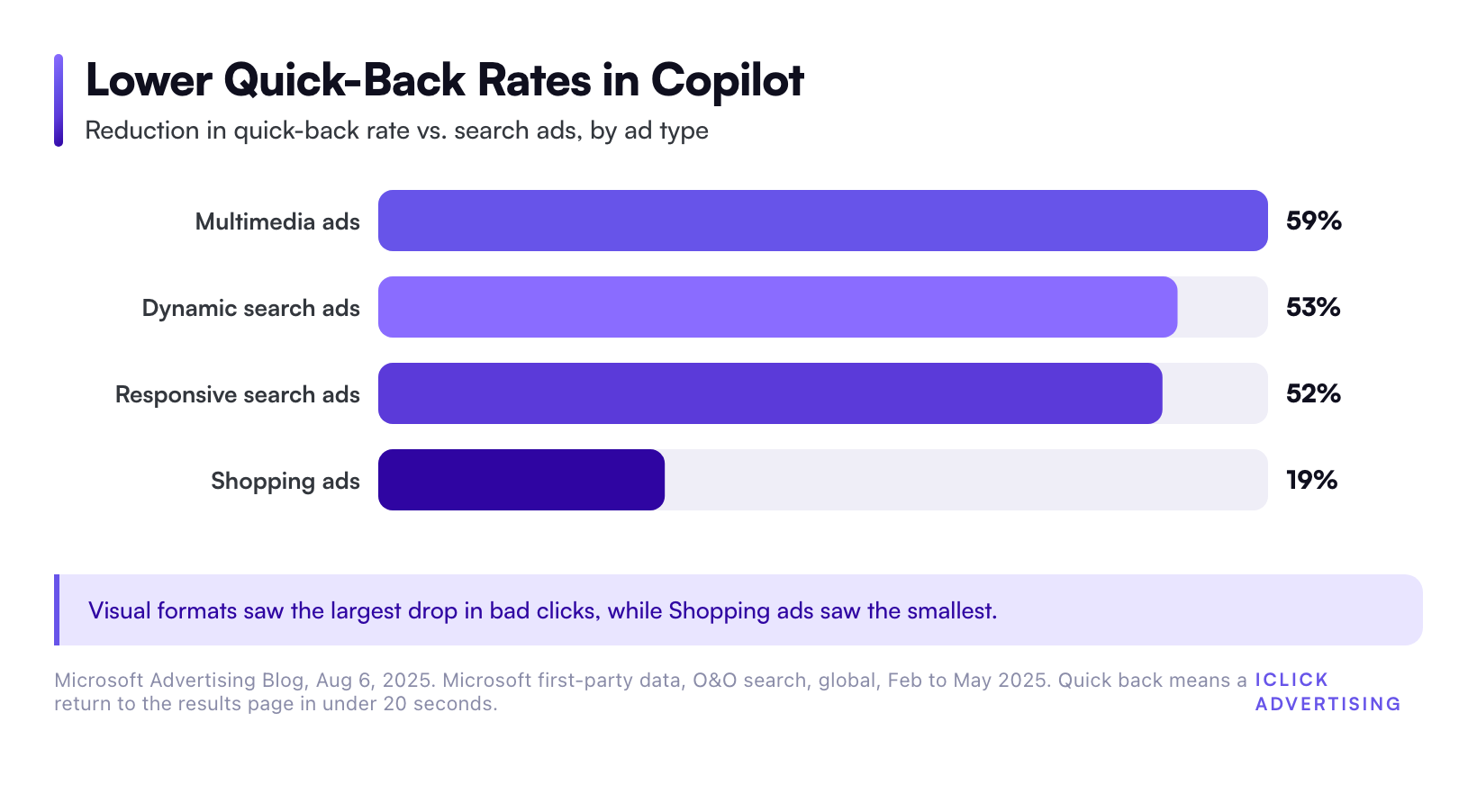
Microsoft also reported lower quick-back rates. A quick back is when a user returns to the results page within 20 seconds of clicking an ad. It is a rough signal of a bad click.
Compared with search ads, Copilot quick-back rates were 59% lower for multimedia ads and 53% lower for dynamic search ads. They were 52% lower for responsive search ads and 19% lower for Shopping ads.
How to read these numbers
These are Microsoft’s own first-party numbers. The CTR, conversion, and journey figures come from Microsoft owned-and-operated search traffic, globally, from February to May 2025.
The purchase figure is narrower. It covers Edge users from December 21 to December 31, 2024, and it measures “assumed purchases” based on URL addresses. That is a holiday week and an inferred metric.
None of these figures is an independent benchmark. They are also averages across every advertiser. A higher average CTR does not mean your account will see one.
The practitioner read: the direction is credible. Conversational queries are longer and more specific, so the user has often decided what they want before they see an ad. Higher intent should lift CTR and cut bounce. The size of the lift is unproven for any single account.
What is known vs. unknown about Copilot ads
| Known (documented by Microsoft) | Unknown (not published) |
|---|---|
| Eligible ad types and the logo requirement | What share of your impressions come from Copilot |
| Automatic opt-in, with no opt-out | Copilot-only CTR, CPC, and conversion rate for your account |
| Negative keywords are honored | How the auction weighs Copilot placements versus Bing results |
| Bing policies apply in Copilot | How often an ad block appears per conversation |
| Showroom ads are in pilot | Showroom ad pricing and general release date |
The biggest gap is reporting. Microsoft’s help article says it “does not currently support specific metrics for ads served in Copilot.” You cannot filter a report to Copilot traffic.
That shapes everything about testing. You cannot run a clean Copilot campaign and read its results. You can only improve eligibility and watch blended Microsoft Advertising performance.
Who should test Copilot ads
Because you cannot opt out, the real question is not whether to run Copilot ads. It is whether to invest effort in making your account Copilot-ready.
Strong fit
- eCommerce brands with clean Shopping feeds. Product ads are eligible, and Microsoft’s 194% shopping-intent purchase figure points straight at this group. A premium DTC brand with detailed product attributes is the clearest case.
- Considered purchases with long research cycles. Think guitars, massage chairs, fine jewelry, or B2B software. Buyers ask Copilot comparison questions before they buy.
- Brands already profitable on Bing. Copilot runs on your Bing campaigns. If Bing works, Copilot readiness is a low-cost add-on.
- Travel and hospitality. Property promotion and Tours and Activities ads are eligible, and trip planning is a natural chatbot use case.
Weak fit, for now
- Accounts with no Microsoft Advertising presence. There is no Copilot-only buy. You need a working Bing account first.
- Advertisers who need channel-level proof. If your CFO needs a clean Copilot ROAS number, you cannot produce one today.
- Emergency and local-intent services. Someone with a burst pipe calls the first number on a results page. They rarely open a chat.
- Brands with thin creative. Copilot builds ads from your assets. Missing logos and stale images limit what it can build.
If you are unsure whether Microsoft is worth the effort at all, start with our Microsoft Ads vs Google Ads comparison.
How to get your account ready for Copilot ads
A Copilot test is really an eligibility and measurement project. Here is the sequence we would follow.
Step 1: Add a logo everywhere
Add a logo extension at the account level, or confirm the business logo automated extension is on. Without it, your search ads are not eligible. This takes about 10 minutes.
Step 2: Fix your Shopping feed for long queries
Copilot users write full sentences. Put use cases, sizes, materials, and audience in product titles and attributes. “Solid spruce acoustic guitar, slim neck, for small hands” matches more conversational queries than a model number does.
Step 3: Refresh images and multimedia assets
Copilot assembles ads from your existing text and images. Upload clean product and lifestyle images, and run at least one multimedia ad per core campaign.
Step 4: Audit negative keywords for conversational queries
Pull your search terms report and look for long, question-style queries. Add negatives for patterns you do not want, such as “free,” “DIY,” or “jobs.” Copilot honors them.
Step 5: Set a before-and-after baseline
Copilot metrics are not broken out, so record 30 days of Microsoft Advertising CTR, conversion rate, and CPA before your changes. Compare the next 30 days. Watch for rising impression share on long-tail queries.
Step 6: Read results at the account level
Judge the test on blended Microsoft performance, not on a Copilot line item. If CTR and conversion rate rise after the eligibility fixes, Copilot is a likely contributor. You cannot prove it alone, so do not claim more than the data shows.
This setup work is part of our AI PPC management process. Every step above is also something an in-house team can do.
How Copilot ads compare with other AI ad placements
Copilot is one of three AI surfaces PPC teams now plan around.
- Copilot ads run on your existing Microsoft campaigns, with no opt-out and no separate reporting.
- ChatGPT ads are a separate buy with their own pricing questions. We cover them in our guide to what ChatGPT ads cost.
- Google AI placements run through AI Max, Performance Max, and Demand Gen. See Google’s AI ads stack, explained.
Meta is moving the same way on the social side, with automated creative and targeting. Our explainer on Meta’s AI advertising stack covers that shift.
The common thread is less manual control and less channel-level reporting. That raises the value of clean inputs: feeds, assets, negatives, and conversion tracking. It is also why we wrote an honest answer to whether AI will replace PPC agencies.
Find out if your Microsoft account is Copilot-ready
Most Copilot gaps are basic: a missing logo, a thin feed, or no negative keyword plan for long queries. They are easy to fix once someone finds them.
Our free written audit checks your PPC accounts against 47 points. It lands as a PDF in five business days, with no sales call. Request your free written PPC audit.
Related on iClick
Sources
- Microsoft Advertising Help: About ads in Copilot (updated June 18, 2026)
- Microsoft Advertising Blog: 73% higher CTRs: Why advertisers need to pay attention to conversational AI (August 6, 2025)
- Microsoft Advertising Blog: Showroom ads announcement (March 2025)
- Microsoft Advertising Blog: Cannes Lions 2025: Brand agents and Showroom ads with Brava Fabrics and Mercedes-Benz USA (June 2025)
Frequently asked questions
Can I opt out of Copilot ads in Microsoft Advertising?
No. Microsoft’s help article says eligible ad types are automatically opted in and advertisers cannot opt out of serving ads in Copilot. Your main control is negative keywords, which Copilot honors at the account, campaign, and ad group levels. Microsoft also says placement is never guaranteed, so eligibility does not mean your ads will appear.
Do Copilot ads cost more than Bing search ads?
Microsoft has not published separate pricing for Copilot. Ads serve from your existing campaigns and bids, and there is no Copilot-specific bid adjustment. Because Copilot metrics are not broken out in reporting, you cannot see a Copilot-only CPC either. Judge cost at the blended Microsoft Advertising account level.
What do I need for my ads to show in Copilot?
Run an eligible ad type: responsive or dynamic search ads, Performance Max, Shopping product ads, multimedia ads, or Property promotion and Tours and Activities ads. Search ads also need a logo through a logo extension or business logo automated extension. Even then, Microsoft says placement is not guaranteed.
Can I see Copilot ad performance in my reports?
Not today. Microsoft states it does not currently support specific metrics for ads served in Copilot. Copilot impressions and clicks are blended into your normal Microsoft Advertising data. The practical workaround is a before-and-after comparison of account CTR, conversion rate, and CPA after you fix eligibility gaps like missing logos.
What are Showroom ads in Copilot?
Showroom ads are an interactive Copilot-only format Microsoft announced in March 2025. A user showing purchase intent can enter a branded product experience inside Copilot. The U.S. pilot began in April 2025 with select clients, including Mercedes-Benz USA. Microsoft has not announced general availability or pricing.